Basecamp 5: What's New, What Changed, and What's Still Missing (2026)
If you opened Basecamp recently and the interface felt cleaner, faster, and a little different to move around, you were looking at Basecamp 5. It is the current version of the product, and every account now runs on it. The short version: Basecamp 5 is the same Basecamp at its core, with a tighter interface and a focus on speed, not a pile of brand-new project-management features.
This post walks through what Basecamp 5 is, what actually changed in daily use, what the core tools still are, and the gaps people keep running into once the new-version shine wears off. We will be honest about all three.
The short answer
Basecamp 5 is the current major version of Basecamp, the project management tool from 37signals. It shipped as a refinement rather than a feature release.
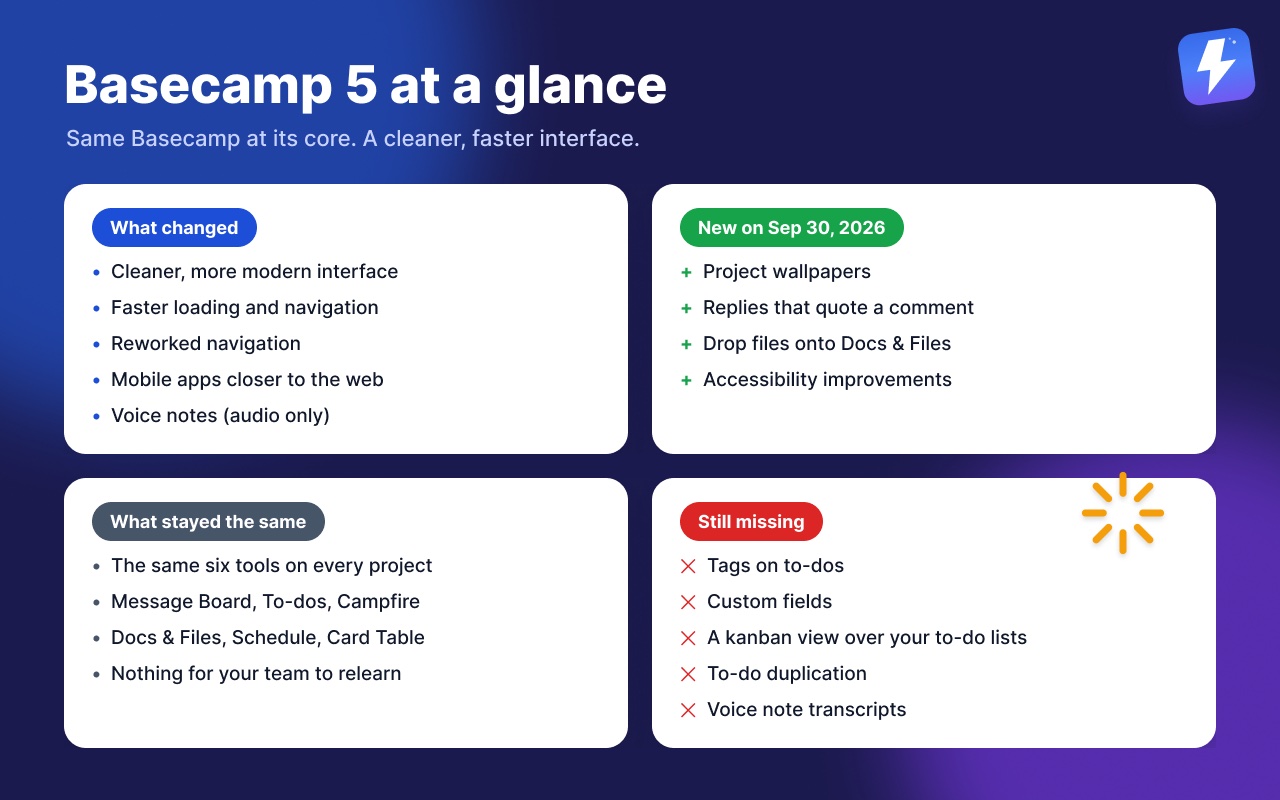
What changed: a cleaner and more modern interface, faster loading and navigation, a reworked navigation structure, and closer parity between the mobile apps and the web app.
Newest additions (September 30, 2026): project wallpapers, replies that quote a specific comment, dropping files straight onto Docs & Files, and a round of accessibility fixes. Details below.
What did not change: the shape of the product. Projects still open to the same six tools, and teams that knew earlier versions had nothing to relearn.
What Basecamp 5 still does not include: tags on to-dos, custom fields, a kanban view layered over your existing to-do lists, and to-do duplication. These are deliberate omissions consistent with Basecamp’s opinionated design, not oversights, and they are the gaps teams most often try to close with an extension.
What people assume is missing but is not: time tracking. Basecamp added Timesheet in June 2024; it now comes with the Pro and Unlimited plans.
What is Basecamp 5?
Basecamp 5 is the latest major version of Basecamp, the project management and team communication tool from 37signals. It is the version new accounts sign up to, and existing accounts were moved onto it automatically on May 25, 2026.
The philosophy behind Basecamp has not changed across versions. The whole point of the product is to be simple and opinionated. Every project gives you the same six tools on the home screen, you do not configure a complicated workflow before you can start, and the company deliberately leaves out features that other tools pile on. Basecamp 5 keeps that philosophy. It refines the experience rather than reinventing it.
So if you came to this post expecting a long list of new features like custom fields, automations, or a kanban view, the honest answer is that those are not what this update was about. We will come back to that, because it is the part most teams actually care about.
What changed in Basecamp 5?
Here is what you notice when you use Basecamp 5 day to day:
- A cleaner, more modern interface. The layout was tightened up, with clearer typography and more breathing room. Projects, messages, and to-dos feel less cluttered.
- Speed. The app feels quicker to load and move between screens. Navigation between projects and tools is snappier than older versions.
- A refined navigation structure. Getting around your projects and the tools inside them was reworked to be more consistent.
- Mobile parity. The mobile apps stay close to what you get on the web, so jumping between phone and desktop is less jarring.
- Voice notes. The new editor records voice messages right inside messages, comments, documents, Campfires, and Pings. They’re audio-only, though: there is no transcript and search can’t see what was said, which is a gap we’ll come back to below.
What did not change is the shape of the product. You still get a project home screen with the same set of tools, and you still work the same way you always did. If your team already knew Basecamp, Basecamp 5 did not force you to relearn anything.
We are keeping the list above general on purpose, because how the update feels matters more to most teams than the version history. The one exception is below: 37signals keeps adding to Basecamp 5, and when it announces something, we note it with the date.
New on September 30, 2026
37signals’ latest in-app announcement added four things:
- Project wallpapers. Any project can carry its own background image, like a client’s logo, a photo, or a subtle pattern. Click the project name to upload one, then pick Fill Screen or Tile. Everyone on the project sees it. Web and desktop apps only.
- Replies that quote a comment. Click Reply on a comment to quote it, or highlight part of it first to quote just that part, so it’s clear what a short “Sounds good!” is answering. It works anywhere you can comment, and in Pings and Chats through the ••• menu.
- Drop files onto Docs & Files. Drag files from your computer straight onto the Docs & Files tool on the project page. They land in the main area without notifying anyone, ready to sort into folders.
- Accessibility. Keyboard navigation, screen reader announcements, and working with text, attachments, and galleries through assistive technology all improved, and 37signals says more is coming.
For everything else that has shipped since launch, month by month, see Basecamp updates.
The core tools are still the core tools
Basecamp 5 keeps the same toolset that has defined the product for years. Inside any project you get:
- Message Board for announcements and longer discussions, so they do not get lost in chat.
- To-dos for tasks, organized into to-do lists, with assignees and due dates.
- Campfire for real-time group chat within the project.
- Docs & Files for documents and uploads.
- Schedule for dated events and milestones.
- Card Table, Basecamp’s built-in kanban-style board with columns and cards. This is a separate tool from to-do lists, and it has its own rules. If you have not used it, our complete guide to Basecamp card tables covers how columns, cards, and the triage column work.
A couple of features people often ask about are worth being precise on, because they exist and Basecamp 5 keeps them:
- Project Templates are native. You can save a project’s structure and reuse it for new projects, which is genuinely useful for agencies and repeatable work. More on the edges of templates in our templates guide.
- Timesheet is native. Basecamp added its own time tracking in June 2024: a green timer on to-dos, cards, docs, and the project home page, hours typed in as “2:30” or “2.5” with optional notes, and a report under Activity that totals across projects, filters by project, person, or date range, and exports to CSV. It comes with the Pro ($99/month) and Unlimited plans, at no per-seat cost, and clients never see it. See does Basecamp have time tracking.
- Hill Charts are native, on to-do lists. They show whether work is still being figured out or moving toward done. Basecamp has Hill Charts, not a Gantt chart, and the two are not the same thing. For the ongoing month-by-month record of what 37signals ships, see Basecamp updates.
What people still wish Basecamp 5 had
This is where most “what’s new in Basecamp 5” questions are really pointed. Teams upgrade, look around, and notice the same gaps that existed before. Basecamp’s simplicity is a feature, but it does leave specific things out.
The most common ones:
- Tags on to-dos. Basecamp has no native way to tag a to-do or a card with a label like “urgent,” “design,” or “client X” and then filter by it. There is no built-in tagging.
- Custom fields. You cannot add your own fields, like a priority level, an effort estimate, a client name, or a stage, to a to-do or card. What you see is what you get.
- A kanban view over your to-do lists. Basecamp has a Card Table, which is a separate kanban-style tool. What it does not have is a way to look at your existing to-do lists as a board with columns. The structure you already built in your to-do lists stays a flat checklist. People ask about this constantly, and the honest answer is in does Basecamp have a kanban view.
- Billing on top of tracked hours. Timesheet logs hours and reports on them, but it stops there. If you need invoicing, budgets, or rate cards attached to those hours, Harvest, Everhour, or Clockify still do more. It is also only on the Pro and Unlimited plans. See does Basecamp have time tracking.
- To-do duplication. A single card in a Card Table can be copied natively, but there is no equivalent for a to-do, so a repeated task has to be rebuilt by hand.
- Voice note transcription. Basecamp 5 records voice notes but never turns them into text. A spoken decision can’t be skimmed, quoted, or found with search; it can only be replayed. How to close that gap is covered in how to transcribe Basecamp voice notes.
None of these are bugs. They are deliberate omissions that keep Basecamp simple. But if your work is more complex than the simple case, these gaps are real, and Basecamp 5 did not close them.
Does Assistant for Basecamp work with Basecamp 5?
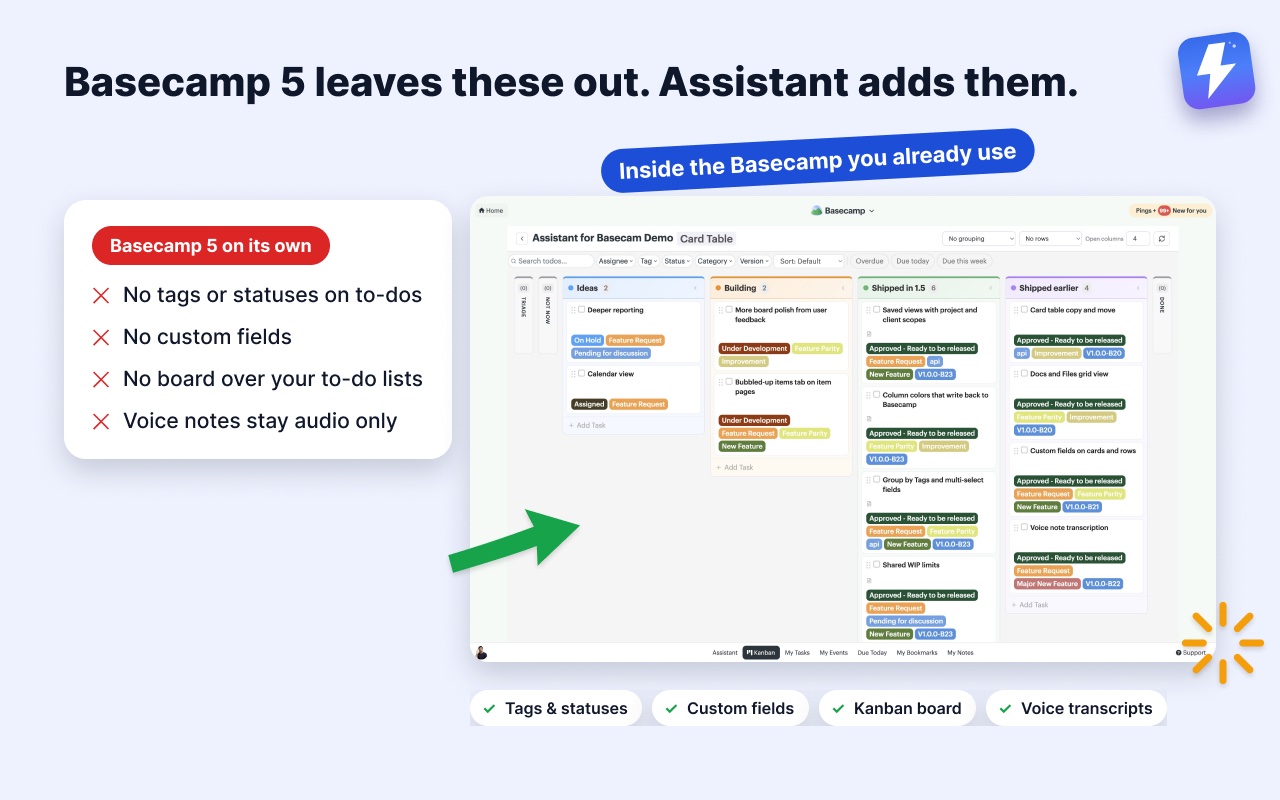
Yes. We built Assistant for Basecamp specifically for Basecamp 5. It is a browser extension that adds features inside the Basecamp you already use. Your projects stay in Basecamp, and your team doesn’t move to another tool. You install the extension, open Basecamp, and the new features appear in place.
Assistant for Basecamp is aimed directly at the gaps above:
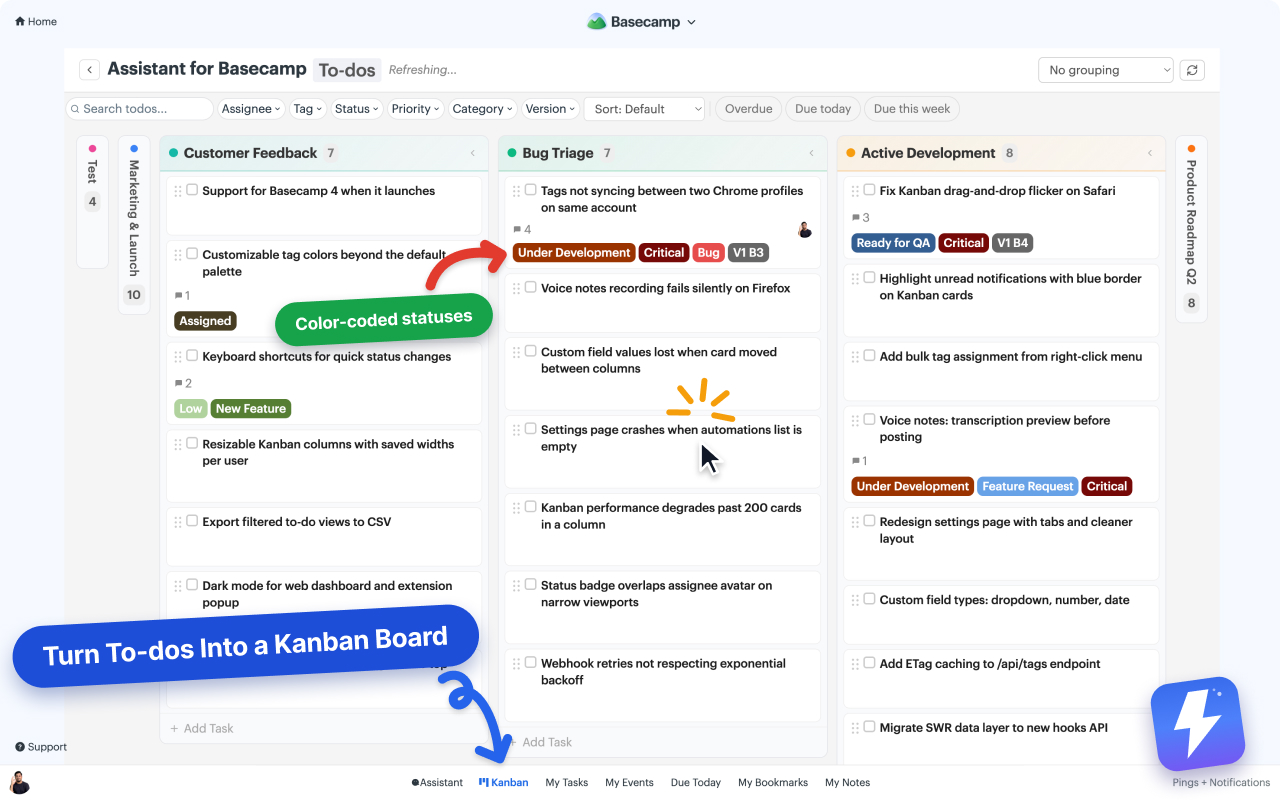
- Tags and statuses on your to-dos, cards, and messages, with colored badges so you can scan a list and see what is what. Walkthroughs: how to add tags and how to add statuses.
- Custom fields, single-select, multi-select, text, number, and date, so you can attach a priority, an estimate, a client name, or a stage to any item. See how to add custom fields to Basecamp.
- A real kanban board over your own lists, where each of your to-do lists becomes a column. Your project’s existing structure is the board. There are no preset Backlog and Done columns to fight with. You also get grouping (by assignee, tag, status, or any custom field), a pivot view with two axes, shared WIP limits, column colors, and a split-view detail panel. How to add a kanban board to Basecamp shows it in action, and the Kanban board for Basecamp page has the full breakdown.
- Automations driven by Basecamp’s own events and custom-field changes, which can set a field, attach an option, complete a to-do, assign people, or post a comment. To be clear about the limits: these do not accept inbound Zapier or Make webhooks. More in how to automate Basecamp without Zapier.
- An unread highlight for the day-to-day friction of staying on top of a busy project. See how to spot unread updates.
- Voice note transcription. One click under any Basecamp voice note returns the transcript, a one-line summary, and the action items, shared with the whole team and posted to the thread so even people without the extension can read it. See how to transcribe Basecamp voice notes or the feature page.
The board is not stuck at one project either. It opens over a single to-do list or card table, over a whole project, or over every project in the account at once. Search the picker for the projects or clients you want, select several projects or several clients rather than a mix, and save that arrangement as a named view. Views are per person and stored on our side, so yours follow you to any computer you sign in from.
The honest limits, so none of them surprise you: to-dos and card tables never share a board, because the two behave differently in Basecamp and one board holding both would be worse at each. Nothing here is a report, either. Grouping and the pivot view rearrange work you can already see, and there are no dashboards or charts behind them. And Assistant runs only inside Basecamp’s own pages, in desktop Chrome or Firefox, so there is nothing to open on a phone. If you need a board on a tablet away from Basecamp, Tracked has one, and we would rather tell you that up front than have you find out after installing.
Assistant for Basecamp is $29/month or $290/year, with unlimited seats, so one admin pays for the whole team. There is a 7-day free trial and no card needed. You can read the pricing or install it for Chrome or Firefoxinstall it for Chrome or Firefox and see your own projects on a board in a couple of minutes.
The bottom line on Basecamp 5
Basecamp 5 is a faster, cleaner version of the Basecamp you already know. It refined the interface and the navigation without changing what the product is. If you liked Basecamp before, you will like it more now.
What it did not do is add tags, custom fields, a kanban view over your to-do lists, or to-do duplication. Those are the same gaps that were there in earlier versions, kept out on purpose. If those gaps are slowing your team down, that is exactly the space Assistant for Basecamp fills, right inside Basecamp 5.
Useful? Tell Google you want more of this.