Kanban for Basecamp
A real Kanban board, inside Basecamp.
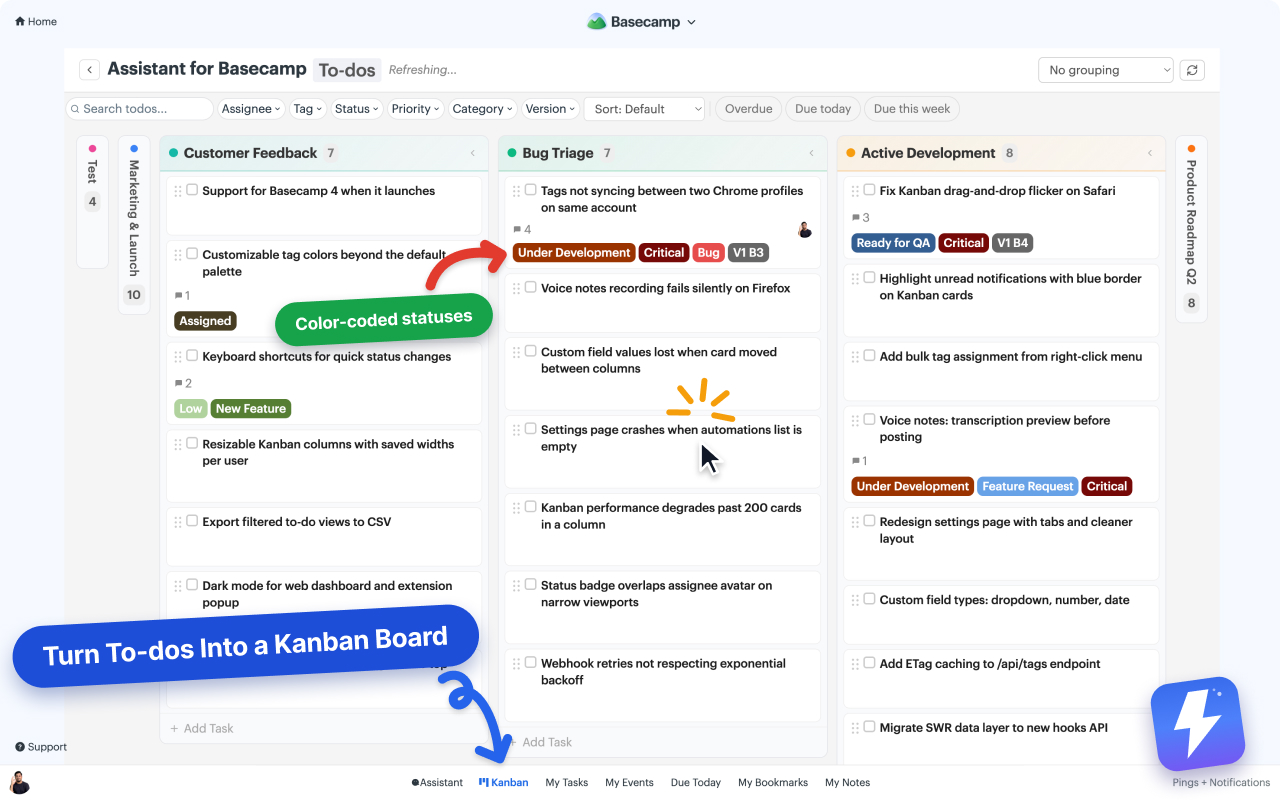
Basecamp to-do lists have no board view, and Card Tables live in their own silo. Assistant turns one list, a whole project, or every project in your account into a drag-and-drop Kanban board, without moving your work anywhere.
Does Basecamp have a Kanban board?
Basecamp has no Kanban view over its to-do lists. It ships Card Tables, a separate board tool with its own columns and cards that you populate by hand, so your existing to-do lists stay flat checklists. Assistant for Basecamp adds a drag-and-drop Kanban board that works on both to-do lists and Card Tables: each list, or each card-table column, becomes a board column automatically, so there is nothing to set up or migrate. The same board opens at three levels: a single to-do list or card table, a whole project, or every project in the account at once, with To-dos and Cards always on separate boards. Narrow a board to the projects or clients you pick and save it as a named view that follows you to any computer. A pivot view puts one field across the columns and another down the rows, and a column count can carry a shared WIP limit that turns red when open work passes it. Display rules drop the columns and rows that hold no open work, or hide and show them on conditions you set. You can group the board by any select-type field (tags, status, priority, version) and stack filters by tag, status, assignee, or custom-field value, plus quick filters for overdue, due today, and due this week. A split-view detail panel opens a to-do or card beside the board instead of loading its own page, so you never lose your place. Dragging a card writes the change back to Basecamp through its own API, so the real to-do moves, not a copy of it. Browser extension for Chrome and Firefox, $29/month or $290/year for unlimited users.
Your project's structure is the board.
Every to-do list becomes a column. A project with "Backlog", "This week", and "Done" lists is already a three-column board the moment you open Kanban. No templates to pick, no cards to migrate, no second tool for your team to learn.
Works on to-do lists
The board view Basecamp never gave to-dos. Open any to-do set as a Kanban board with one click.
Works on Card Tables
Card Tables get the same treatment: tags, statuses, custom fields, grouping, and filters on top of your existing columns.
Drag and drop that sticks
Moving a card moves the real to-do in Basecamp. Teammates without the extension see the same change in their list view.
One board, any scope
One list, one project, or every project at once.
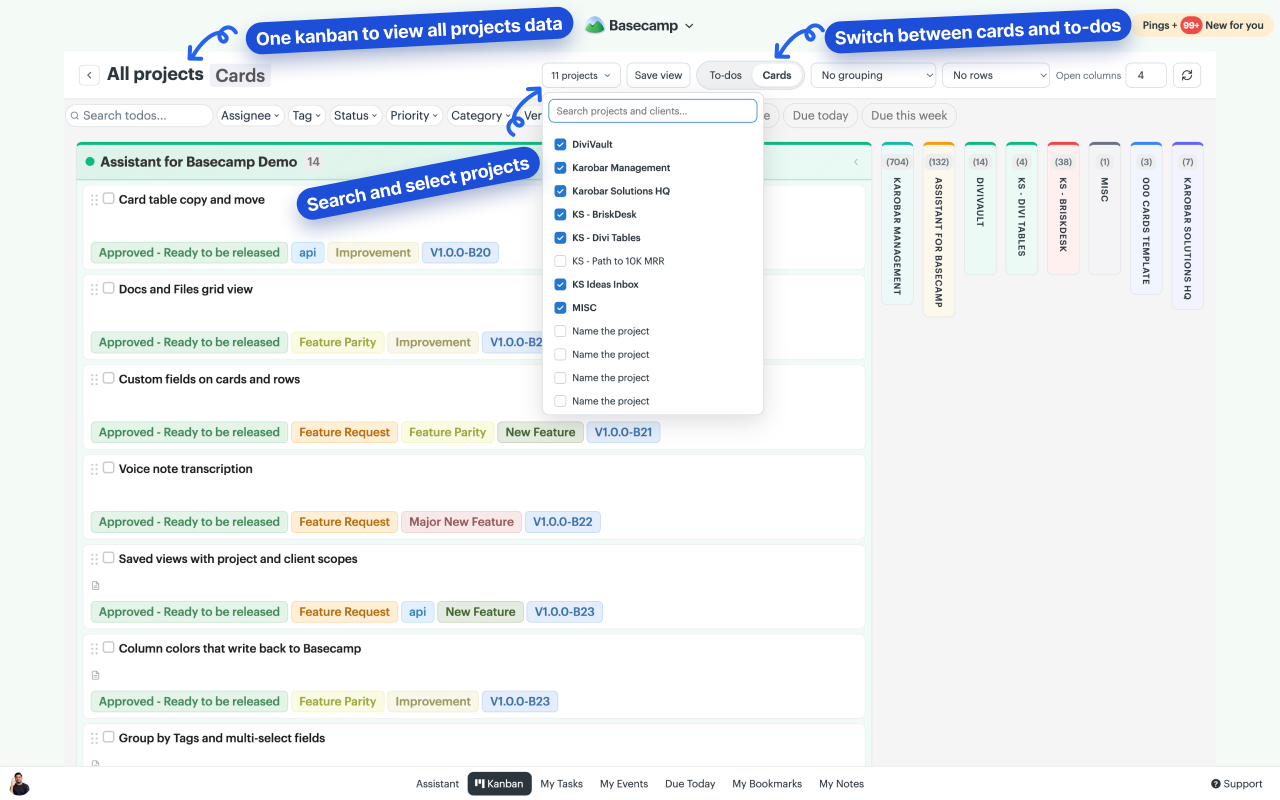
Open a board over a single to-do list or card table, over a whole project, or over every project in your account. Search the picker for the projects or clients you want, keep the ones you care about, and save that setup as a named view. To-dos and Cards always get their own board, so a card never lands in a to-do column.
- ✓ Search your projects and clients, then pick the ones the board covers
- ✓ Scope a view to several projects, or to several clients
- ✓ Save the setup by name and reopen it in one click
- ✓ Views are yours alone and follow you to any computer

Pivot view
Two fields, two axes.
Pick one field for the columns and another for the rows. Status across the top and To-do lists down the side, for example, and every item lands in its own cell. Now you can read who is blocked on what, per list, without filtering twice.
- ✓ Columns from one field, rows from another
- ✓ Collapse a row to its header when you're done with it
- ✓ Column headers and row labels stay in view while you scroll
Shared WIP limits
Set the limit once. The whole team sees it.
Click a column count to cap how much work sits there. The count turns red the moment open work goes over, so the pile-up is visible before anyone has to raise it in a meeting.
- ✓ Click the count on any column to set its limit
- ✓ Stored per board, so one column can allow 10 here and 3 there
- ✓ Completed items never count toward the limit
- ✓ Everyone on the team sees the same limit

The details you notice on day two.
The board is drawn with Basecamp's own fonts, colors, and spacing, so it reads as part of the page rather than something bolted onto it.
Colors that write back
List columns carry each Basecamp list's own color, and card-table columns their real column color. Change a color from the board and it changes in Basecamp for everyone.
Bubbled up and bookmarked, flagged
Anything you bubbled up or bookmarked carries a blue flag, on native lists, on the item page, and on board cards. No hunting for the thing you set aside this morning.
Dates that read right
Recurring to-dos show a repeat icon, due dates show the year when it isn't this year, and a completed item never shows up as overdue.
Group and slice
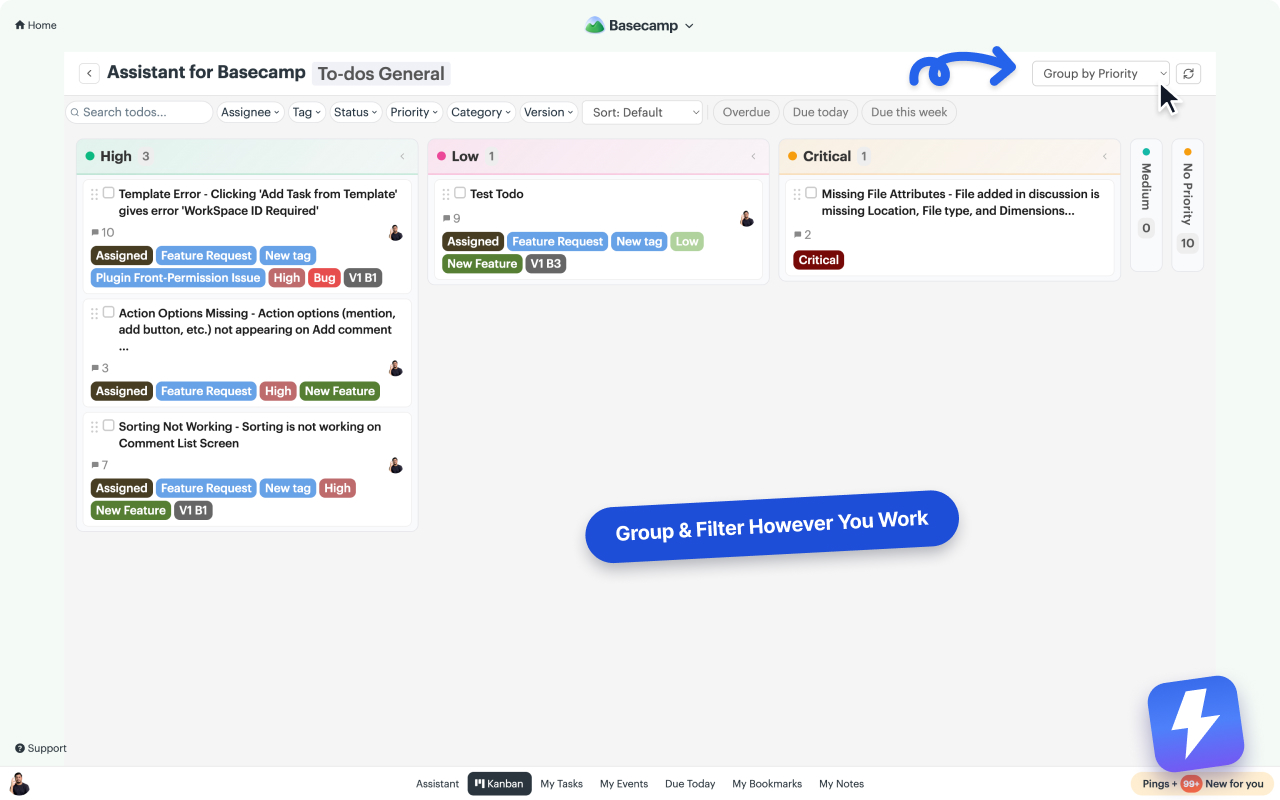
Group the board by anything that matters.
Group by assignee, or by any select-type custom field: Priority, Category, Version, plus the built-in Tags and Status. Columns follow the field's option order and colors, and the board remembers your choice per project. Group by Tags or any multi-select field and an item with three tags shows up in all three columns.
- ✓ Filter by search, assignee, tag, status, or due date
- ✓ Grouped by assignee, drag a to-do to move that one assignment, or Ctrl-drag to add a person
- ✓ Column colors come from Basecamp, and editing one writes back for everyone
- ✓ Collapse columns you don't need in view right now
- ✓ Unread changes highlighted right on the cards
Display rules
Hide what you don't need. Or say exactly what you do.
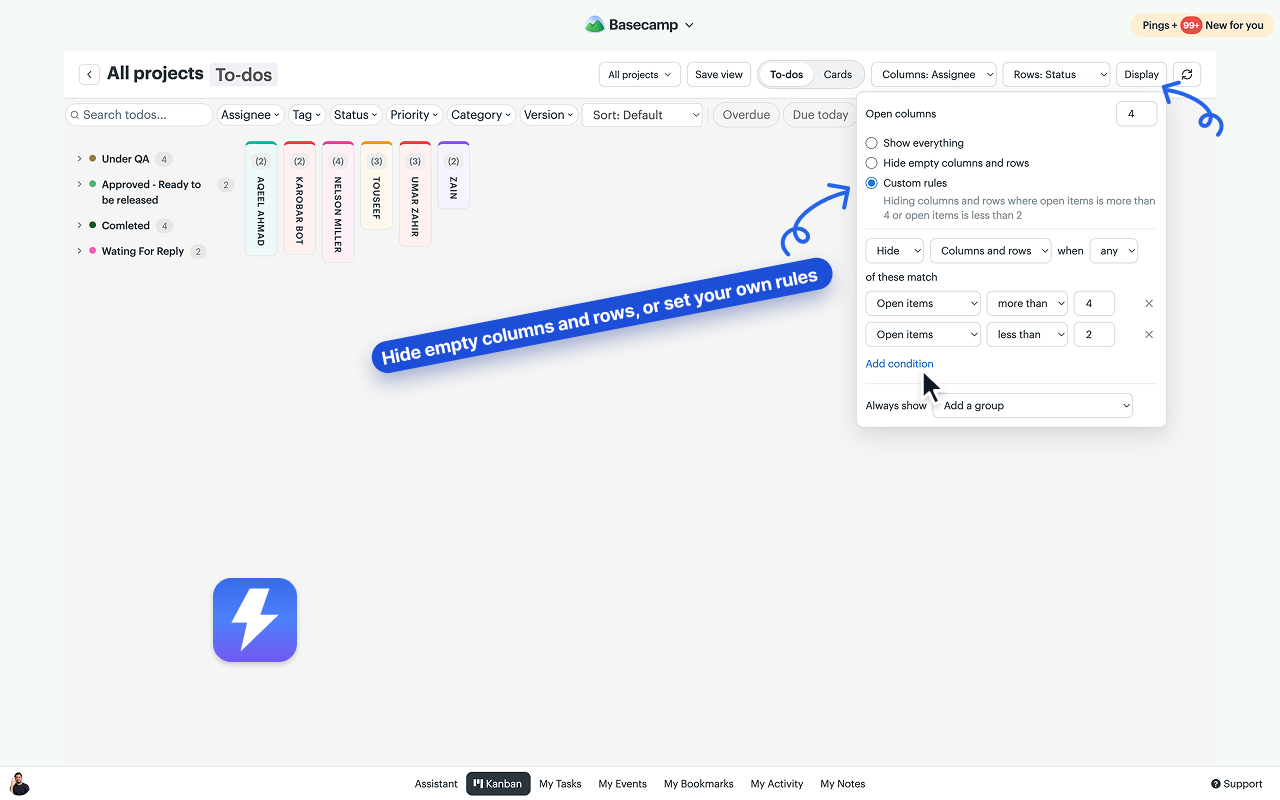
Group by assignee and everyone gets a column, including the teammate who left last year and still holds completed to-dos. Half the board goes empty and the work you came to look at scrolls off the side. The Display button at the right end of the toolbar drops every column and row with no open to-dos, and Custom rules let you write the rule yourself.
- ✓ Hide empty columns and rows in one click, on a flat board or on pivot rows
- ✓ A person whose only items are completed leaves the board until they pick up work again
- ✓ Custom rules hide or show on open, completed or overdue items, due this week, last activity, the WIP limit, or the names you pick
- ✓ An Always show list keeps the columns and rows you never want hidden
- ✓ Rules run after the filter bar, are yours alone, and a saved view carries them
Card Tables vs. a board over your to-dos
Card Tables are Basecamp's own take on kanban, and they're good at what they do. The catch: they're a separate silo. Here's the honest comparison.
| Basecamp Card Tables | Assistant's Kanban board | |
|---|---|---|
| Works on your to-do lists | No. Cards live in their own tool | Yes. Every list becomes a column |
| Priority, status, and custom fields | No fields on cards | Tags, statuses, and five field types |
| Group and filter the board | No grouping or filtering | Group by assignee or any field, filter by anything |
| Where the data lives | In Basecamp | Your to-dos stay in Basecamp. The board is a view, not a copy |
More depth: Card Table vs to-do list · Does Basecamp have a Kanban view? · Card Tables: the complete guide
On a board in the next five minutes.
Install the extension
From the Chrome Web Store or Firefox Add-ons. Anyone on the account connects it once; everyone gets access automatically.
Open any project
Click Kanban in the bottom menu for the whole project, the "Open in Kanban" button on a single to-do set or Card Table, or the account board for every project at once.
Work the board
Drag cards, group by priority, filter to your name. Every change saves straight back to Basecamp. Full guide in the help center.
Kanban questions, answered.
Does Basecamp have a built-in Kanban board? +
Partially. Basecamp's Card Tables are kanban-style, but they're a separate tool with their own cards. Your to-do lists, where most Basecamp work already lives, have no board view. Assistant adds a real Kanban board over both.
Where do the columns come from? +
Every to-do list in your project becomes a column, so your project's structure is the board. Nothing to set up, no separate tool to migrate into. On Card Tables, your existing columns carry over as they are.
Does dragging a card change anything in Basecamp? +
Yes, for real. Dragging a card to another column moves the to-do to that list (or the card to that column) in Basecamp itself. Anyone without the extension sees the same change in the normal list view.
Can I group the board by priority or status? +
Yes. Group by assignee, or by any select-type custom field: Priority, Category, Version, or the built-in Tags and Status. Columns follow the field's option order and colors, and your grouping choice is remembered per project. Group by Tags or any multi-select field and an item with three tags shows up in all three columns. You can also run a pivot: one field builds the columns, another builds the rows.
Can I hide people who have no open to-dos? +
Yes. The Display button at the right end of the toolbar has a Hide empty columns and rows option: any column or row with no open to-dos drops off the board, so a teammate whose only remaining items are completed stops taking up a column until they pick up work again. Custom rules go further, hiding or showing columns and rows on conditions like open items, overdue items, last activity, or the WIP limit, with an Always show list for the ones you never want hidden. The rules are per person and a saved view carries them.
Can I see every project on one board? +
Yes. The account board covers every project you can open in Basecamp. Search the picker for the projects or clients you want, narrow the board to those, and save the setup as a named view you can reopen any day. To-dos and Cards always get separate boards, so the two never mix on one screen.
Can I set a WIP limit on a column? +
Yes. Click a column's count and set a limit. Limits are stored per board and shared with the team, so the same column can allow 10 in one project and 3 in another. The count turns red once open work passes the limit, and completed items never count toward it.
How much time does a Kanban board actually save? +
It depends on how often you touch Basecamp, so here is the arithmetic rather than a claim. Savings come from two places. Small repeated costs: opening an item (a page load out and another back, versus a split-view panel beside the board), changing a status (open, move to another list, confirm, versus one drag), checking where a project stands, and stacking filters to answer "what's overdue for Sara on Client X". That is about 9 minutes per person per working day. Then whole workflows, which are larger and multiply when everyone takes part: a standup that ends five minutes early saves five minutes per attendee, and release QA filtered to a version field replaces reconstructing the build from memory. For a team of 10 that totals about 2.7 hours a day, or 13.3 hours a week. That is roughly 56 hours a month, about $0.52 per hour recovered against the $29/month flat price. These are modelled figures, not measured customer results; the full assumptions and an editable calculator are on the pricing page.
Do my teammates need to install anything? +
Only the people who want the board view. Everyone else keeps using Basecamp exactly as before, and one admin's subscription covers the whole account.
What does it cost? +
$29/month or $290/year for your whole Basecamp account, unlimited users. The Kanban board is included, along with tags, statuses, custom fields, and automations. 7-day free trial, no card needed.
Setting up a workflow? Start with how to add a Kanban board to Basecamp and filtering and grouping the board.
Your to-dos, as a board.
Install the free extension and open your first Kanban board in minutes. 7-day trial, no card needed.