Basecamp Card Table vs To-Do List: When to Use Which
If you’ve set up a project in Basecamp, you’ve hit the same fork most people do: do you track the work as a to-do list, or as a card table? They look like they do the same job, so it’s easy to pick one at random and regret it three weeks later. The honest answer to the basecamp card table vs to-do list question is that they’re built for two different shapes of work, and using the wrong one makes a project feel heavier than it should.
This guide walks through what each tool is actually good at, when to reach for which, and what to do when your work doesn’t fit neatly into either.
What’s the difference between a card table and a to-do list?
Both live inside a Basecamp project, and both hold items of work. The difference is how those items move.
A to-do list is a checklist. You add items, assign them to people, give them due dates, and check them off when they’re done. An item has two states: open or complete. That’s it. You can have many lists in one project, and a to-do can hold notes, comments, and files.
A card table is Basecamp’s kanban-style tool. Instead of a flat checklist, you get columns, and you drag cards from one column to the next as work progresses. A card moves through stages like Not started, In progress, and Done, and you can add your own columns. It’s built to show flow, not just completion.
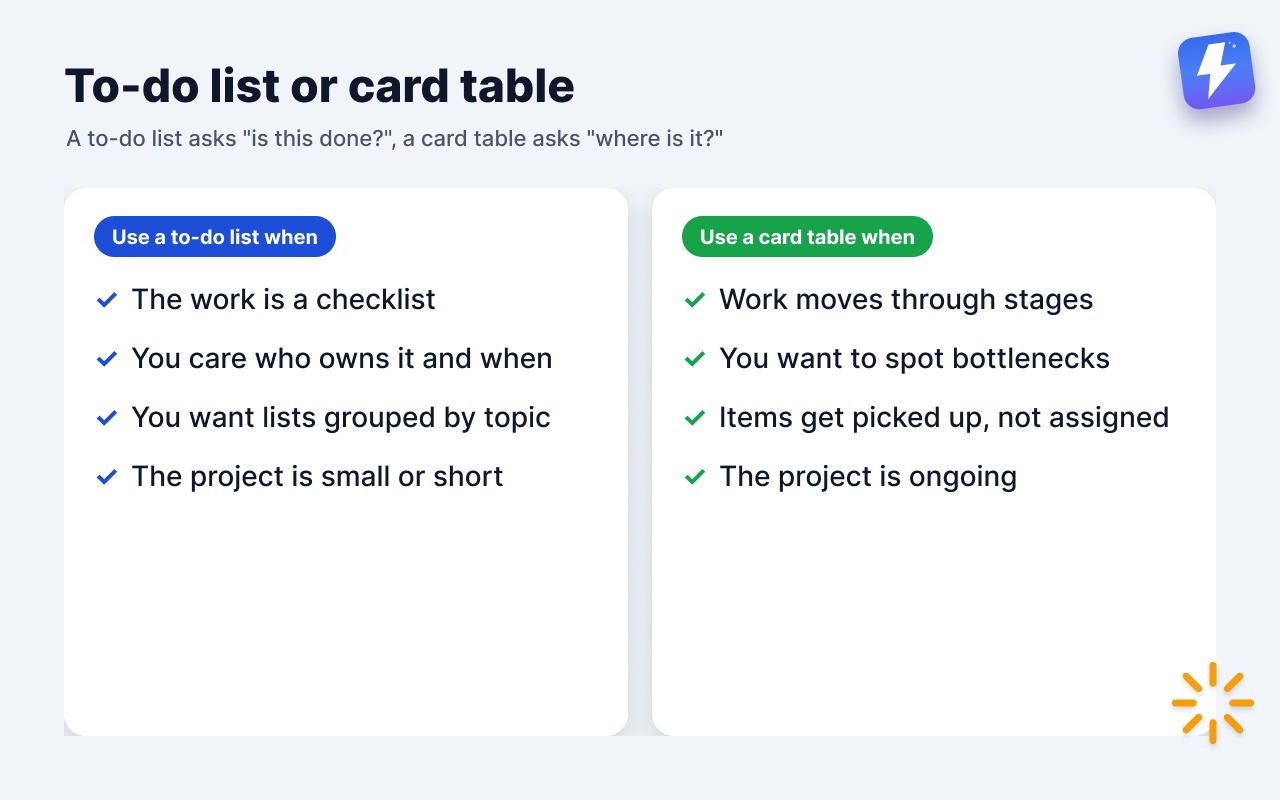
So the short version of card table or todo in Basecamp: a to-do list answers “is this done yet?” and a card table answers “where is this in the process?”
When should you use a to-do list?
To-do lists are the right call more often than people expect. Reach for one when:
- The work is a checklist. A launch has 14 things that need doing. They don’t move through stages, they just need to get done. A list is faster to read and faster to update.
- You care about who owns what and when it’s due. To-dos have clean assignment and due-date handling, and overdue items show up in Basecamp’s reports. A card table’s date handling is lighter.
- You want grouping by topic. Multiple lists in one project let you split work by area: Design, Copy, QA. Each list is its own checklist.
- The team is small or the project is short. For a two-week job with a clear finish line, a board is overhead you don’t need.
If your honest mental model of the work is “a pile of tasks that need to get done,” use a to-do list.
When should you use a card table?
A card table earns its place when the process matters as much as the outcome. Use one when:
- Work moves through repeatable stages. A support queue, a content pipeline, a hiring funnel, a bug triage flow. Each item passes through the same columns in the same order.
- You want to see bottlenecks at a glance. If eight cards are stuck in In review, a board shows that instantly. A checklist hides it.
- Items get picked up, not pre-assigned. On a board, work often sits in a “to grab” column and someone pulls it. A checklist assumes you assign upfront.
- The project is ongoing. Boards shine for work that never really “finishes,” it just keeps flowing.
If your honest mental model is “a stream of work that moves through stages,” use a card table.
Where each one falls short
Neither tool is the winner everywhere, and pretending otherwise just leads to the wrong pick.
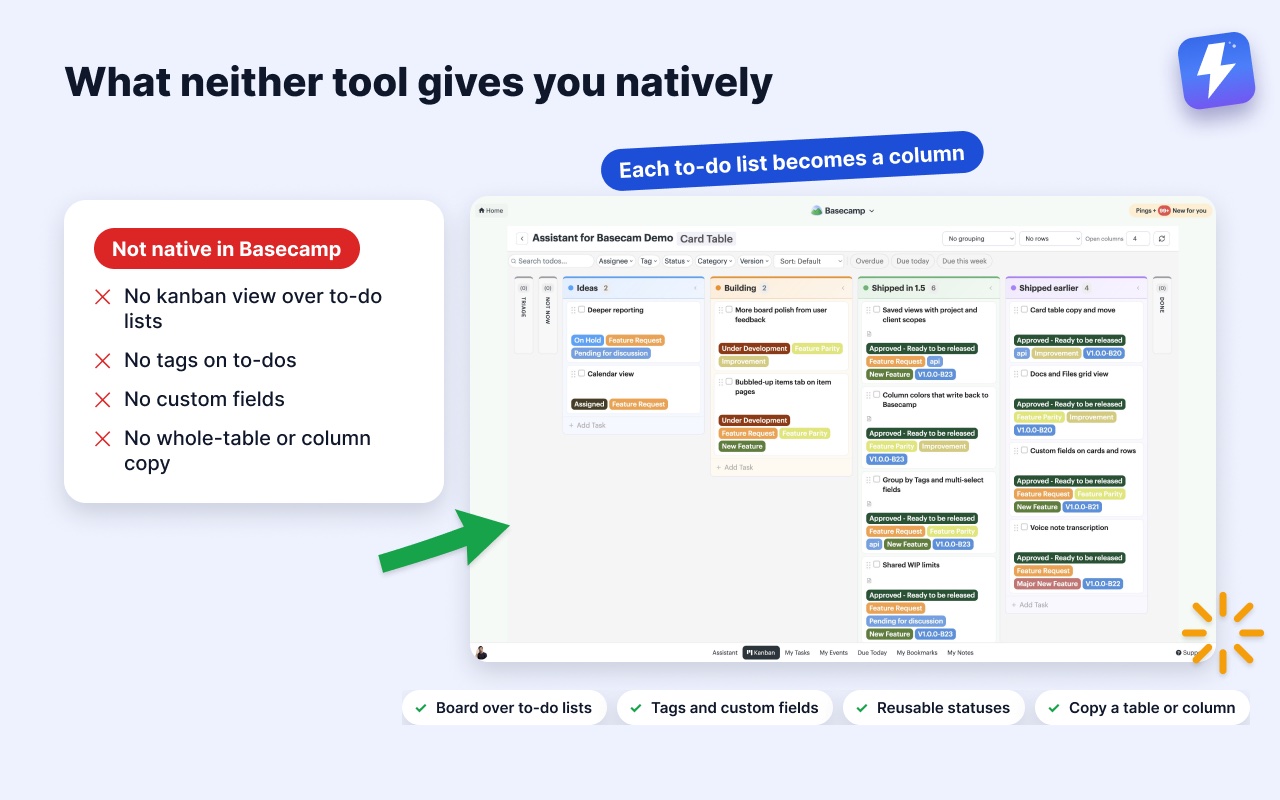
To-do lists give you no sense of flow. You can’t see that a task is “started but not finished,” only open or done. There’s no kanban view over them, no columns, no drag-between-stages. For anything with a middle, that’s a real gap.
Card tables are their own silo. The basecamp todos vs cards trade-off is that a card table doesn’t talk to your to-do lists at all. If your work already lives in to-dos, you’d have to re-enter it as cards to get a board, and you lose the clean assignment and reporting that to-dos give you. Card tables also stop at the single card: Basecamp copies or moves one card for you, but there’s no way to duplicate a whole table or copy a column into another one, so repeating a board means rebuilding it by hand.
It’s worth being clear on what Basecamp does not have natively, on either tool: no tags on to-dos, no custom fields, no reusable statuses beyond a card’s column, and no kanban view that sits on top of your to-do lists. (If you’re weighing this against other apps, our does Basecamp have a kanban view? post covers it in full.)
A simple rule for picking
When you’re staring at a new project and can’t decide, ask one question: does this work have stages, or is it a checklist?
- Checklist with a clear finish → to-do list
- Repeatable stages, ongoing flow → card table
And a second question if you’re still torn: do I need to see where things are stuck? If yes, you want columns, so use a card table. If you only need to know what’s done, a list is lighter and faster.
What if your work is both?
This is the case nobody talks about, and it’s the most common one. Most teams want the clean assignment and reporting of to-do lists and the flow view of a board. Native Basecamp makes you choose.
That’s the gap Assistant for Basecamp fills. It’s a browser extension that adds a kanban board over your existing to-do lists, so you don’t have to abandon lists to get a board. Each to-do list becomes a column, which means your project’s real structure is the board. Nothing gets re-entered, and the to-dos stay in Basecamp where they already live. The full feature rundown is on the Kanban board for Basecamp page.
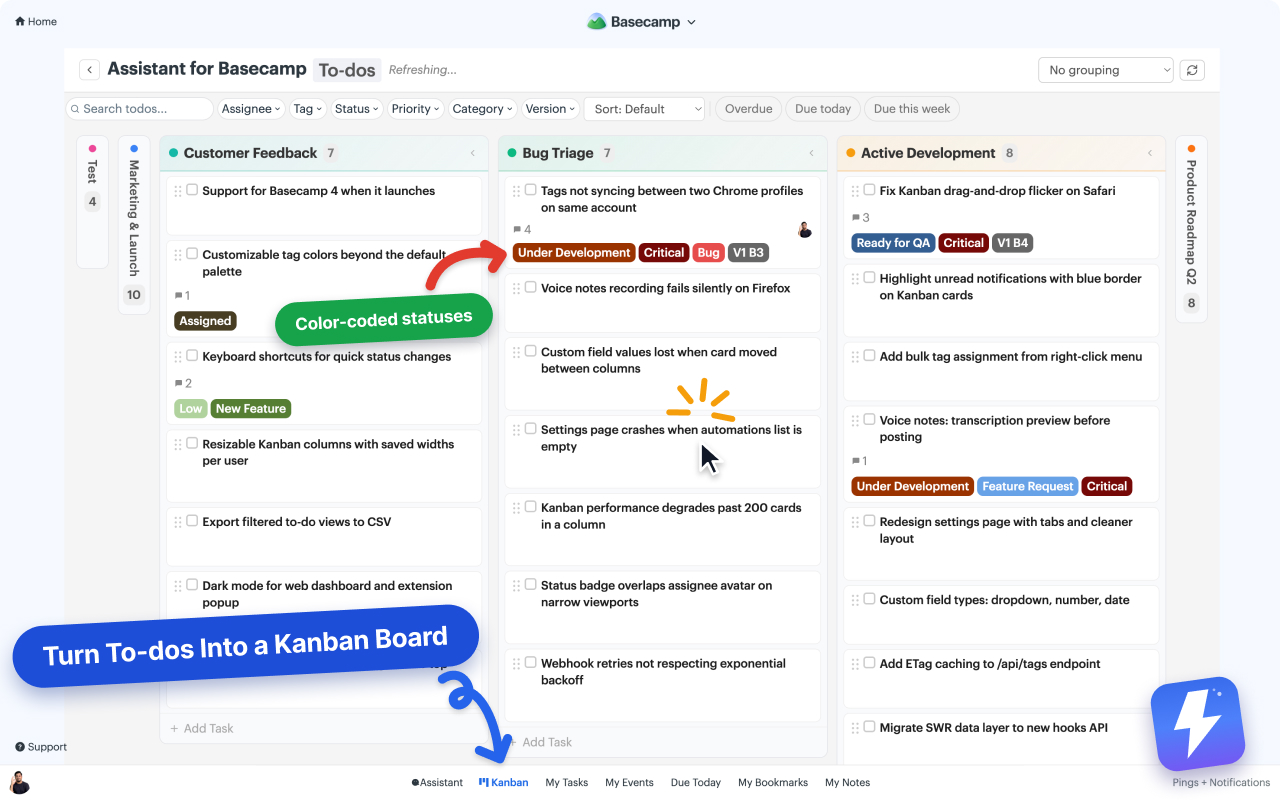
On top of that board you get the things native Basecamp doesn’t offer on to-dos: tags, custom fields with colored badges, reusable statuses, and grouping that rebuilds the board by assignee, tag, or status. Dragging a card between columns moves it to a different to-do list, and the change syncs straight back to Basecamp, so teammates who never open the board still see it. Column colors come from Basecamp’s own list colorways, and changing one from the board writes it back to Basecamp for the whole team.
For the card table side, Assistant works one level up from the single card Basecamp already copies: copy a whole card table, copy a single column with its cards, or move a column, into the same project or a different one. Each runs as a job you can pause and pick up again, which matters when the table is large. How to duplicate a card in Basecamp walks through it.
One thing is deliberate: to-dos and cards get separate boards. You can open a board over a single to-do list or card table, over a whole project, or over every project in your account, but the two item types never share one. They behave differently in Basecamp, and a board that mixed them would be worse at both.
The short version
Use a to-do list when the work is a checklist with clear owners and due dates. Use a card table when the work moves through repeatable stages and you need to see where things are stuck. When you want both, the lists you already keep plus a board to watch them flow, add Assistant for Basecamp, open a project, and your to-do lists become the board. You can set up the board in a few minutes from the kanban help doc, and try the whole thing free for 7 days.
Useful? Tell Google you want more of this.