v1.5.8 Live
October 2026
Assistant is on Firefox, dark mode matches Basecamp on every Assistant screen, and a clearer first step after you install.
New
- Assistant is on Firefox. Install it from Firefox Add-ons; it does everything the Chrome version does, on the same account and plan.
Fixed
- Dark mode now covers all of Assistant. Automations, Integrations, AI usage, the Docs & Files grid, the pickers, dialogs and the custom field settings panel had stayed light. They now follow Basecamp's Appearance setting, including Same as OS.
- Search boxes, pickers and date fields no longer stay white in dark mode.
Changed
- The welcome page now starts with Connect Basecamp, with a line on what access Basecamp grants and how to revoke it. Pinning the extension comes second.
- On the free tier, the Kanban screen now says the workspace is on the free tier. It used to say there was a payment issue.
v1.5.7 Live
September 2026
Plan ahead with due dates.
New
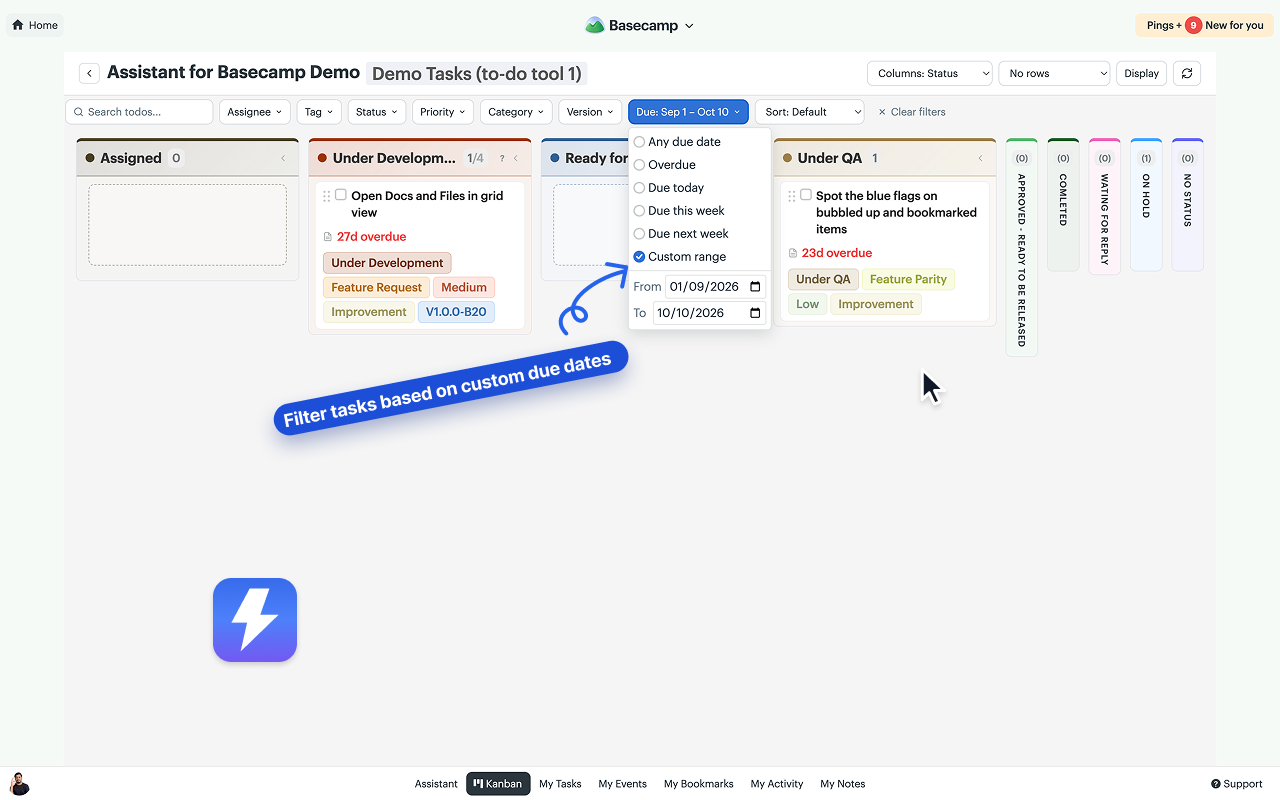
- The Kanban Due date filter now includes Due next week and Custom range. Pick a start date, an end date, or both to plan upcoming work.
Changed
- Due this week now runs through Sunday.
v1.5.6 Live
September 2026
A fix for the project home. Basecamp changed the page's markup, which switched off two things Assistant adds there. Both are back.
Fixed
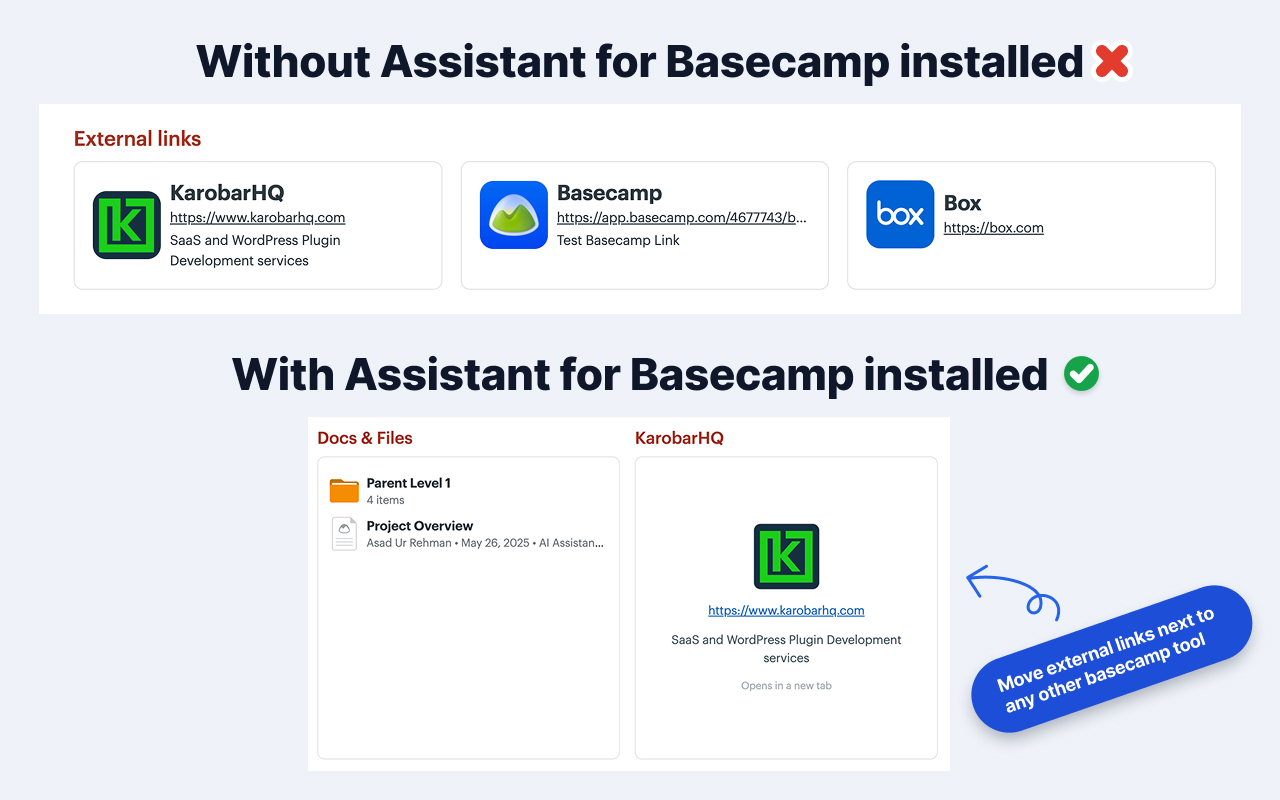
- External links show as dock cards again. They had dropped back to Basecamp's flat strip under the tools, whatever the Options switch said.
- The Open in Kanban button is back on the project home's to-do and card table cards.
v1.5.5 Live
September 2026
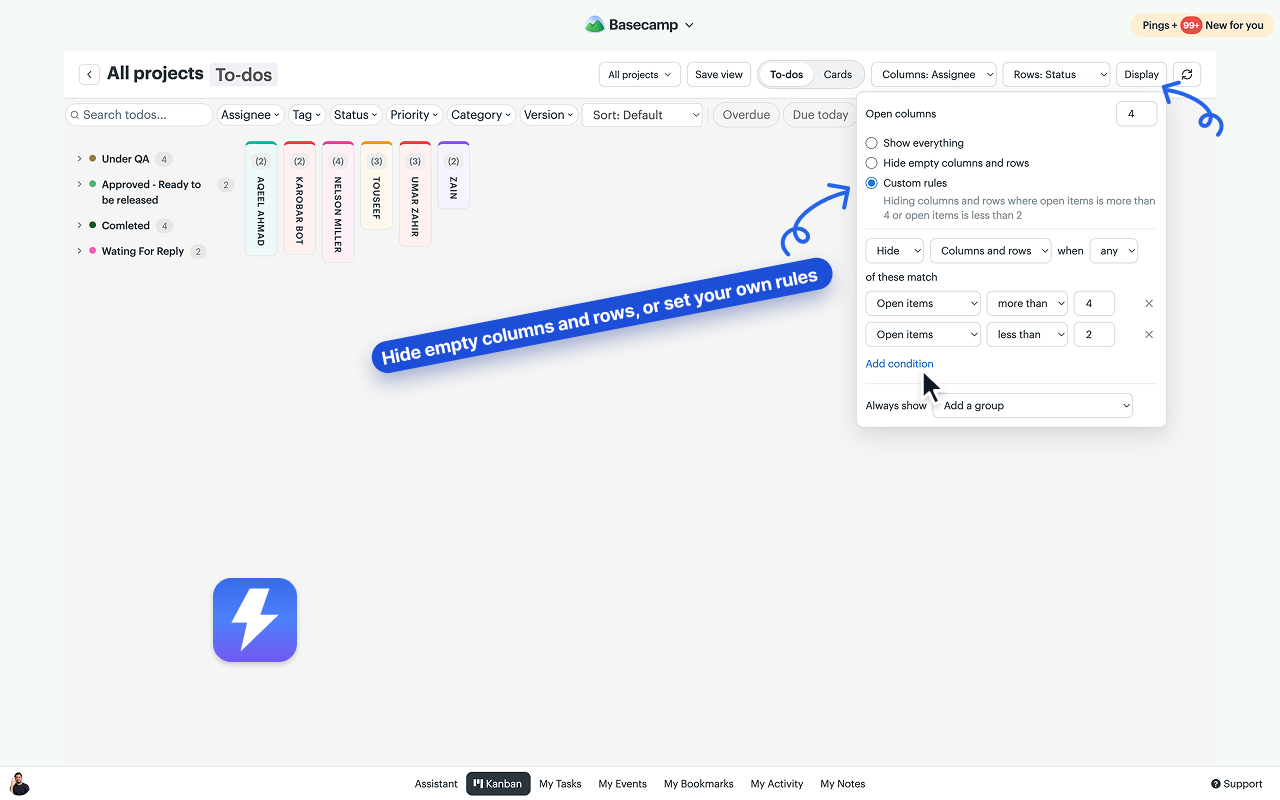
Display rules for the Kanban board. A Display button on the toolbar hides empty columns and rows, or runs show-and-hide rules you write yourself, so the board only carries the work you want in front of you.
New
- A Display button at the right end of the Kanban toolbar. It opens a popover with the Open columns limit and three choices. Show everything, the default. Hide empty columns and rows, which drops any column or row with no open to-dos, so a person whose only remaining items are completed leaves the board. Custom rules, a builder: hide or show columns, rows, or both when all or any of your conditions match, on open, completed, overdue or due-this-week counts, last activity, the WIP limit, or a name, with an Always show list for the ones you never want hidden. Rules run after the filter bar, are per person, and a saved view carries them.
Changed
- Column and row counts show open work only. Completed items are reported in the count's tooltip, in the WIP help popover, and in the Completed section.
- Filtering no longer hides empty columns on its own; turn on Hide empty columns and rows for that. The Open columns limit moved from the toolbar into the Display popover.
MCP 1.1 Live
September 2026
Sign in from the client. The claude.ai and ChatGPT connectors, Claude Desktop, Claude Code, Codex, and Cursor-style clients now connect to Assistant's MCP server with a sign-in: you approve the app, pick the workspace, and nothing is copied.
New
- OAuth sign-in for the MCP endpoint. A client that supports it registers itself and sends you to Assistant; you sign in with Basecamp, choose the workspace and read-only or read and write, and click Allow. Access tokens last fifteen minutes and renew on their own.
- Connected apps on the dashboard's MCP page: every app you approved, with its scope, and a Disconnect button that cuts it off at once.
Changed
- The setup guide and the dashboard snippets lead with the sign-in for each client and keep the token route underneath for scripts and clients without sign-in. The Claude Desktop tab became Claude & ChatGPT apps.
- API tokens stay as they were: same routes, same limits, same revoke.
MCP 1.0 Live
September 2026
An MCP server and API tokens. Claude Code, Codex, or your own scripts can now manage Assistant's fields, statuses, saved views, automation rules, and WIP limits with a token you create on the dashboard.
New
- API tokens. Any connected user can create a token for one workspace on the dashboard's new MCP page. A token acts as you, with your role, read-only if you choose, and can be revoked at any time.
- An MCP endpoint at api.getassistant.io/mcp with 29 tools: read and set field values by name, manage fields and options, per-project field settings, saved board views, automation rules and their logs, and WIP limits. Basecamp's own data stays on Basecamp's API.
- Batch writes: one call sets up to 100 field values.
- Setup prompts per client. Paste the Claude Code, Codex, or other-agent prompt into the chat and the agent adds the server and runs a first tool call. Claude Desktop gets a ready config through the mcp-remote bridge.
Changed
- The dashboard has an MCP page in the sidebar with your tokens, connection snippets for Claude Code and Codex, and the tool list.
v1.5.2 Live
September 2026
A free tier, and anyone can connect. Seven everyday enhancements now stay on after the trial, any member can connect a workspace, and Kanban opens from the account home.
New
- A free tier. When a trial or subscription ends, the seven everyday enhancements keep working for everyone in the account: unread highlights, bubbled-up and bookmark marks, the copy-link button, external links as dock cards, multi-line subtask titles, completed subtasks to the bottom, links in a new tab, and divider width. The team features pause until an admin subscribes; nothing is deleted.
- Anyone can connect a workspace. Connecting used to need a Basecamp admin. Now any member can connect and start the 7-day trial for the whole team. Subscribing is still an admin's job.
- Switches for more of the everyday features. Bubbled-up marks, the copy-link button, multi-line subtask titles, the Docs & Files grid, and Kanban due-date polish each have their own switch in Assistant → Options.
Changed
- Without a subscription, the Assistant page opens on Options. The other tabs stay visible with a padlock and say what a subscription adds.
- The "team features are paused" banner stays dismissed for a month instead of returning in every new tab.
Fixed
- Kanban from the account home. Clicking Kanban on your Basecamp home page led to a "navigate to a Basecamp page first" dead end. It now opens the cross-project board, as it was meant to.
v1.5.1 Live
September 2026
Sign-in that sticks. Sessions renew on their own, sign-ins land on the first try, and the dashboard stops asking you to log in again.
Improved
- You stay signed in. Sessions now renew themselves while you use Assistant instead of expiring every seven days. You only see the sign-in screen again after a full week away.
- The dashboard and the extension act as one session: whichever side you connect first signs the other in, and the fresher sign-in always wins.
- Signing out of the extension now signs you out everywhere at once.
Fixed
- The dashboard no longer reloads itself in a loop or asks you to sign in again right after you just did. An expired extension session could silently overwrite a fresh dashboard sign-in; it can't anymore.
- Clicking Connect while a sign-in window was already open failed instantly and kept failing. Extra clicks now simply join the sign-in already in progress.
- Connecting from the card on a Basecamp page now takes effect immediately, with no manual reload, and no longer counts as dismissing the card.
- The connect card no longer appears on top of Basecamp's authorization screen during sign-in.
- A brief network problem no longer signs you out.
- The popup no longer shows you as connected after a session has actually ended.
v1.5.0 Live
August 2026
One board for everything. A Kanban for a whole project or every project at once, a pivot view with two axes, saved views, shared WIP limits, and colors that match Basecamp's own.
New
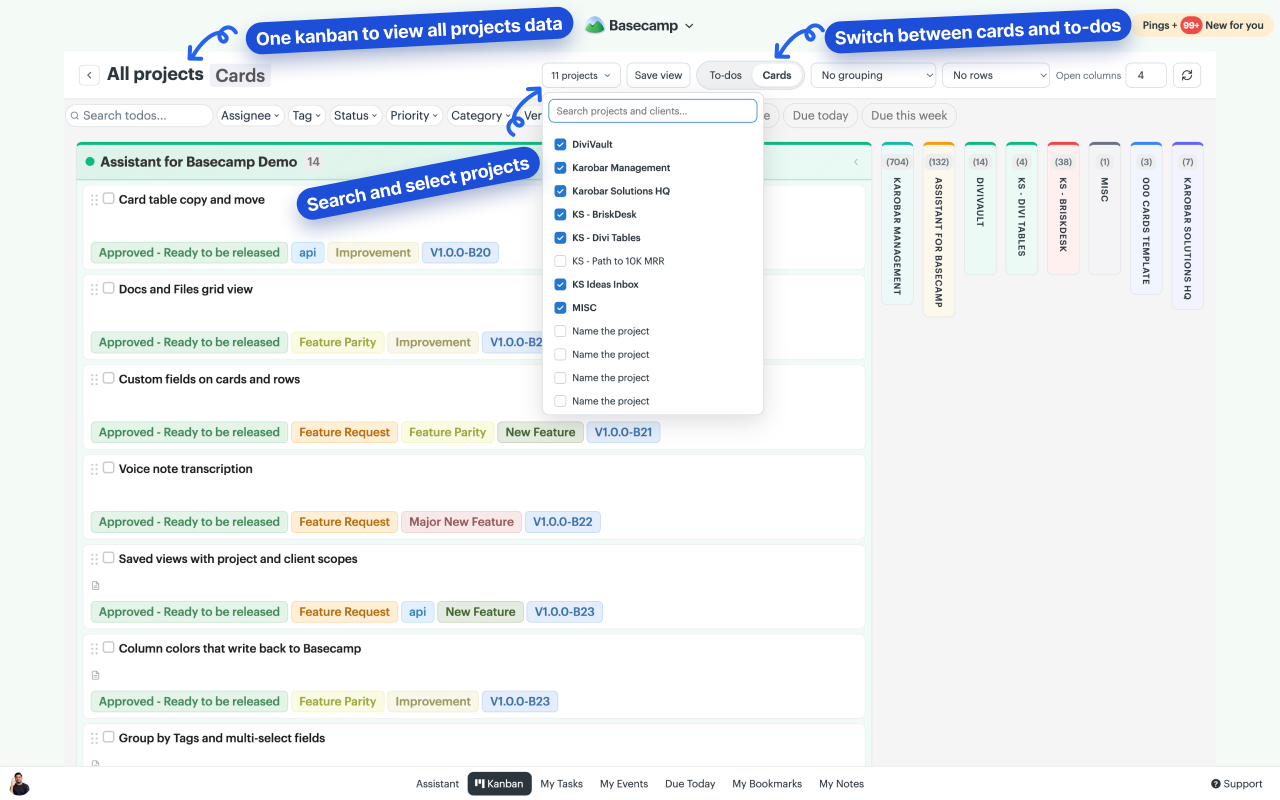
- Boards beyond a single tool. Open a Kanban for all of a project's to-do lists, all of its card tables, or every project in the account at once. To-dos and Cards each get their own board and are never mixed.
- A pivot view. Pick one field for the columns and another for the rows, for example Status across and To-do lists down, and every item lands in its cell. Rows collapse to their header, and column headers and row labels stay in view while you scroll.
- Saved views. Search projects and clients, scope the board to several of either, and save the whole setup as a named view. Views are per person and stored on our servers, so they follow you to any computer.
- Shared WIP limits. Click a column count to set a limit. Limits are stored per board, so the same column can allow ten in one project and three in another, and everyone on the team sees them. The count turns red once open work passes the limit; finished work never counts against it.
- Group by Tags and any multi-select field. An item carrying three tags shows up in all three columns. Assignee grouping works the same way: a to-do assigned to two people appears in both columns, dragging a copy moves that one assignment, and Ctrl-drag adds a person instead of replacing one.
- Column colors that write back to Basecamp. To-do list columns use each list's own colorway and card-table columns their real column color. Pick a new color from the board and it changes in Basecamp for everyone. Status, tag and field columns use the colors set in Assistant.
- Bubbled-up and bookmarked items carry a small blue flag on native lists, on item pages, and on board cards, so you can spot them without opening any menus.
- Recurring to-dos show a repeat icon on the board, and due dates include the year when it is not the current year.
- Choose how many columns stay open, from two to all of them. The rest collapse to slim strips you can click to reopen.
Improved
- Every color picker offers Basecamp's own palette with a checkmark on the current color, and field chips use a light tint of their color with dark text so the label stays readable at any hue.
- The board reads as native Basecamp. Fonts, colors, spacing and radii come from Basecamp itself, down to the empty-column placeholders.
- Account-wide boards show a running item count while they load, keep their data between visits, and refresh with a small delta instead of fetching everything again.
- Drops land instantly. A card's field chips change the moment you drop it, and empty cells accept a drop wherever your pointer actually is.
- Column and row counts include completed items, while WIP limits keep measuring open work. A help icon on the count explains the split.
- Custom fields now work on files in Docs & Files, not only on documents.
Fixed
- Completed items no longer show as overdue.
- Recording a voice note no longer hides Basecamp's own preview before you post it.
- Dragging inside the Docs & Files grid no longer reloads the page.
- Colors chosen from Basecamp's palette render as chips again everywhere they appear.
- Switching between To-dos and Cards no longer flashes the previous board's data.
v1.4.0 Live
August 2026
Voice notes, transcribed. One click turns any Basecamp voice note into text the whole team can read, search, and edit.
New
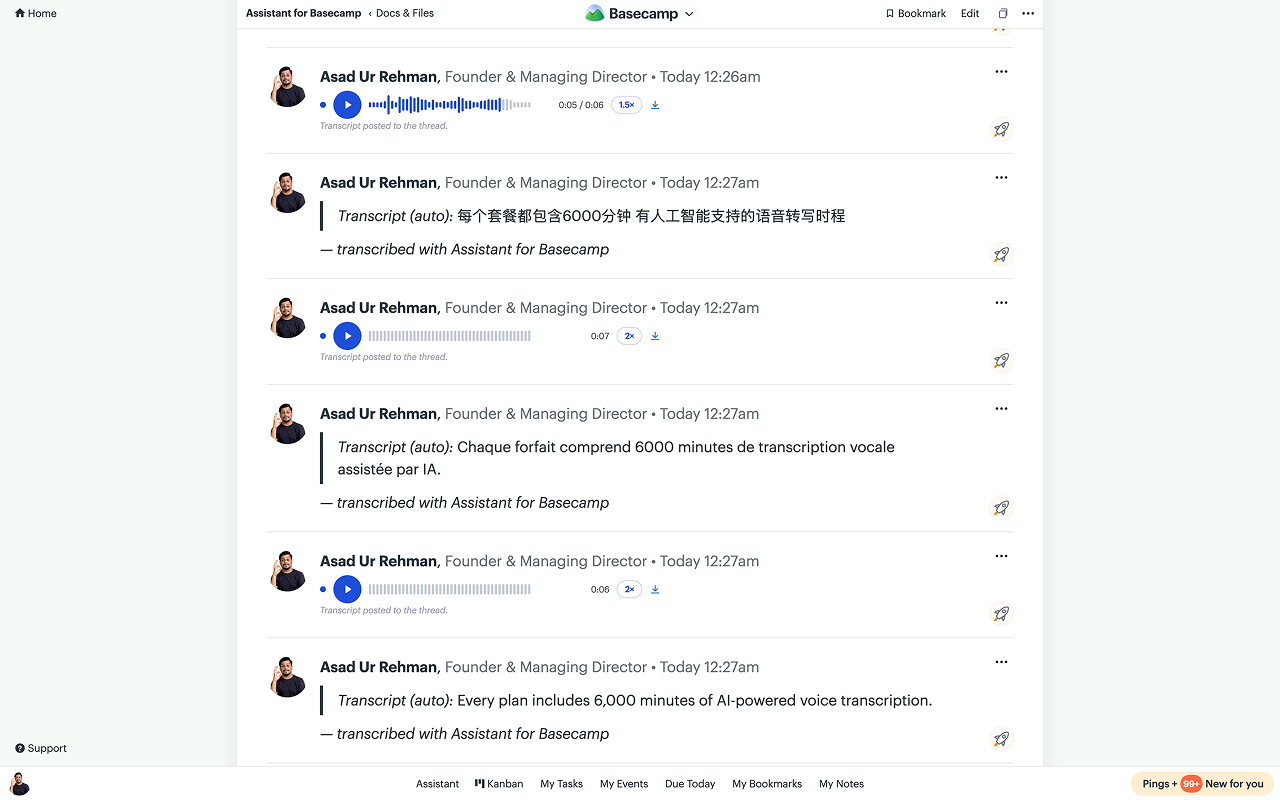
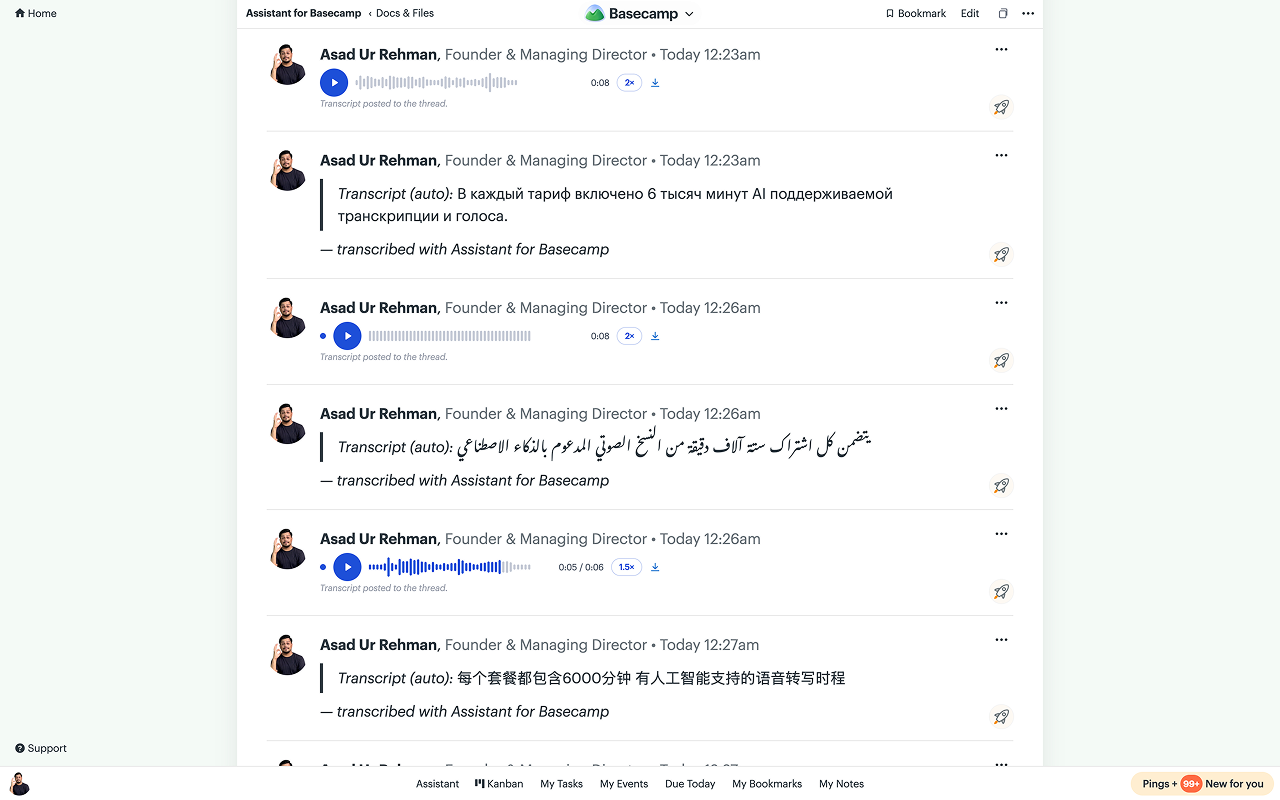
- Transcribe any voice note. A Transcribe button under every Basecamp voice note: a few seconds later the transcript is posted as a comment on the thread, with a one-line summary and action items on longer notes. Works on teammates' notes and months-old notes alike, in any language.
- The transcript comment is the transcript. Everyone reads the same comment, with or without Assistant, on any device, and Basecamp's own search can find what was said. Each note is transcribed once for the whole workspace; after that the Transcribe button disappears. Campfires and Pings have no comments, so those transcripts show inside Assistant's player.
- A player built for catching up: waveform scrubbing, 1×/1.5×/2× speed that's remembered, resume from where you stopped, an unheard dot on unfinished notes, and auto-advance to the next note in the thread.
- Editable transcripts. On threads the transcript is your comment, editable like any other; Campfire and Ping transcripts have an Edit action in the player, and the summary regenerates from the corrected text.
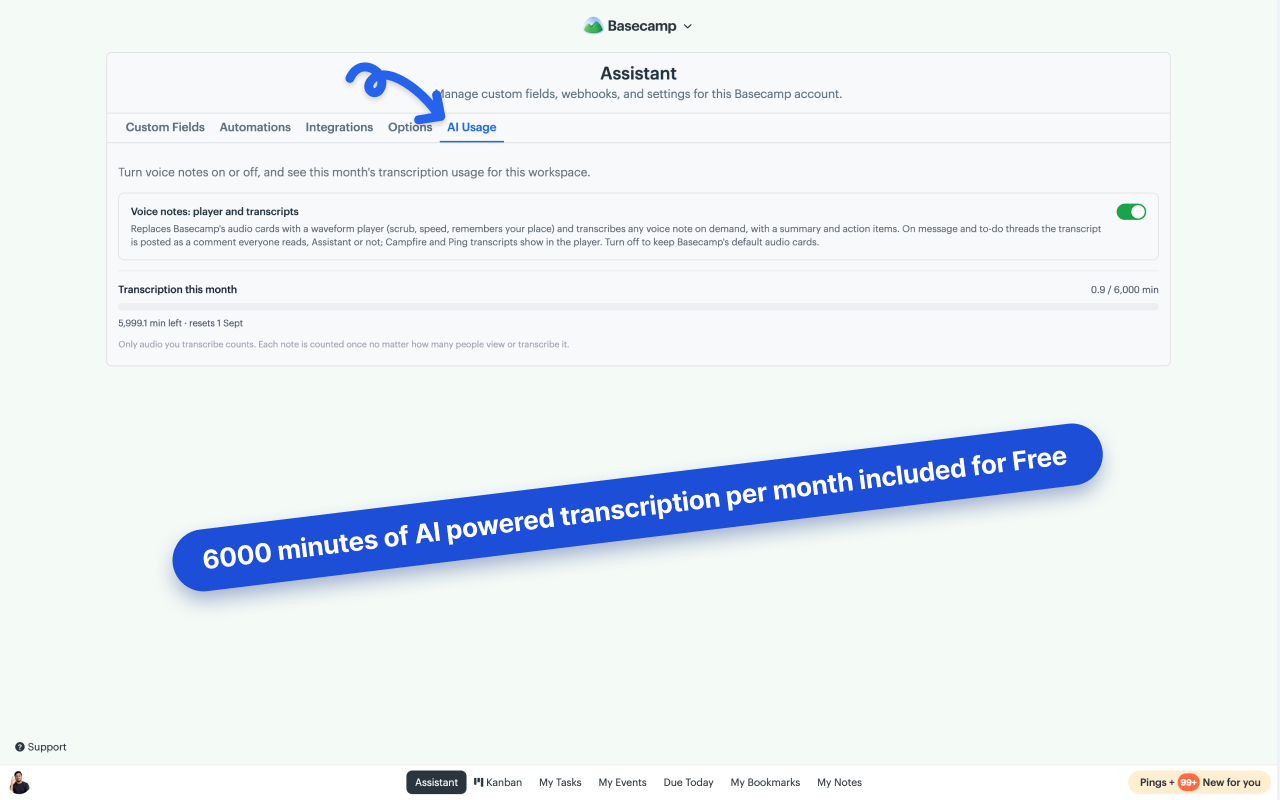
- Every workspace includes 6,000 transcription minutes per month, tracked in Assistant → Usage. Voice note audio is never stored on our servers. It's read only for the seconds transcription takes; we keep the transcript text, summary, and action items.
- Custom fields on Basecamp's own cards and rows. Every enabled field that has a value now shows up in place, so Priority, Status, Category and the rest are readable without opening anything.
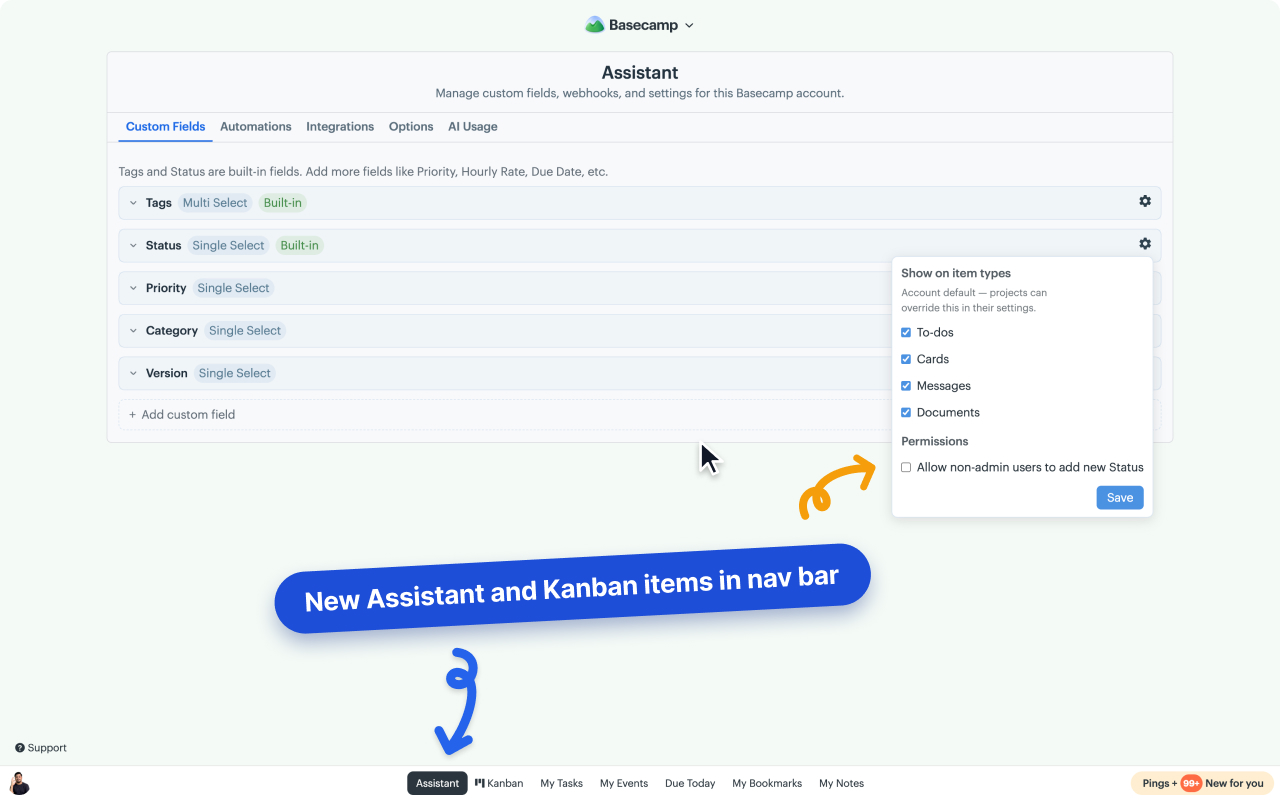
- "Show on item types" per project. The account setting stays the default; a project overrides it only where you say so.
- Admins can gate who adds new field options, admins-only by default, so a shared Status list stays tidy.
- A "No list" Kanban column for todos that aren't in any to-do list, and duplicating a card table can now copy it into another project.
Improved
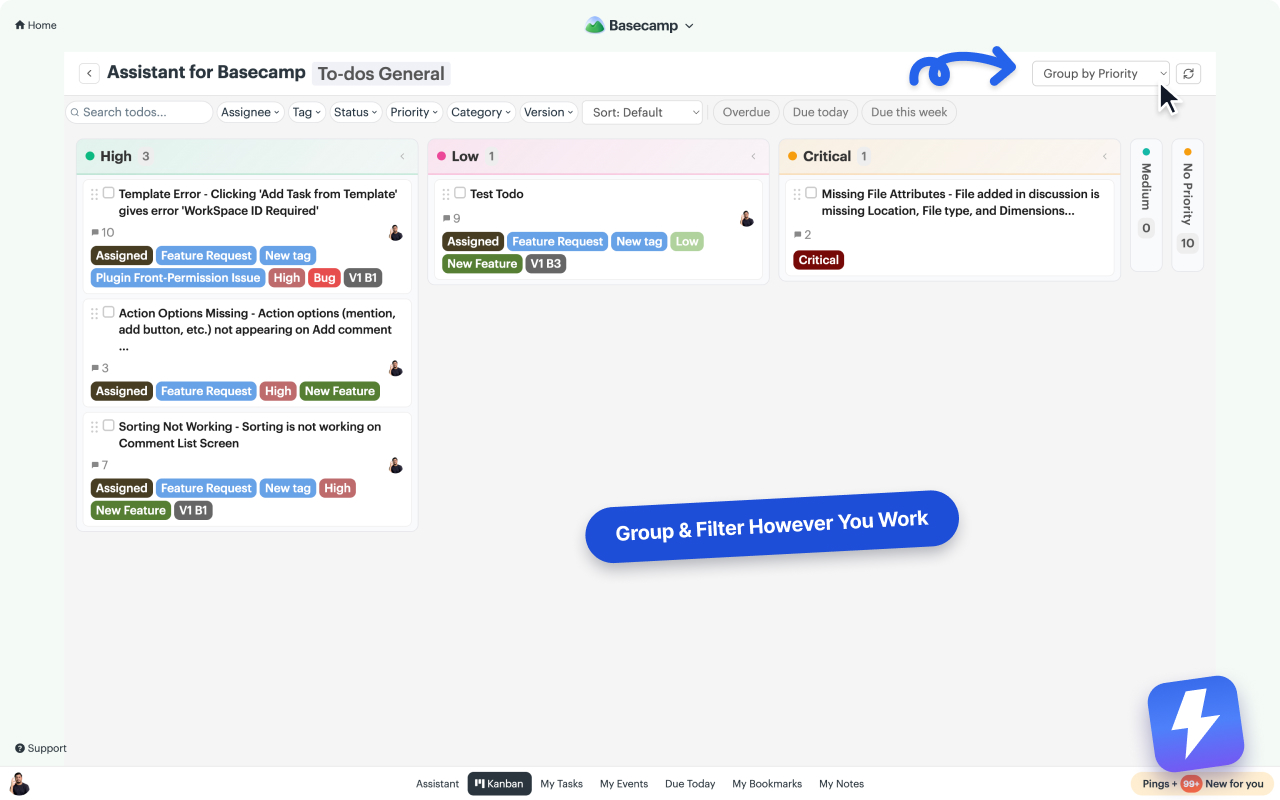
- Grouping the Kanban by a field now builds real columns instead of stacked swimlanes: one column per option in your admin order, stale values after them, "No {field}" last. Drag a card across and the drop sets that field's value. The item's real list or table membership is untouched.
Changed
- The tag/status preview overlay is gone. Values live on the cards and rows themselves now, so there's nothing extra to hover.
Fixed
- Collapsed Kanban columns accept drops instead of rejecting them.
- The perma toolbar stays visible inside the Kanban detail panel, and Basecamp's top bar and Pings sidebar no longer show through it.
- The first fetch after a cache invalidation bypasses the browser's HTTP cache, closing a hole where stale data could survive revalidation.
v1.3.0 Live
July 2026
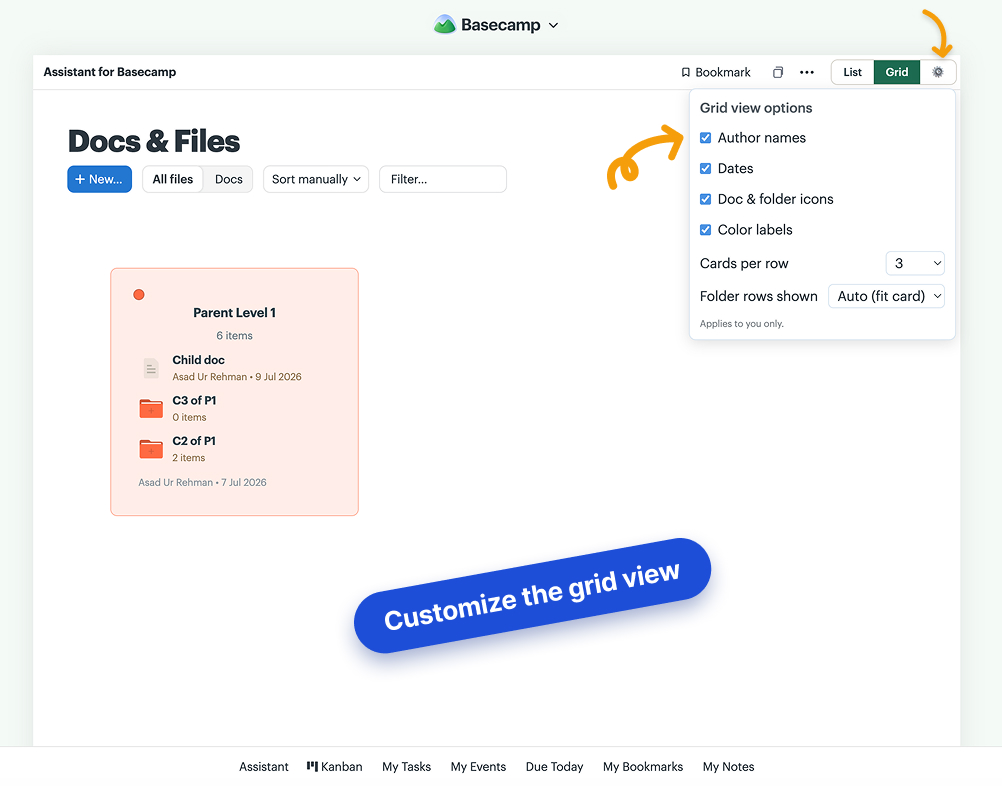
Customize the grid view per user, set color labels right from the grid, drag items out of folders with live drop hints, and a batch of fixes.
New
- Grid view options. A ⚙ next to the List | Grid toggle: show or hide author names, dates, doc & folder icons, and color labels on grid cards, and pick cards per row (Auto or 2–6) and how many folder rows show before scrolling. Cards grow or compact to match. Per user, synced across your devices.
- Color labels in the grid. Every card carries Basecamp's color dot; click it to set an item's color without leaving the grid. The change saves to Basecamp itself, so the list view and your teammates see the same color.
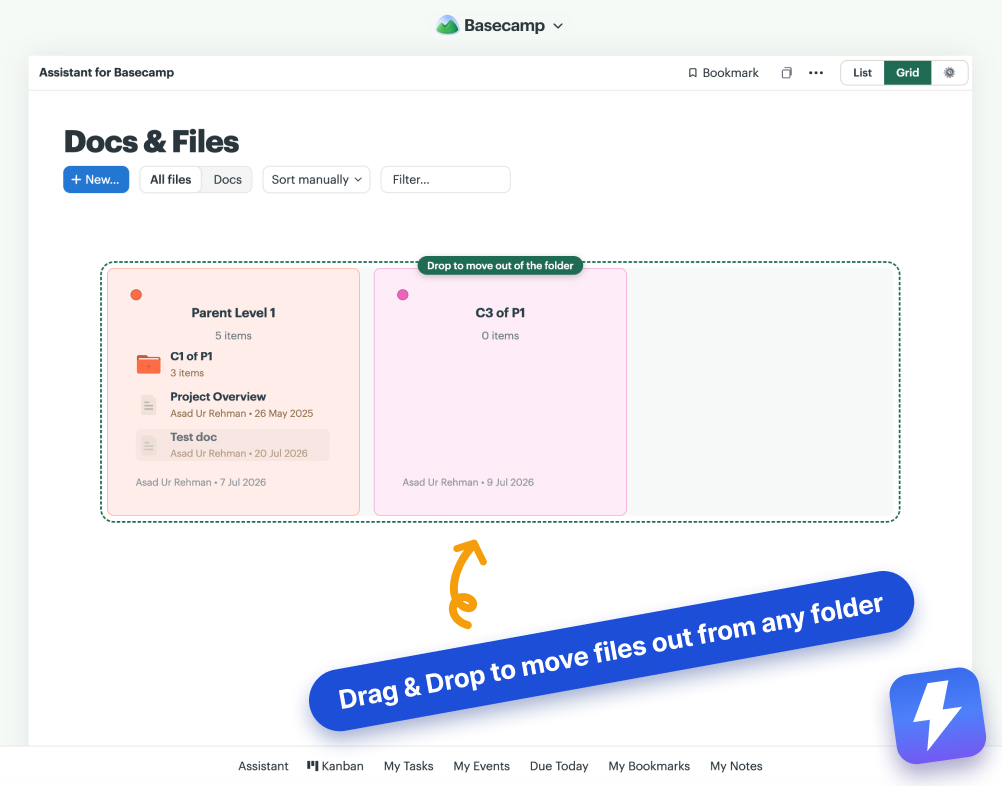
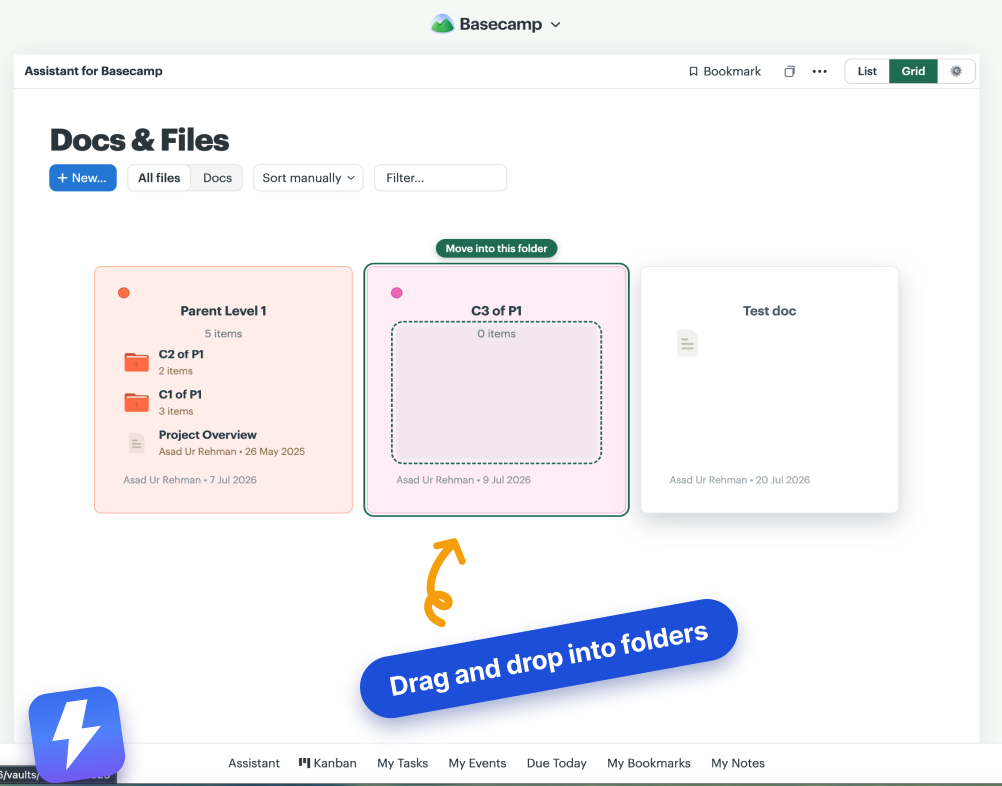
- Drag items out of folders. Drop a row from a folder card onto open grid space and it moves back to the top level. While you drag, live hints show exactly what a drop will do: folders light up with "Move into this folder", open space says "Drop to move out of the folder".
- Show or hide URLs on external link dock cards (Assistant → Options, on by default).
- A one-time review ask. After a couple of weeks of real use, Assistant may ask once for a Chrome Web Store review. "No thanks" is permanent, and it never shows more than three times total.
Fixed
- Moving items in the grid no longer flashes and rebuilds the view. Drag-and-drop is now a smooth in-place update.
- "Show on item types" now truly applies on messages and files: fields unchecked for Messages or Documents no longer appear there.
- The Show-on-item-types settings popover is never cut off on the bottom field rows, and its gear now toggles it closed properly.
- Short custom field names like "Recommender 1" stay on one line in detail views instead of wrapping awkwardly.
Changed
- Grid field pills follow field visibility: only fields set to show on Documents render pills on Docs & Files grid cards.
- Anonymous funnel events now carry the extension version, so we can see how updates roll out.
v1.2.1
July 2026
Completed subtasks can sink to the bottom, new feature toggles in Options, and billing status is now admin-only.
New
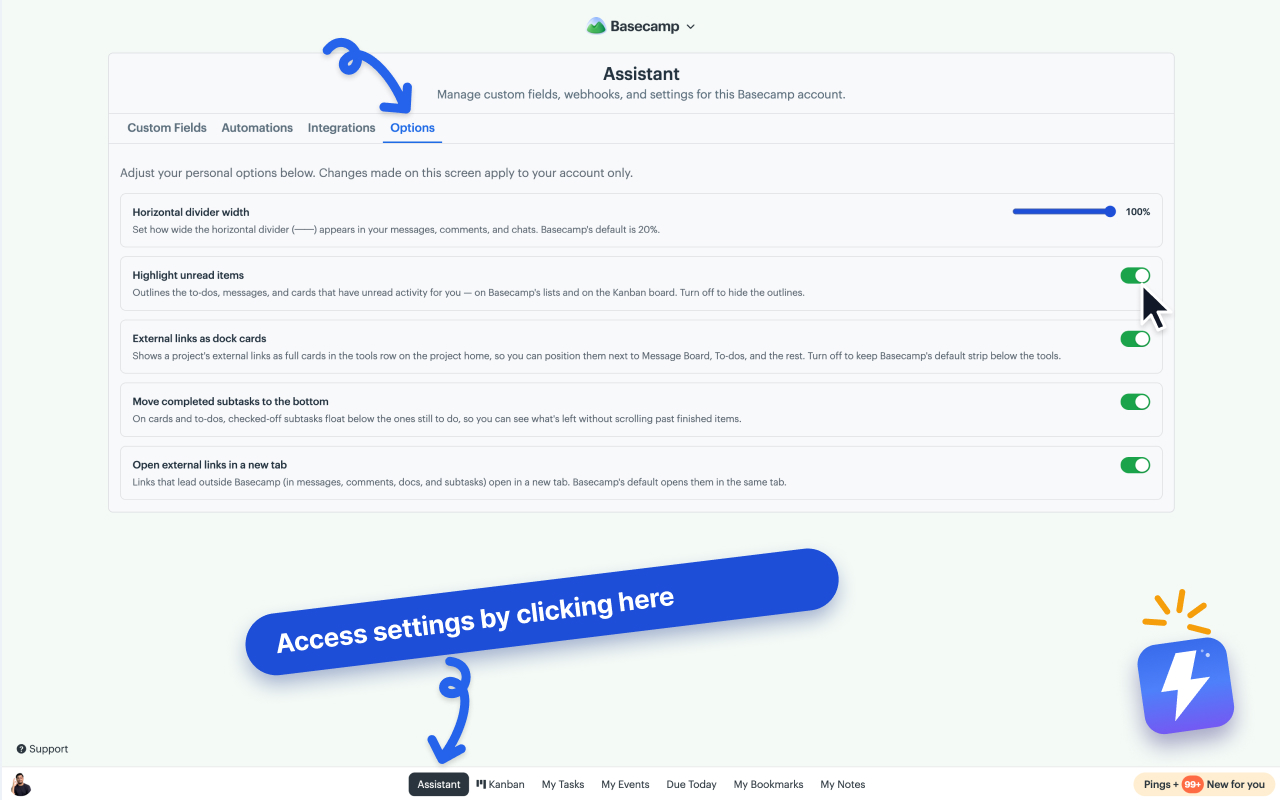
- Move completed subtasks to the bottom (Assistant → Options, off by default): checked-off subtasks float below the ones still to do on cards and to-dos, so what's left is visible at a glance.
- On/off switches in Assistant → Options for unread highlighting and for showing external links as dock cards, so you can tailor which features run. Both default on.
Changed
- Trial and billing status now shows only to Basecamp admins. Members, including clients invited into an account, no longer see trial countdowns or billing badges. If a workspace's subscription lapses, members see a short "ask your Basecamp admin" note instead.
v1.2.0
July 2026
A Grid view for Docs & Files, group the Kanban by any custom field, per-project field control for admins, external links as dock cards, and more.
New
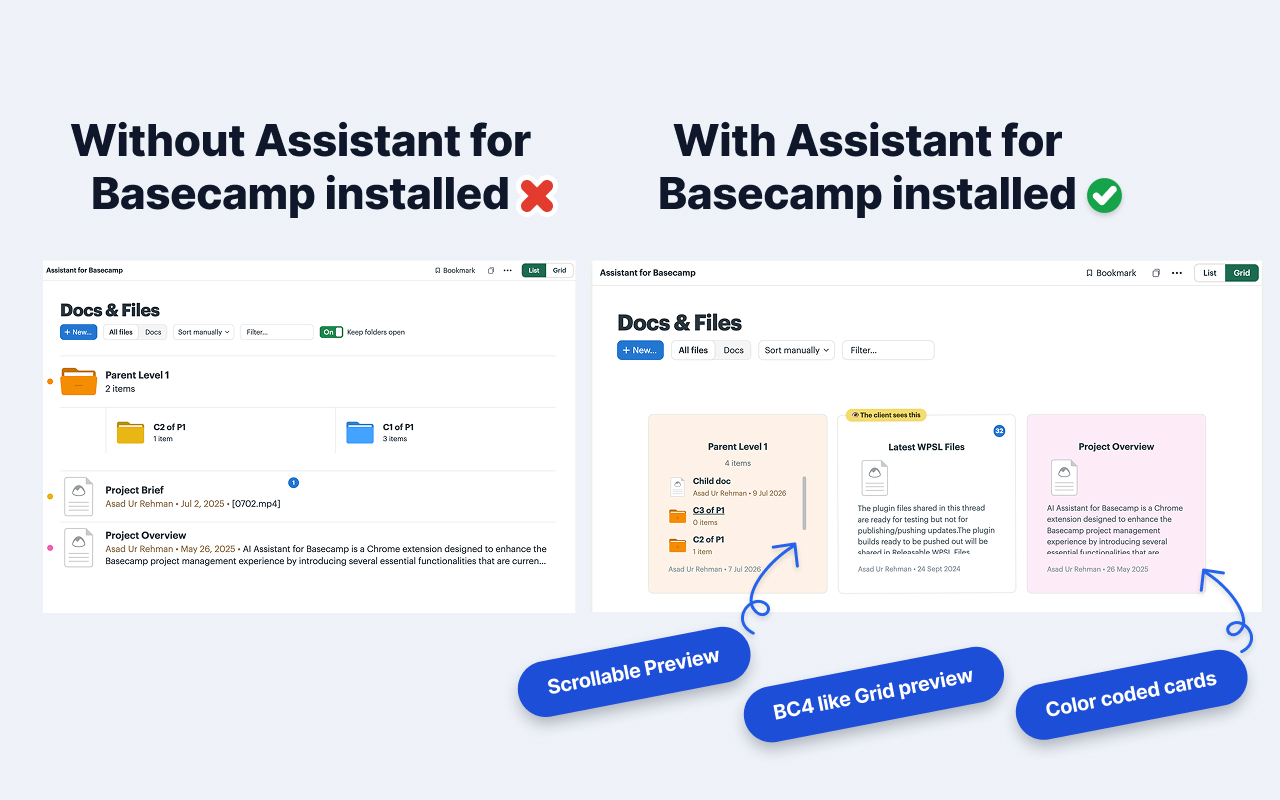
- Grid view for Docs & Files. A List | Grid toggle on every Docs & Files page: folder cards that peek inside, image thumbnails, comment counts, your custom-field pills on every card, drag-and-drop reordering that saves back to Basecamp, and cards tinted with each item's Basecamp color.
- External links become real dock cards. A project's external links move from the small flat strip into the tool grid as full-size dock cards, with per-user placement.
- Group the Kanban by any select-type custom field: Priority, Category, Version, and the built-in Tags and Status. Lanes follow the field's option order and colors, and your grouping choice now persists per project.
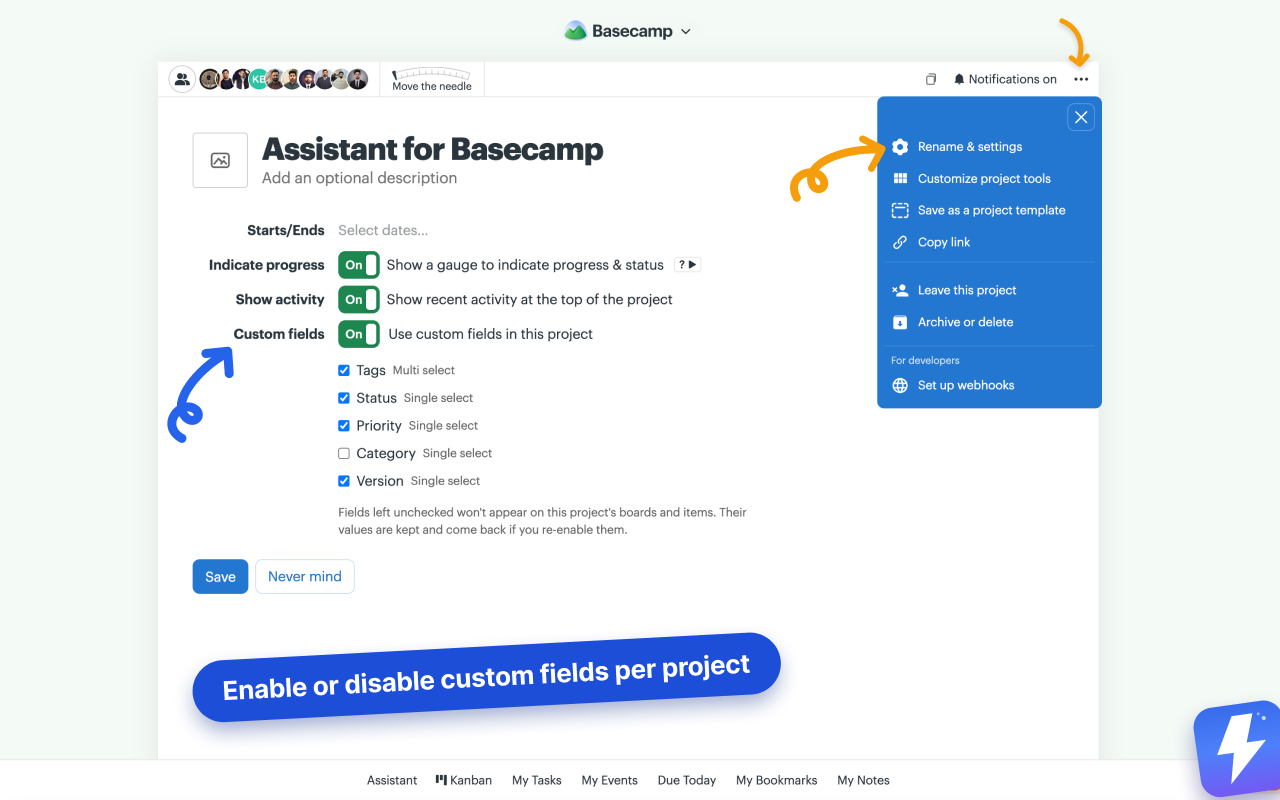
- Per-project custom fields. Admins choose which fields each project uses from Basecamp's project Rename & settings page: turn custom fields off for a project entirely, or uncheck individual fields. Values are kept and come back on re-enable, and fields you create later stay visible everywhere by default.
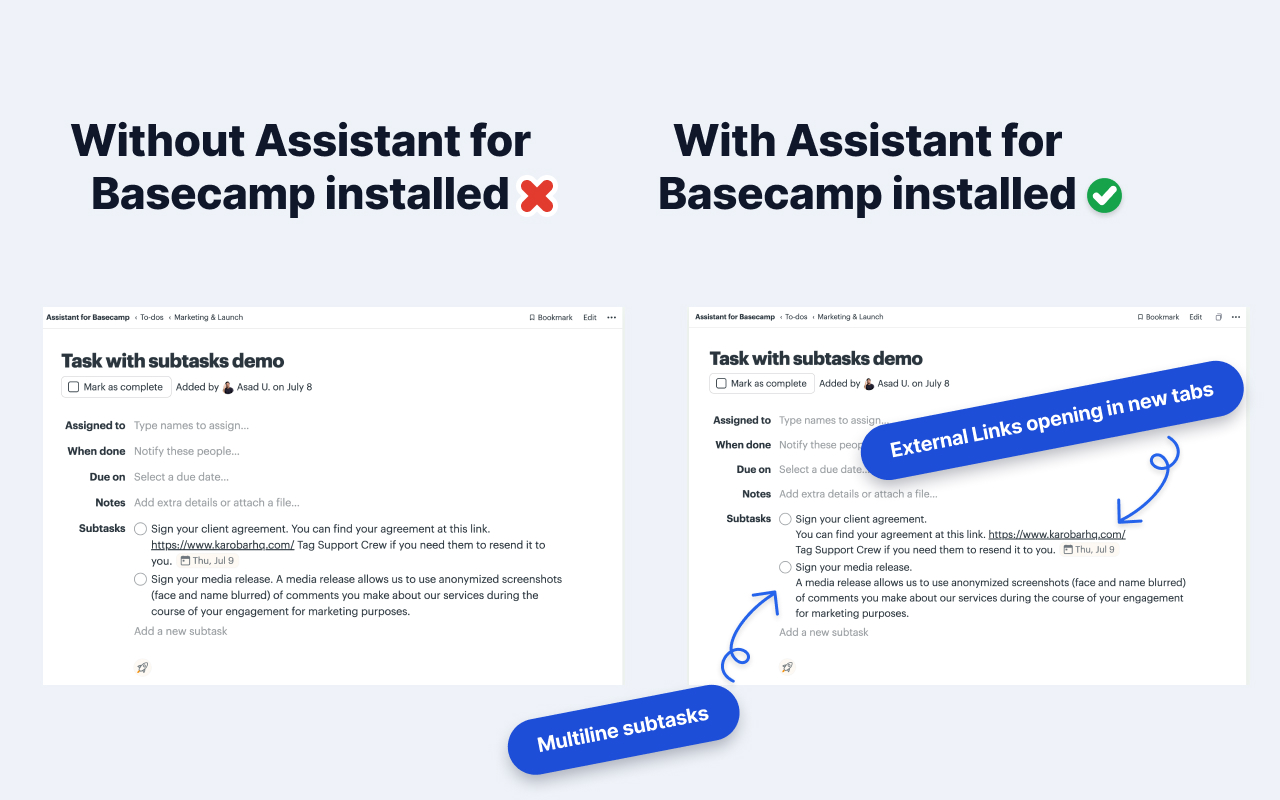
- Open external links in a new tab (Assistant → Options). Links that leave Basecamp, in messages, comments, docs, and subtasks, open in a new tab; Basecamp's own navigation is untouched.
- Multi-line subtask titles display their line breaks instead of collapsing onto one line, with URLs still clickable.
Fixed
- Opening Kanban from the home page could load forever; it now opens your most recently updated project.
- The Kanban button opens the exact to-do set or card table you're viewing instead of a previously remembered one.
- The board's auto-refresh no longer strips tag, status, and field chips while fresh data loads.
- Signing out no longer retries a failed auth check in a loop.
- The duplicate-table toast's Resume button actually resumes now, and copies interrupted by closing the tab pick up where they left off.
- The "Duplicate this table" menu icon no longer overlaps its label.
Changed
- Requires Chrome 103 or newer. Requests to Basecamp now time out after 30 seconds instead of hanging silently.
v1.1.0
June 2026
Resize dividers, a new Account screen in the popup, and one shared login across the extension and dashboard.
New
- Set how wide the horizontal divider renders in posts, comments, and chats, from Assistant → Options.
- A new Account screen in the popup lets you manage your plan and open the Stripe billing portal without leaving the extension.
Improved
- The extension and your getassistant.io dashboard now share one login, so signing into either gets you into both.
- Kanban opens your most recently updated project automatically instead of dropping you on an empty picker.
- First-run setup now has a welcome checklist you can reopen, clearer in-page prompts, and a one-time tip pointing at the Kanban nav.
Changed
- The "Features" tab is now "Options".
v1.0.0
June 2026
Basecamp 5 support, one flat price for unlimited seats, and Open-in-Kanban.
Basecamp 5 support
- Updated the extension for Basecamp's 2026 redesign: navigation, field, and Kanban injection, unread highlighting, and same-origin API calls all work on the new app.basecamp.com.
Pricing
- Moved to one flat price: $29/month or $290/year for unlimited seats. One admin connects and pays, and everyone in that Basecamp account gets access automatically. No per-seat charges, seat assignments, or access requests.
New
- Open in Kanban button on card tables and to-do sets. Jump straight into the Kanban view for that board.
- Click a collapsed Kanban column's title to expand it.
Removed (now native in Basecamp 5)
- Voice notes: Basecamp 5 records voice messages natively.
- Activity sidebar: Basecamp 5 ships a built-in recent-activity feed.
- "Post this message" primary toggle: Basecamp 5 already makes Post the primary action.
v0.3.0
April 2026
A Features tab, connection-aware UI, and role- and seat-aware access.
New features
- New Features tab inside the Assistant overlay: per-user toggles to enable or disable features.
- Option to make "Post this message" the primary action, with drafting as secondary.
- A copy icon to quickly copy the URL of the open Basecamp page, in the website and the PWA app (cmd+shift+L also works).
- Extension UI now only renders on Basecamp accounts connected to Assistant. No more empty tabs on unrelated accounts.
- Role- and seat-aware gating: members without a seat see a clear "Request access" prompt on the Kanban page instead of a broken experience.
- Basecamp admins on unconnected accounts get a "Connect Assistant" prompt for one-click onboarding from inside Basecamp.
- Settings tabs (Custom Fields, Automations, Integrations) are now admin-only.
- Removed legacy inline Kanban code and two unused feature panels.
Auth & API
- Unified /auth/me endpoint returns identity, accounts, and preferences in a single round trip; retired the separate /auth/accounts call from the extension.
- Cancelling Basecamp's OAuth consent screen now bounces you back to the web app with a friendly message instead of stranding you on a raw API error.
v0.2.1
March 2026
Performance and data-layer groundwork.
- ETag caching on all GET endpoints for faster re-renders.
- SWR data layer on the web app.
- Custom fields and automations fully wired end-to-end.
- Settings tab UI redesign.
v0.2.0
February 2026
The big one. Kanban, custom fields, and automations land.
Major release
- Kanban board view (#kanban hash route).
- Custom fields with text, number, dropdown, multi-select, and date types.
- Automations: trigger-based rules to auto-tag, auto-assign, and auto-status.
- Voice notes with auto-transcription.
- Unread highlight across to-dos, cards, and messages.
- Cross-project activity dashboard.
v0.1.0
Initial release
Where it started: tags, statuses, and the extension's first build.
- Tags on any to-do, card, or message.
- Custom statuses with workflow states.
- Chrome extension bootstrap.
- Basecamp OAuth connection flow.
- Per-seat billing via Stripe.