Basecamp Alternatives (2026): What Leaving Actually Costs
Most lists of Basecamp alternatives are written to sell you the tool at the top. This one isn’t. We build Assistant for Basecamp, a browser extension that adds features inside Basecamp, so our obvious bias is that you’d stay. We’ll get to that. But if Basecamp genuinely isn’t the right tool for your team, switching is the correct call, and the rest of this guide is an honest read on where each of the popular alternatives to Basecamp actually fits.
First, a quick gut check. People usually start hunting for Basecamp competitors for one of three reasons: they want a visual board view, they want custom fields and structured data on tasks, or they want automations. Those are real gaps in stock Basecamp. Whether they’re worth a migration depends on how much else you’d lose, which we cover at the end. We also costed a migration properly in the real cost of leaving Basecamp.
What is Basecamp actually missing?
Before comparing tools, it helps to be precise about what Basecamp does and doesn’t have natively, because half the “Basecamp can’t do X” claims online are wrong.
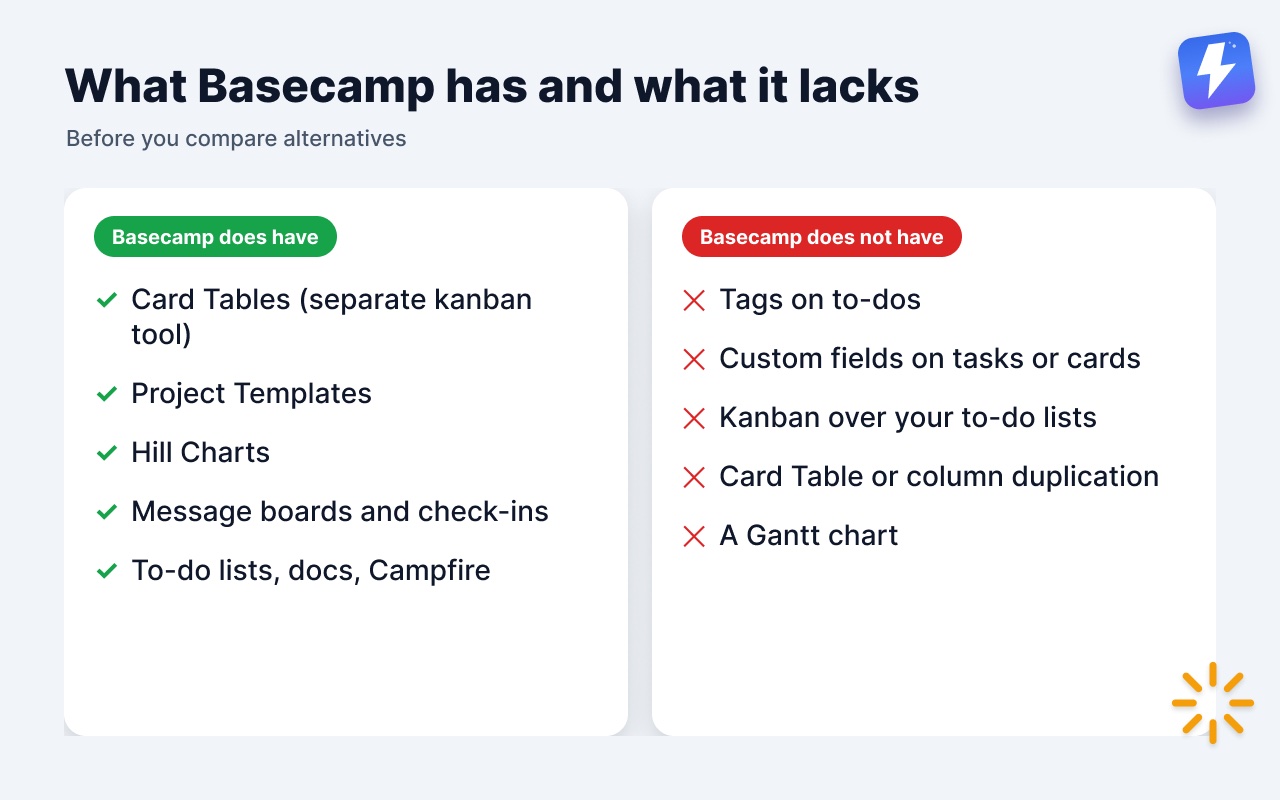
Basecamp does have:
- Card Tables, a separate kanban-style tool with columns you can add to any project.
- Project Templates, so you can spin up new projects with a preset structure.
- Hill Charts for visualizing where work sits between “figuring it out” and “making it happen.”
- Message boards, to-do lists, docs, schedules, Campfire chat, and check-ins, all in one calm place.
Basecamp does not have:
- Tags on to-dos.
- Custom fields on tasks or cards.
- A kanban view layered over your existing to-do lists (Card Tables are their own separate thing, not a view of your lists).
- Card Table duplication, or a way to copy or move a column between tables (single cards copy and move fine, and a whole Card Table can be moved to another project).
- Time tracking on the lower plans (Timesheet only comes with Pro and Unlimited; teams also bolt on Harvest or Everhour).
- A Gantt chart (Hill Charts are the Basecamp equivalent, and they work differently).
So when you read that “Basecamp has no kanban,” that’s only half true: it has Card Tables, just not a board view over your to-do lists. Keep that distinction in mind, because it changes which alternative makes sense.
The best Basecamp alternatives in 2026
Here’s the short version, then the detail.
| Tool | Best for | Where it beats Basecamp | Where Basecamp beats it | Stay and add Assistant instead? |
|---|---|---|---|---|
| Trello | Tiny teams, simple boards | Dead-simple kanban | Depth, docs, messaging | Yes: the board, over your existing to-dos |
| Asana | Mid-size teams, process | Views, fields, timelines | Calm, low overhead | Fields and grouped views yes; timelines no |
| ClickUp | Power users who want everything | Sheer feature count | Simplicity, focus | Boards, fields, automations yes; “everything” no |
| Notion | Docs-first teams, wikis | Flexible docs + databases | Real PM structure, messaging | A visual Docs & Files grid and fields on files; not a wiki |
| Monday.com | Ops teams who love color | Visual boards, automations | Price, calm | Yes: board, automations, column colors |
| Teamwork | Client-billing agencies | Invoicing, budgets, rate cards | Calm, no per-user fees | No: time tracking isn’t Assistant’s lane |
The last column is the honest version of our bias: Assistant closes some of these gaps inside Basecamp and doesn’t close others. When the answer is no, switching is the right call, and we say so. The full reasoning is in the case for not leaving at the bottom.
Trello
Trello is the simplest kanban tool most people have used. Lists, cards, drag them across columns. If your “project management” is genuinely a handful of cards moving through three or four stages, Trello does that with almost no setup, and the free tier covers a lot.
Where it beats Basecamp: native, frictionless kanban out of the box. No configuration, no learning curve.
Where Basecamp wins: Trello is thin once a team grows. There’s no real message board, no docs to speak of, no schedule, no check-ins. You end up bolting on Power-Ups for things Basecamp includes by default. For one person or a two-person side project, Trello is fine. For a team running several projects with discussion and files, it gets stretched fast.
If a board over your work is the only reason you’re looking, read does Basecamp have a kanban view before you migrate. You may be solving the wrong problem.
Asana
Asana is the default “grown-up” alternative. List view, board view, timeline, calendar, custom fields, rules. It’s built for teams that want to formalize a process: who owns what, what stage it’s in, when it’s due, with reporting on top.
Where it beats Basecamp: multiple views of the same data, custom fields, and a timeline (closer to a Gantt chart than Basecamp’s Hill Charts). If you need a project plan with dependencies, Asana handles it natively.
Where Basecamp wins: Asana asks more of you. There’s a real cost to configuring projects, fields, and rules, and a real cost to keeping a team disciplined about updating them. Basecamp’s pitch is the opposite: less structure, less overhead, less nagging. Many teams move to Asana, build an elaborate system, and quietly stop maintaining it. If your team won’t keep fields updated, Asana’s advantage evaporates.
ClickUp
ClickUp’s pitch is “one app to replace them all.” Tasks, docs, goals, whiteboards, time tracking, dozens of views, deep customization. If you want a single tool that can be configured into almost anything, ClickUp can probably do it.
Where it beats Basecamp: raw feature count. There is very little ClickUp can’t be configured to do.
Where Basecamp wins: the same thing. ClickUp’s depth is its tax. New team members face a steep learning curve, settings sprawl across menus, and “we’ll set it up properly later” becomes permanent. Basecamp is opinionated on purpose: fewer choices, less to maintain. If you’ve ever been burned by a tool that needed a full-time admin, that’s the trade ClickUp asks you to make.
Notion
Notion isn’t really a project manager. It’s a flexible documents-and-databases tool that you can shape into a project manager. For docs-first teams, internal wikis, and lightweight tracking, it’s excellent, and the database-as-table-or-board flexibility is genuinely useful.
Where it beats Basecamp: docs and knowledge management. Linked databases, flexible page structure, a real wiki. Basecamp’s docs are simpler by comparison.
Where Basecamp wins: Notion has no built-in team messaging, no check-ins, and its task management is something you assemble rather than something you get. For teams that want a tool that already is a project manager, rather than a kit for building one, Basecamp is less work. Notion rewards teams that enjoy building systems and punishes teams that don’t.
Monday.com
Monday leans into colorful, visual boards with heavy automation and a large template library. Operations and marketing teams that like a “command center” feel often gravitate to it.
Where it beats Basecamp: visual boards, status columns, and a deep automation builder, all native.
Where Basecamp wins: price and calm. Monday’s per-seat pricing climbs quickly with team size and with the higher tiers needed for serious automation. Basecamp charges by active projects with no per-user fees, so its bill doesn’t grow as you hire, a real advantage for a growing team. Monday can also feel busy: a lot of color, a lot of motion, a lot to look at. Some teams love that. Others find it the opposite of focus.
Teamwork
Teamwork is aimed squarely at agencies and client-services teams. Built-in time tracking, billing, invoicing, and client access are its reason to exist.
Where it beats Basecamp: if you bill clients by the hour, tracking, invoicing, and rate cards in one tool is a genuine advantage. Basecamp’s Timesheet logs hours and reports on them, but only on the Pro and Unlimited plans, and it doesn’t invoice, so you’d still add Harvest or Everhour for billing.
Where Basecamp wins: for teams that don’t need billing baked in, Teamwork is more machinery than they’ll use, and the calm, low-overhead feel of Basecamp wins. The decision here is unusually clean: if hourly billing is core to how you run, look hard at Teamwork. If it isn’t, the comparison tilts back to Basecamp.
So which Basecamp alternative is best?
There isn’t one. The honest answer depends on the gap you’re trying to close:
- You want a simple board, nothing else → Trello, or stay on Basecamp and add a board view.
- You want formal process and reporting → Asana.
- You want one tool to do everything and you’ll maintain it → ClickUp.
- You’re docs-first and like building systems → Notion.
- You want visual ops boards and budget isn’t tight → Monday.
- You bill clients hourly → Teamwork.
Notice how often the answer is “you want one thing Basecamp doesn’t have natively.” That’s the real pattern in most switching decisions. Teams rarely hate Basecamp. They hate one specific gap, and they’re willing to give up everything Basecamp does well to close it.
That’s usually a bad trade, and it’s worth naming why.
The case for not leaving Basecamp at all
Here’s the contrarian read. Most teams searching for Basecamp competitors don’t actually need a different tool. They need three specific things Basecamp doesn’t ship: a board view over their existing work, structured fields on tasks, and a bit of automation. Migrating an entire team to a new tool to get those three things means relearning everything, re-importing everything, and losing the calm that made Basecamp work in the first place.
This is the gap we built Assistant for Basecamp to close, without leaving Basecamp. It’s a browser extension, so nothing migrates and nobody adopts a second tool.
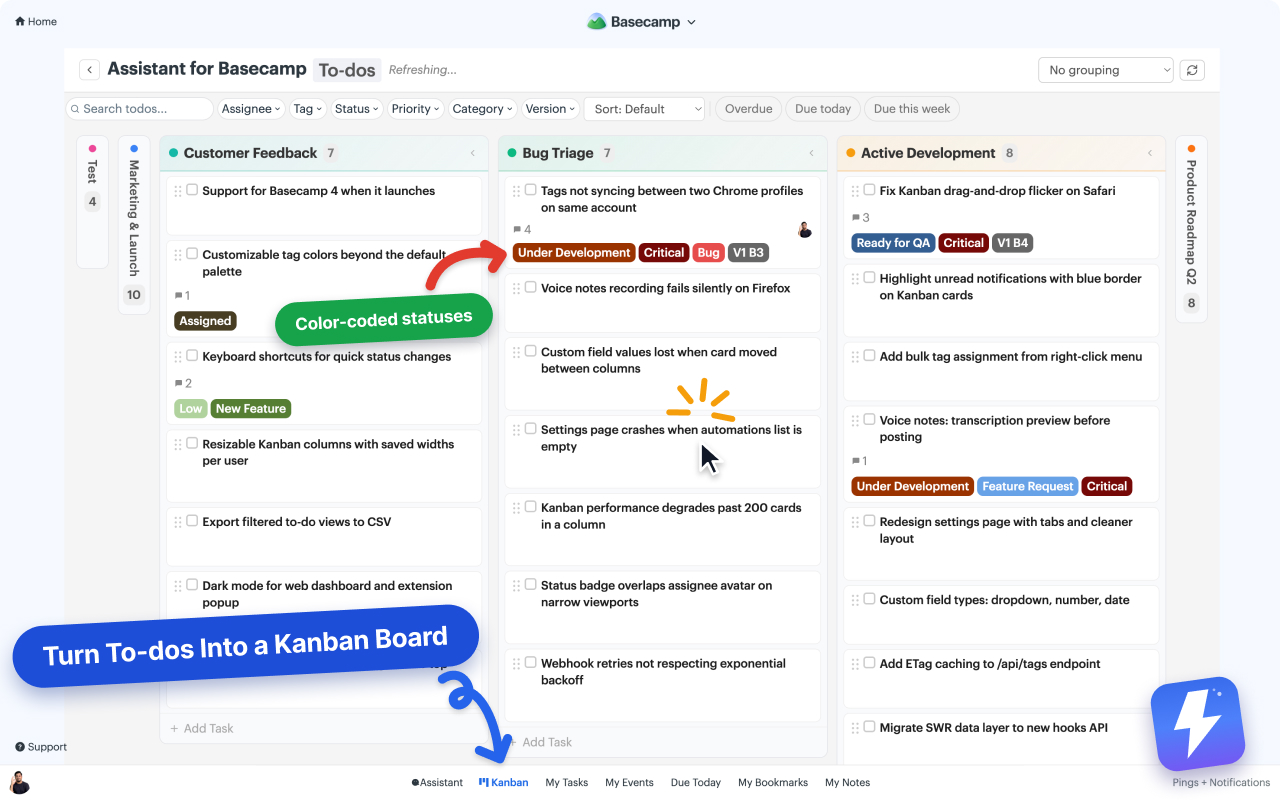
What it adds inside Basecamp:
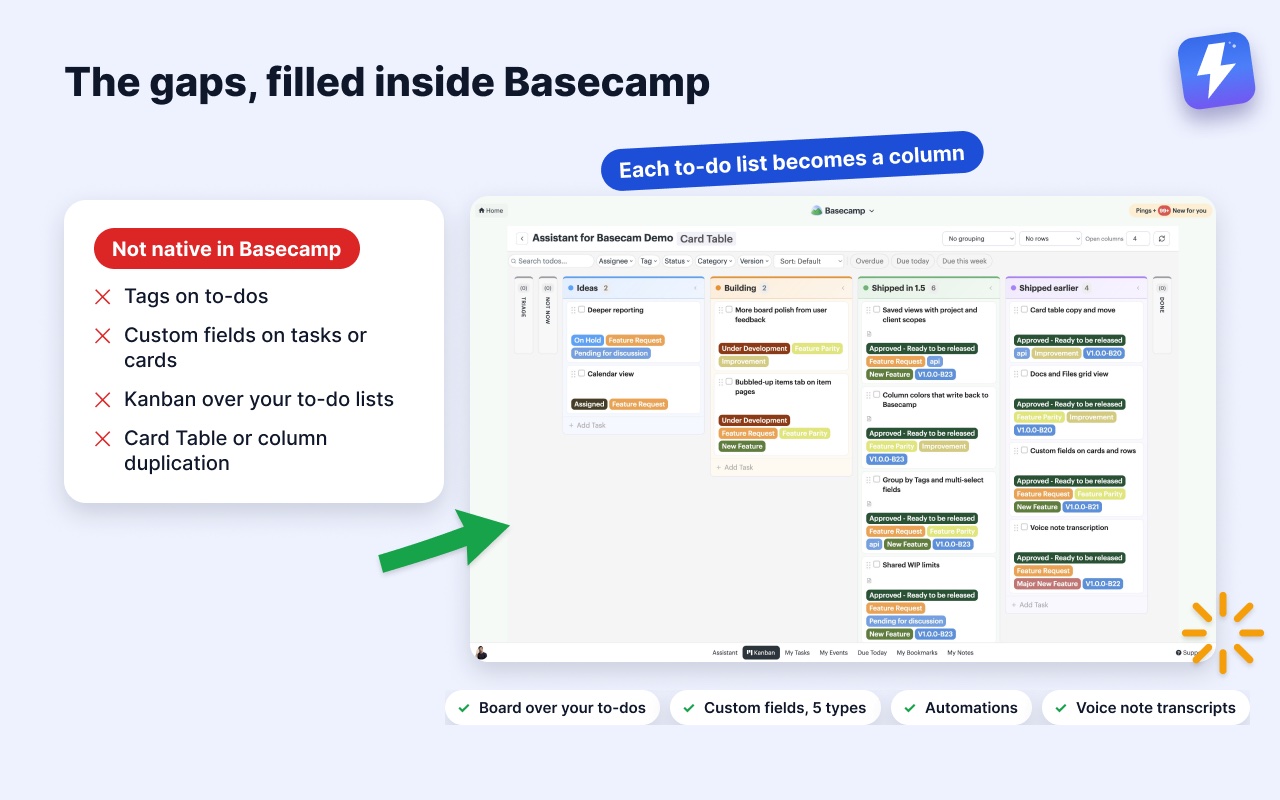
- A Kanban board where each of your to-do lists becomes a column. Your project’s existing structure is the board, so there’s nothing to set up or re-enter, and no preset Backlog/Doing/Done to bend your work into. Run it on one list, on a whole project, or on every project in the account, and save a chosen set of projects or clients as a named view you can reopen on any computer. To-dos and cards always get separate boards. Here’s how the board works.
- Custom fields in five types (single-select, multi-select, text, number, date) with colored badges, plus tags and statuses on cards, to-dos, and messages.
- Automations that run on Basecamp’s own events and on custom-field changes. They can set a field, attach or detach an option, complete a to-do, assign people, or post a comment. No external service required. See how to automate Basecamp without Zapier.
- Grouping (including by tags and multi-selects), a pivot view, shared WIP limits, column colors that save back to Basecamp, a split-view detail panel, and an unread highlight.
- Voice note transcription. Basecamp 5 records voice notes but never turns them into text. One click posts the transcript as a comment the whole thread can read and search, with a summary and action items on longer notes.
Where this doesn’t fit: if you’ve decided Basecamp’s overall model is wrong for you, an add-on won’t fix that, and one of the tools above is the right move. It also runs only inside Basecamp, in desktop Chrome or Firefox, so there’s no mobile app and nothing to open on a tablet. Assistant closes the common feature gaps; it doesn’t turn Basecamp into ClickUp, and it shouldn’t.
The math is simple, though. Switching tools costs a team weeks of migration and retraining, plus the ongoing per-seat pricing of Asana, ClickUp, or Monday. Assistant is $29/month or $290/year for unlimited seats, with one admin paying for the whole team and a 7-day free trial with no card needed. For a lot of teams, the cheaper and less disruptive move is to fix the three gaps and stay where the rest of the work already lives.
How to decide
Run this test before you migrate anything:
- Write down the specific reasons you’re looking to leave. Not “Basecamp is limited,” but “no board view,” “no custom fields,” “no automation.”
- Check whether those reasons are actually native gaps (use the feature breakdown near the top of this post, and read Basecamp Card Tables so you know what Basecamp already has).
- If your list is one or two of board, fields, or automations, an extension almost certainly costs less than a migration.
- If your list is “the whole way Basecamp works is wrong for us,” then a real switch is justified, and the table above points you to the right tool.
The best Basecamp alternative is often not an alternative at all. It’s the smallest change that closes your actual gap.
Useful? Tell Google you want more of this.