Best Basecamp Add-ons, Extensions & Plugins (2026 Guide)
Basecamp is deliberately simple. To-do lists, message boards, a chat room, docs, schedules. That simplicity is the point, and for a lot of teams it’s exactly enough. But once your project grows past a handful of tasks, you start wishing for things Basecamp doesn’t ship: a kanban board, tags, custom fields, a way to push updates into other apps. That’s where Basecamp extensions and add-ons come in.
This is a roundup of the real options in 2026, sorted by what each one actually does well. Some are browser extensions that add features inside Basecamp. Some are external services you connect through an integration. We make one of them (Assistant for Basecamp), and we’ll be straight about where it fits and where another tool is the better call. Every entry below has a one-line honest verdict so you can skip to the one that matches your problem.
The short answer
The best Basecamp extension depends on which gap you are filling, and the five real options split cleanly:
| Tool | Type | What it adds to Basecamp | Pricing |
|---|---|---|---|
| Assistant for Basecamp | Browser extension | Kanban over to-do lists and Card Tables at one list, one project or every project; pivot view, saved views, shared WIP limits, grouping, stacking filters, split-view detail panel; plus custom fields, tags, statuses, automations, Docs & Files grid | $29/month or $290/year, unlimited users |
| Tracked | Browser extension | Kanban per project, per person or account-wide, labels, estimates; Firefox and Brave plus a web dashboard | $3/user/month ($9/month minimum), or $60/month unlimited |
| Zapier / Make | Integration | Sends Basecamp events to other apps (Slack, Sheets, a CRM) | Usage-based, per task or operation |
| Harvest / Everhour | Companion app | Invoicing, budgets and rate cards on hours logged against Basecamp to-dos | Set by each vendor |
Pricing for Assistant and Tracked verified 2026-08-15. The others are set independently by their vendors and change without notice, so check before you rely on them.
Basecamp itself already ships Card Tables, project templates, Hill Charts, and time tracking through Timesheet (Pro and Unlimited plans), so check what Basecamp already does before paying for any of them.
What counts as a Basecamp extension?
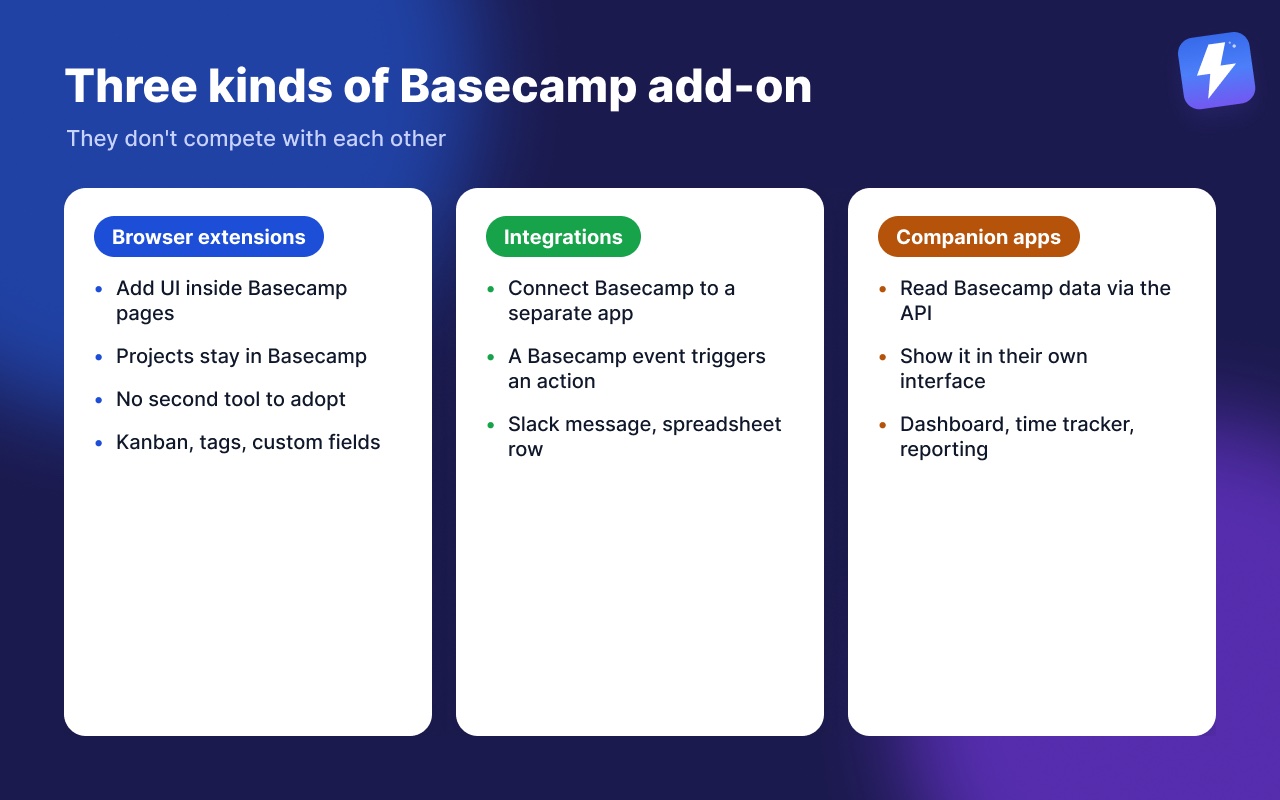
People call these extensions, add-ons, addons or plugins more or less interchangeably, and every one of those searches turns up the same handful of tools. The word matters less than the category, and there are three genuinely different categories that don’t compete with each other:
- Browser extensions that add UI and features directly inside the Basecamp pages you already use (kanban, tags, custom fields). Your projects stay in Basecamp and your team doesn’t adopt a second tool.
- Integrations that connect Basecamp to a separate app, so a Basecamp event triggers an action somewhere else (a Slack message, a new row in a spreadsheet, a logged hour).
- Companion apps that read your Basecamp data through the API and show it in their own interface (a separate dashboard, a time tracker, a reporting tool).
Knowing which kind you need saves a lot of trial-and-error. If you want a kanban view of your existing to-dos, a browser extension is the answer. If you want a Basecamp comment to ping a Slack channel, that’s an integration. If you want a portfolio view across every client, that’s a companion app. Let’s go through the best of each.
Assistant for Basecamp: kanban, custom fields, automations inside Basecamp
Assistant for Basecamp is a browser extension that adds features to Basecamp without moving your projects anywhere. It loads on top of the Basecamp pages you already use, so the work stays in Basecamp and you don’t manage a second tool.
The part most teams come for is the kanban board, and it works on both of Basecamp’s task tools. Instead of giving you preset Backlog/In Progress/Done columns, it turns each of your to-do lists into a column; on a Card Table, your existing columns carry over as they are. Your project’s existing structure becomes the board either way. Drag a card between columns and the underlying to-do moves between lists. You choose how wide the board goes: one to-do list or card table, one whole project, or every project on the account at once, with to-dos and cards kept on separate boards rather than pooled together. On top of that you can group the board by any select-type field (assignee, tags, status, or a custom field like Priority or Version), stack filters by tag, status, assignee, custom-field value, or due window (overdue, due today, due this week), and open any item in a split-view detail panel beside the board instead of loading its own page, so you never lose your place.
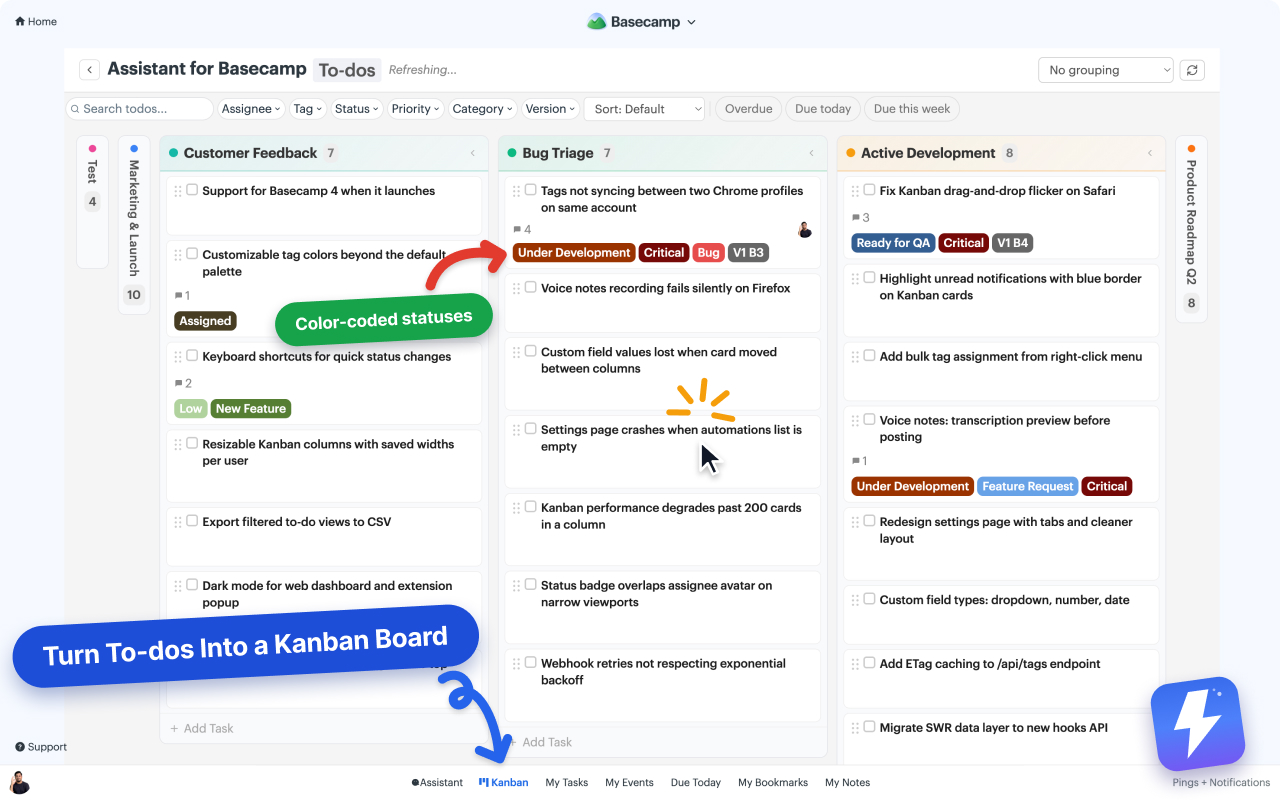
Beyond the board, it adds the structured fields Basecamp has never had:
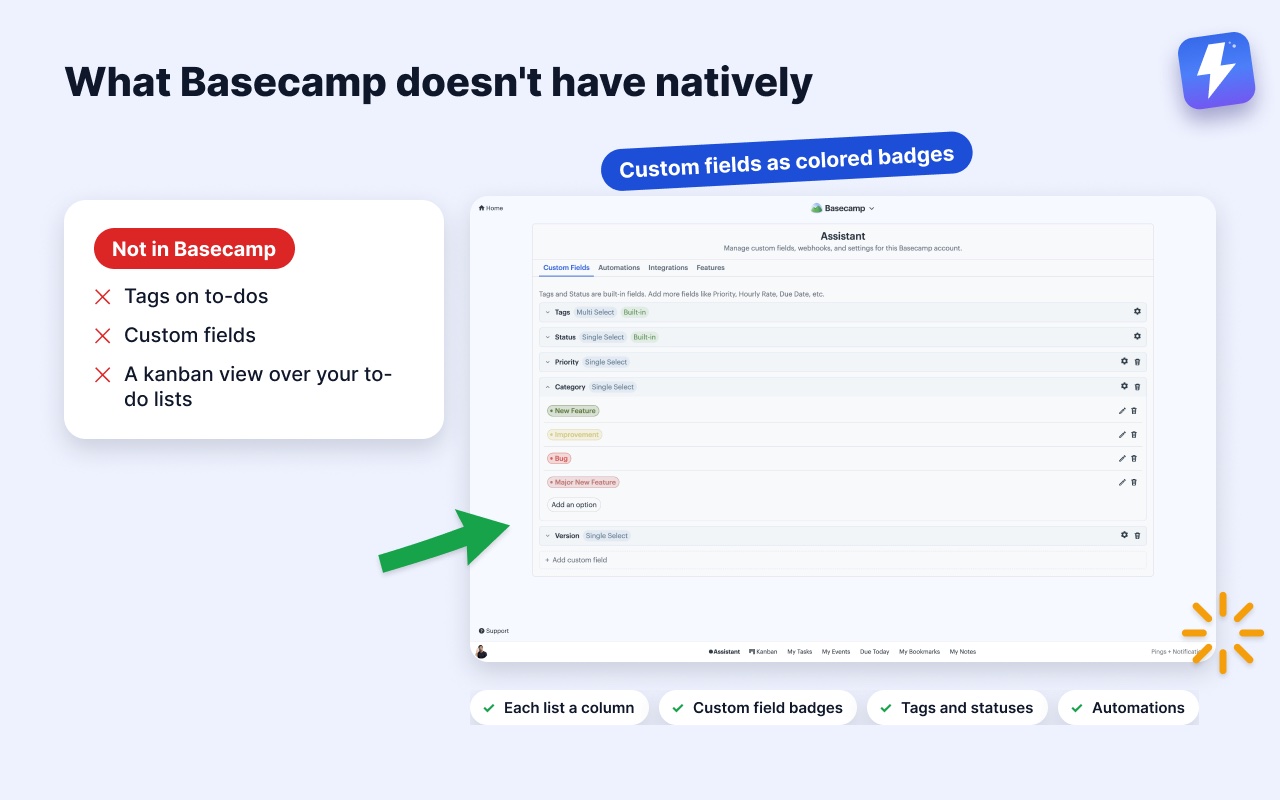
- Custom fields in single-select, multi-select, text, number, and date types, shown as colored badges so you can read a task’s state without opening it.
- Tags and statuses on cards, to-dos, and messages.
- Saved views, a pivot view, and shared WIP limits. Save a set of projects or clients as a named view that follows you to any computer, put one field across the columns and another down the rows, and set per-column limits the whole team can see.
- Automations that run on Basecamp’s own events and on custom-field changes, with actions like set a field, complete a to-do, assign people, or post a comment.
- Voice note transcription. Basecamp 5 records voice notes but leaves them as audio. Assistant adds a Transcribe button that posts the text as a comment on the thread, with a summary and action items on longer notes. Nothing else in this roundup does this, including Basecamp itself.
- Column colors that write back. To-do list columns use each list’s own Basecamp colorway and card-table columns their real column color. Change a color from the board and it’s saved to Basecamp for everyone.
- An unread highlight that borders any item with new activity, plus a blue flag on bubbled-up and bookmarked items.
It’s $29/month or $290/year for the whole workspace, billed to one admin, unlimited seats. There’s a 7-day free trial with no card needed.
Where it doesn’t win: it only runs inside Basecamp’s own pages, in desktop Chrome or Firefox. There’s no standalone dashboard and nothing to open on a phone or a tablet. If the person who checks the board most does it away from a desktop, that’s a real problem and the next tool solves it.
Best for: teams who want their daily work, kanban, fields, tags, automations, to live inside Basecamp instead of a second app. Start with how to add a kanban board to Basecamp or the kanban help doc.
Tracked: Basecamp boards outside Basecamp
Tracked (trackedhq.com) is the other serious Basecamp kanban extension. It adds boards for a project, for a person, or for the whole account, plus colored labels and effort estimates on to-dos. Assistant now covers all three board widths as well, so that’s no longer the line between them.
What does separate them is reach. Tracked ships for Chrome, Brave and Firefox, and it has a standalone web dashboard you can open in any browser, including on a tablet, without being inside Basecamp at all. Assistant runs only inside Basecamp’s pages. If the person checking the board most often does it from a phone or an iPad, Tracked is the honest recommendation and nothing on our feature list changes that.
Where Assistant differs: we go deeper on the data. Custom fields on four item types, statuses, automations, a pivot view, saved views, and WIP limits the whole team shares. Tracked’s labels and estimates are simpler, and for a small team that simplicity is a feature rather than a shortfall. We wrote a full side-by-side in Assistant for Basecamp vs Tracked, and a wider look at the category in Tracked alternatives worth considering.
Best for: teams on mixed browsers, or anyone who wants Basecamp boards on a touch screen.
Zapier and Make: connecting Basecamp to everything else
Zapier and Make are the heavyweight integration platforms. They don’t change anything inside Basecamp. Instead, they watch for a Basecamp event (a new to-do, a new comment, a completed task) and fire an action in another app: post to Slack, add a row to Google Sheets, create an invoice, send an email.
This is the right tool when your problem crosses app boundaries. “When a client posts a message in Basecamp, notify our support channel.” “When a to-do is completed, log it in our CRM.” Neither Basecamp nor an in-page extension can do that, because the action happens outside Basecamp entirely.
One important clarification, since it confuses people: Assistant for Basecamp has automations too, but they’re not the same thing. Assistant’s automations are triggered by Basecamp’s own events and by custom-field changes, and every action they take lands back in Basecamp (set a field, complete a to-do, assign people, post a comment). They do not accept inbound webhooks from Zapier or Make. So the two are complementary: Assistant automates work within Basecamp; Zapier and Make connect Basecamp to other apps. If you want automation that keeps everything inside Basecamp instead of wiring it to other apps, read how to automate Basecamp without Zapier.
Where they win: anything that has to touch a second app. Nothing in-page can replace them for that.
The trade-off: they’re priced per task/operation and can get expensive at volume, and you’re maintaining workflows in a third dashboard. For inside-Basecamp automation, they’re overkill.
Best for: cross-app workflows where Basecamp is one node in a larger chain.
Harvest and Everhour: invoicing and budgets on top of Basecamp hours
Basecamp has tracked time natively since June 2024. Timesheet puts a green timer on to-dos, cards, docs and the project home page, takes hours typed as 2:30 or 2.5 with a note, and reports totals under Activity by project, person or date range with a CSV export. It comes with the Pro and Unlimited plans, and clients never see any of it. Where it stops is invoicing, budgets and rate cards, and that’s why Harvest and Everhour are still on this list. Both connect to Basecamp, let your team log hours against to-dos, and bill from them.
This is squarely outside what any in-page extension does, including ours. Billing is its own discipline, with rate cards, budgets, and invoices, and a dedicated tool does it far better than a bolt-on would. If you’re deciding between Basecamp’s own Timesheet and a third tool, we covered the question in does Basecamp have time tracking?.
Best for: agencies and freelancers who bill hours or need utilization reporting.
What Basecamp already does (so you don’t pay twice)
Before you install anything, it’s worth being clear about what Basecamp ships natively, because a few “extensions” you’ll see promoted are solving problems Basecamp already solved:
- Card Tables. Basecamp has a built-in kanban-style tool called Card Tables, with columns you set up yourself. It’s separate from to-do lists. If you only need a board and you’re happy building it as its own thing, you may not need an extension at all. The difference is that an extension like Assistant turns your existing to-do lists into a board, while Card Tables is a fresh board you populate by hand. We compared them in Basecamp Card Tables: the complete guide and Card Table vs to-do list.
- Project Templates. Basecamp lets you save a project as a template and spin up new ones from it. You don’t need a third-party tool for repeatable project setup.
- Hill Charts. Basecamp’s own progress visualization. It is not a Gantt chart, and Basecamp has no Gantt chart, but if you’ve been hunting for one, Hill Charts may be what you actually want.
- Timesheet. Native time tracking since June 2024: a green timer on to-dos, cards and docs, hours you can log for yourself or for a teammate, and a report under Activity with filters and a CSV export. It’s only on the Pro and Unlimited plans, but on those you don’t need a third-party tool just to log hours.
What Basecamp does not have natively, and where the tools above earn their place: tags on to-dos, custom fields, and a kanban view layered over your to-do lists.
Do these work on Basecamp 3 or Basecamp 2?
A lot of people still search for “Basecamp 3 addons” out of habit, because Basecamp 3 was the version that ran for years. If you signed in at app.basecamp.com or 3.basecamp.com today, you are on Basecamp 5. The name changed, your account did not, and the browser extensions here are built and tested for it.
If you are genuinely still on an older Basecamp that 37signals keeps running, check each tool’s listing before you buy. Assistant for Basecamp is built for Basecamp 5 and we don’t test against Basecamp 2 or 3. The integration-style options (Zapier, Make, the time trackers) connect through Basecamp’s API and tend to be more forgiving about which version you are on.
How to choose the right Basecamp add-on
Match the tool to the actual gap, not the longest feature list:
- You want a board over your existing to-do lists, plus fields and tags, all inside Basecamp. Assistant for Basecamp.
- You want boards on a tablet, outside Basecamp. Tracked.
- You need Basecamp to talk to other apps. Zapier or Make.
- You need invoices, budgets and rate cards on top of hours. Harvest or Everhour.
- You only need to log hours and report on them. Basecamp’s own Timesheet, on Pro and Unlimited.
- You want a self-contained board and don’t mind building it by hand. Basecamp’s own Card Tables, no extension required.
A practical sequence: start with the free Basecamp features, confirm the gap is real, then add exactly one tool for it. The fastest way to test the inside-Basecamp route is the 7-day trial of Assistant, no card needed, and you’ll know within a day whether a kanban-over-to-dos workflow fits how your team works. If it doesn’t, you’ve lost nothing, and the Tracked comparison will point you to the alternative that does.
Useful? Tell Google you want more of this.