Docs & Files grid
Fifty files. One flat list. Good luck.
Basecamp 5 shows Docs & Files as a plain list, so finding that one screenshot means reading filenames one by one. Assistant adds a grid view with real thumbnails, the layout Basecamp 4 users have been missing.
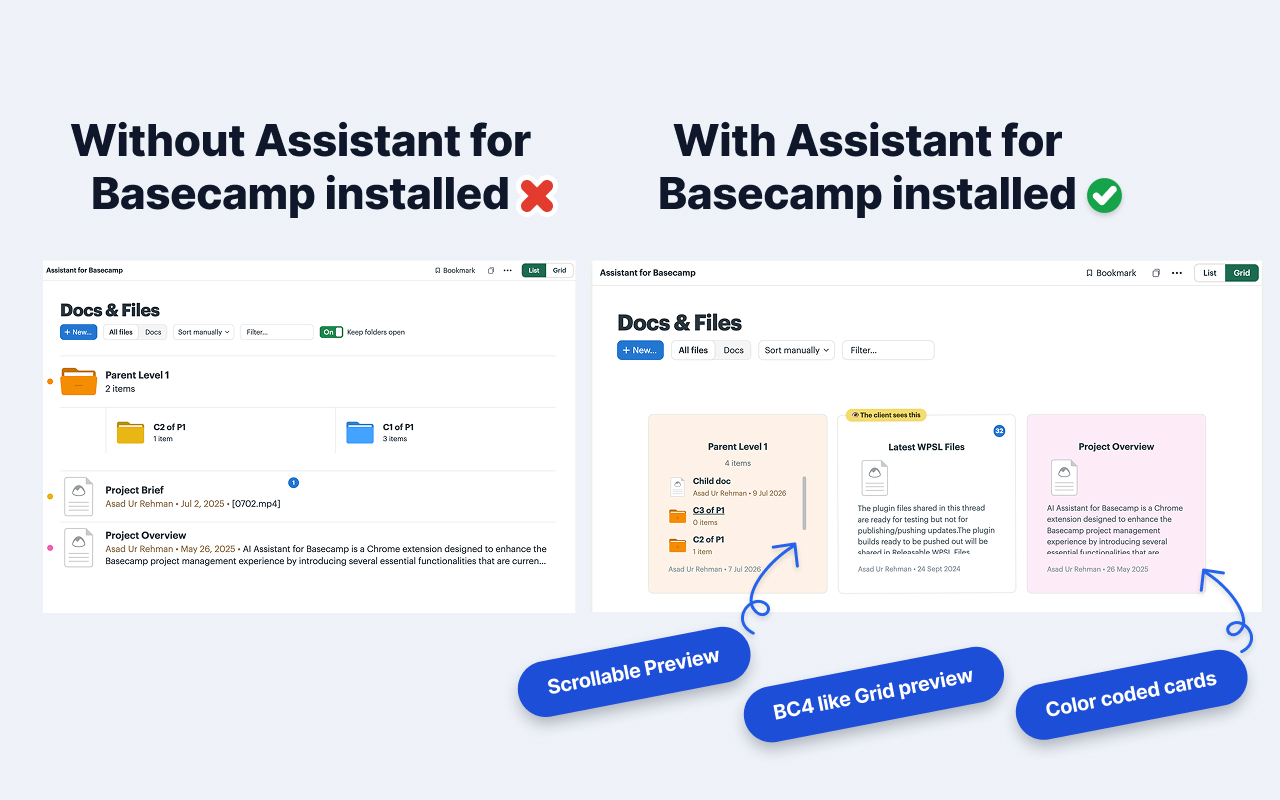
Recognize files by sight, not by filename.
A design review project isn't a spreadsheet. Mockups, briefs, and reference shots deserve a view where you can see them.
Thumbnails and previews
Images render as real thumbnails, and folder cards preview what's inside. The "which one was v3-final" hunt ends here.
Context on every card
Comment counts, custom-field pills, and Basecamp color labels. Click a card's color dot to change it right from the grid.
Drag anywhere, for real
Reorder, file into folders, or drag items back out to the top level. Live hints show what each drop will do, and every move saves to Basecamp, so the list view matches for everyone.
A toggle, not a takeover.
List and Grid sit side by side at the top of Docs & Files. Your choice is yours alone and syncs per user, so the teammate who loves the list keeps the list. The only thing everyone shares is the file order.
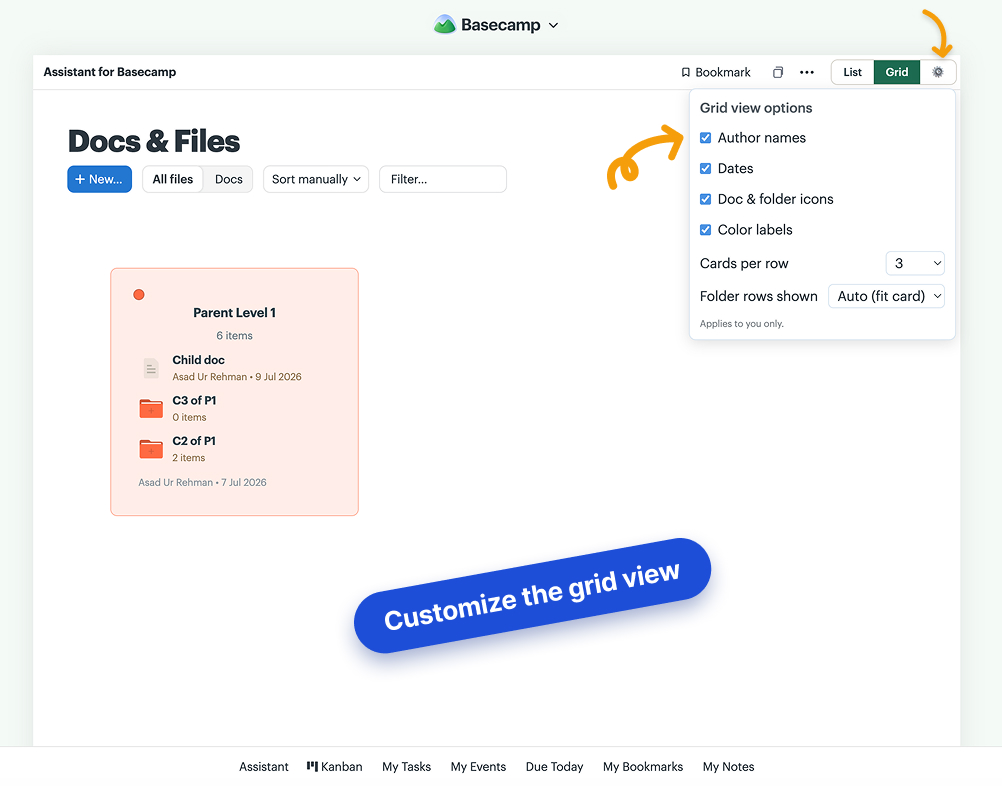
And the grid itself is yours to tune: a gear beside the toggle shows or hides author names, dates, icons, and color labels, and sets cards per row and folder rows shown. Per user, synced across devices.
From list to grid in three steps.
Install the extension
From the Chrome Web Store or Firefox Add-ons. Anyone on the account connects it once; everyone on it is covered.
Open Docs & Files
In any project. You'll see the new List/Grid toggle at the top of the section.
Switch to Grid
Thumbnails, previews, and drag-to-reorder, instantly. Full guide in the help center.
Docs & Files grid, answered.
Why does Basecamp show Docs & Files as a plain list? +
Basecamp 4 had a visual layout for Docs & Files; Basecamp 5 flattened it into a list. Fine for a handful of files, painful for a project with fifty screenshots, briefs, and folders. Assistant brings the visual view back as a toggle.
What do the grid cards show? +
Image files get real thumbnails, folders preview what's inside them, and every card shows its comment count, any custom-field pills, and the color it has in Basecamp. Click the card's color dot to change it right from the grid. You recognize files by sight instead of reading a column of names.
Does drag-and-drop change anything for my team? +
Yes, in a good way: reorders and moves are saved to Basecamp itself, so the list view shows the same thing to everyone. Drops work both directions, into folders and back out to the top level, with live hints showing what each drop will do. Only the List/Grid choice is personal.
Can I customize the grid? +
Yes. A gear next to the List | Grid toggle lets you show or hide author names, dates, icons, and color labels, and pick how many cards per row and how many folder rows show before scrolling. Choices apply to you alone and sync across devices.
Can I keep the list view? +
Yes. It's a toggle at the top of Docs & Files, and your choice syncs per user across devices. You can live in the grid while a teammate stays on the list. Nobody is forced into anything.
What does it cost? +
The grid is part of the one plan: $29/month or $290/year for your whole Basecamp account, unlimited users. 7-day free trial, no card needed.
See your files again.
Install the free extension and flip Docs & Files to a grid in minutes. 7-day trial, no card needed.