Docs & Files grid
Assistant adds a grid view to any Basecamp project’s Docs & Files section, so folders and documents show as visual cards instead of a plain list.
Switching between list and grid
- Open a project’s Docs & Files section in Basecamp.
- Use the List / Grid toggle Assistant adds at the top of the page.
- Your choice is remembered and syncs across your devices, so the section opens the way you left it.
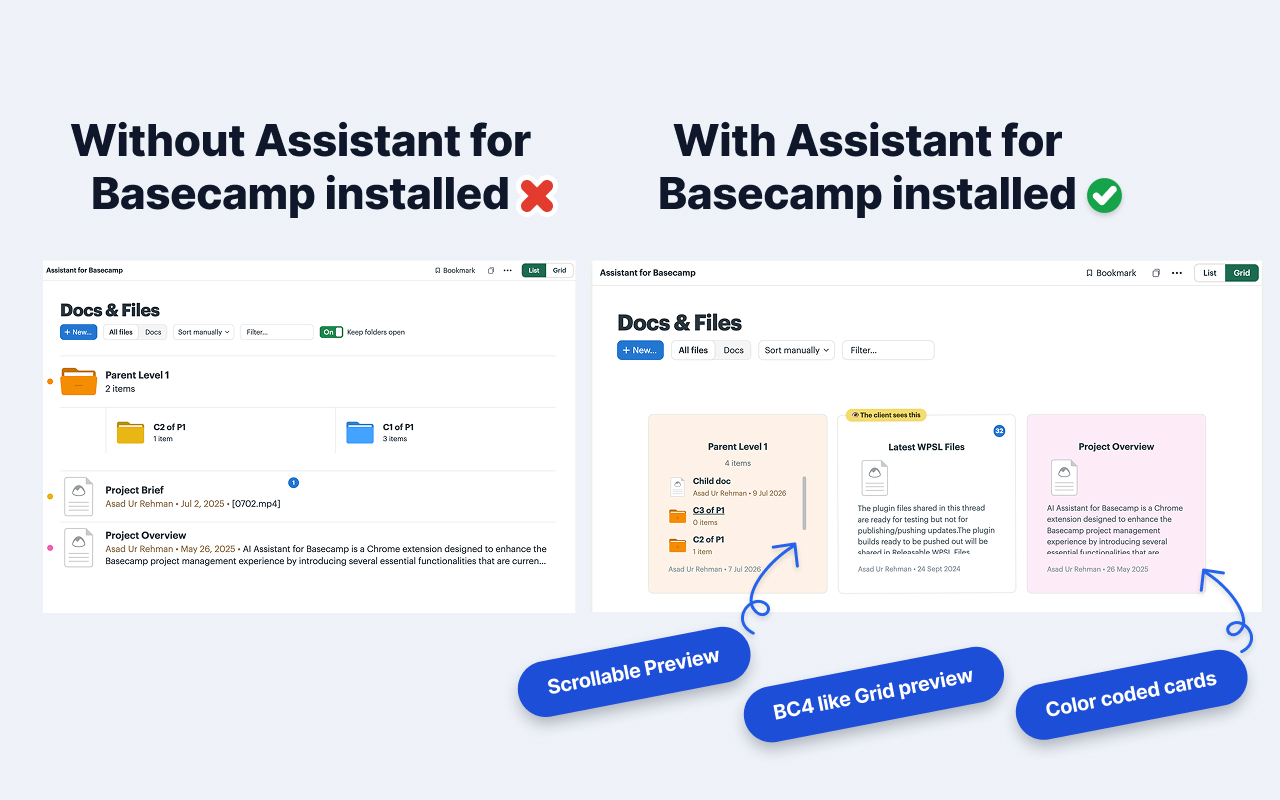
What the grid shows
Each card gives you more at a glance than the native list:
- Folder previews: folder cards peek at the contents inside, so you can tell folders apart without opening them.
- Image thumbnails: image files preview directly on the card.
- Comment counts: see how much discussion a document has.
- Custom field pills: any custom fields on a document show as colored pills on its card.
- Native colors: cards pick up the colors you’ve set in Basecamp.
Reordering
Drag a card to reorder documents and folders inside the current view. The new order is saved in Basecamp, so everyone sees the same arrangement.
Tips
- The grid respects Basecamp’s access rules. People only see files in projects they belong to.
- Switch back to List anytime. The toggle only changes how files are displayed, never the files themselves.
Can't find what you need? Email us at hello@getassistant.io