Tracked for Basecamp vs Assistant: Which Add-on Fits? (2026)
Both tools exist because of the same gap: Basecamp keeps its interface deliberately simple, and some teams need labels, boards, and fields on top of it. Tracked got there first with labels, estimates, and kanban boards. Assistant for Basecamp goes wider: custom fields on four item types, boards that run on one list, one project, or every project in the account, automations, and one-click transcription for Basecamp’s voice notes.
We build Assistant, so read this knowing that. It’s still written to be the comparison we’d want if we were the ones paying: exact prices, real limits on both sides, and a clear “pick Tracked if” section, because for some teams that’s the correct answer.
The short version
Pick Tracked if you want to open a board outside Basecamp, on a tablet or in a dashboard of its own, and if labels and effort estimates genuinely cover what you need.
Pick Assistant if your team sends voice notes and you want to transcribe them; you need real fields (priority, client, version, dates) on to-dos, cards, messages, or documents; you want boards that update fields when you drag; or you want rules that run your process automatically.
What each tool is
Tracked is a browser extension for Chrome, Brave, and Firefox, plus a web dashboard. It adds three things to Basecamp: kanban boards (per project, per person, and one account-wide board), colored labels on to-dos, and effort estimates. $3/user/mo with a $9/mo minimum, $60/mo for unlimited users, 30-day trial.
Assistant for Basecamp is a browser extension for Chrome and Firefox that overlays Basecamp with a Kanban board for Basecamp at three levels (one list, one project, or every project in the account), a custom-field system (tags, statuses, single/multi-select, text, number, date), automations, a Docs & Files grid view, card-table duplication, and unread highlighting. Flat $29/mo or $290/yr for unlimited users, 7-day trial without a card. Details on the pricing page.
Both are overlays: your Basecamp projects stay where they are, and neither is a separate app your team has to adopt.
Feature comparison
| Feature | Tracked | Assistant for Basecamp |
|---|---|---|
| Voice note transcription | one click, posted as a comment | |
| Summary and action items from a note | on longer notes | |
| Boards on to-do lists | ||
| Boards on card tables | ||
| Account-wide board (all projects) | one list, one project, or all projects | |
| Group board by field values | status, priority, assignee, tags, any select field | |
| Drag updates the underlying field | with audit comment | |
| Due-date board filters | overdue, due today, due this week | |
| Pivot view (one field across, another down) | with collapsible rows | |
| Saved views across projects or clients | per user, on any computer | |
| WIP limits per column | shared with the whole team | |
| Column colors written back to Basecamp | ||
| Labels/tags | Labels on to-dos | Tags on to-dos, cards, messages, docs |
| Statuses, selects, text, number, date fields | ||
| Estimates | Built-in | Via a number field |
| Per-project field control | enable/disable per project | |
| Automations | event and field-change triggers | |
| Docs & Files grid | ||
| Duplicate a card table, copy or move a column | duplicate a whole table, copy or move a column, into any project, with every card, comment and attachment, on a job that survives a tab close | |
| One-click copy-link icon | ||
| Unread highlighting | ||
| Campfire notifications | ||
| Browsers | Chrome, Brave, Firefox + dashboard | Chrome, Firefox, Edge, Brave |
| Trial | 30 days | 7 days, no card |
| Price | $3/user/mo, $9 min, $60 unlimited | $29/mo flat, unlimited users |
Voice notes: the one gap Tracked doesn’t touch
Basecamp 5 put a microphone in every composer, and people use it, because talking is faster than typing. The problem lands on the receiving end. A two-minute voice note takes two minutes to consume, can’t be skimmed, can’t be quoted in a reply, can’t be read in a meeting, and Basecamp’s search cannot see a word of it. Three weeks later, when you know the client said something about the discount but not where, that note may as well be a locked box.
Tracked does not address this. Neither does Basecamp. It’s the one row in the table above where the comparison isn’t “more or less” but “yes or no.”
Assistant adds a Transcribe button under every voice note. Click it and a few seconds later the transcript is posted as a comment on the thread, which is the part that matters. It isn’t held inside the extension where only subscribers see it: teammates without Assistant read the same comment, on any device, and Basecamp’s own search finally indexes what was said. Longer notes come back with a one-line summary and the concrete asks pulled out.
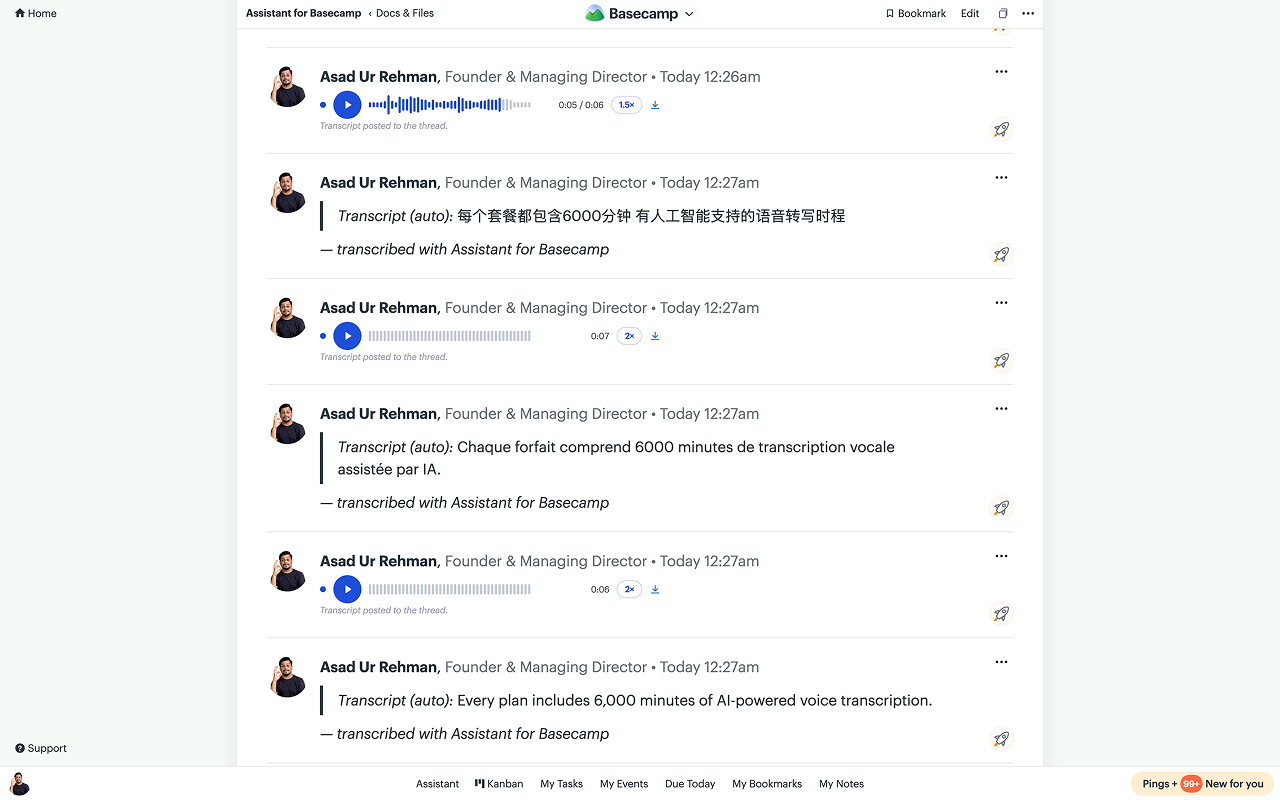
A few details that decide whether this is useful or a gimmick:
- It works on anyone’s notes, including ones recorded months before you installed anything.
- The language is detected automatically, so a note in Urdu or French comes back in the language it was spoken in.
- Each note is transcribed once for the whole workspace, however many people open it, so a busy thread doesn’t burn your quota repeatedly.
- Transcripts stay editable, and the summary regenerates from your corrections.
- 6,000 minutes a month are included in the flat price. The audio itself is never stored on our servers; it’s read for the seconds transcription takes and discarded.
Campfires and Pings have no comment system, so those transcripts show inside Assistant’s player rather than as a comment. That’s the one place the “everyone reads it” promise doesn’t fully hold.
Boards: both go wide, one goes deep
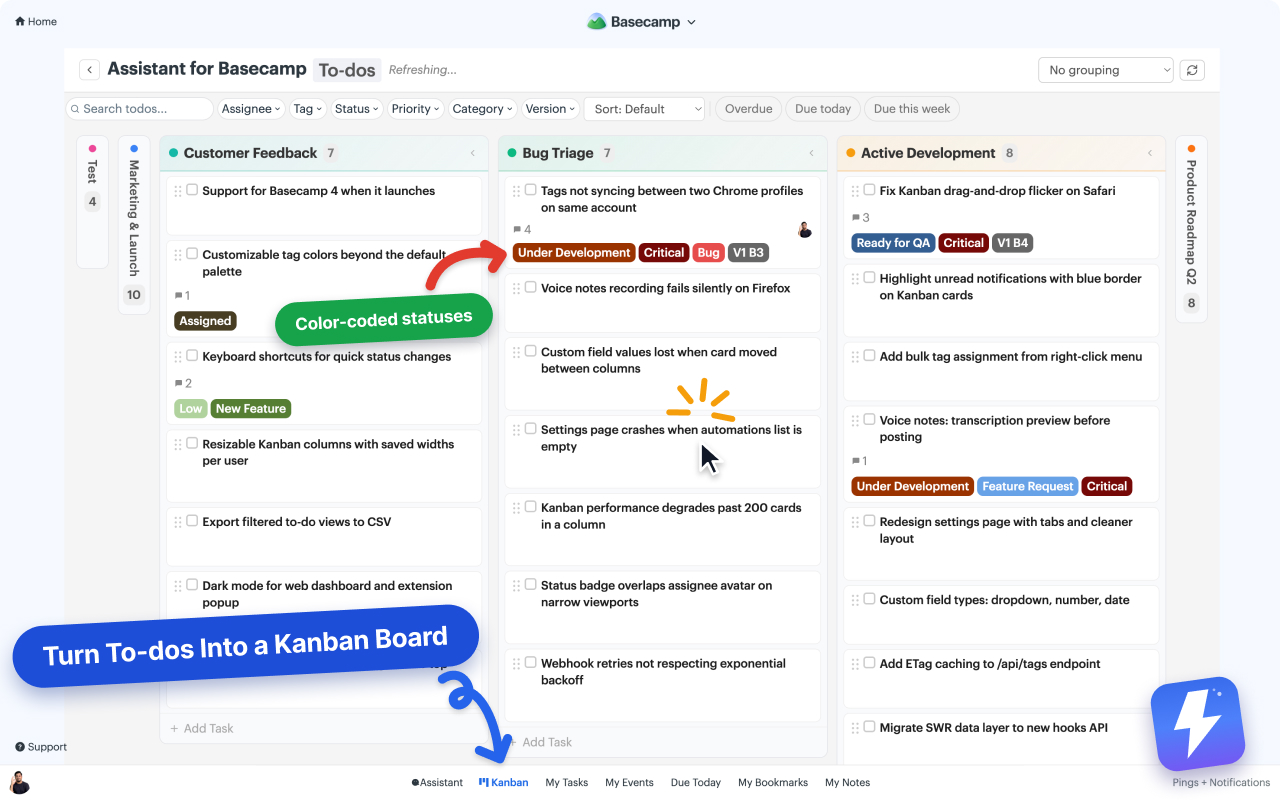
Tracked’s board comes in three shapes: one project, one person, or the whole account. Assistant now covers the same ground. You can build a board from a single to-do list or card table, from a whole project, or from every project on the account at once. To-dos and cards always get their own boards and are never mixed into one, because a to-do and a card are different things in Basecamp and a board that blurs them tells you the wrong thing.
Saved views are what make the wide board usable day to day. Search the picker for projects or clients, select several projects or several clients (not a mix of the two), and save the whole arrangement under a name. Views are stored per user on our servers, so the board you built on your desktop is there when you open Basecamp on a laptop.
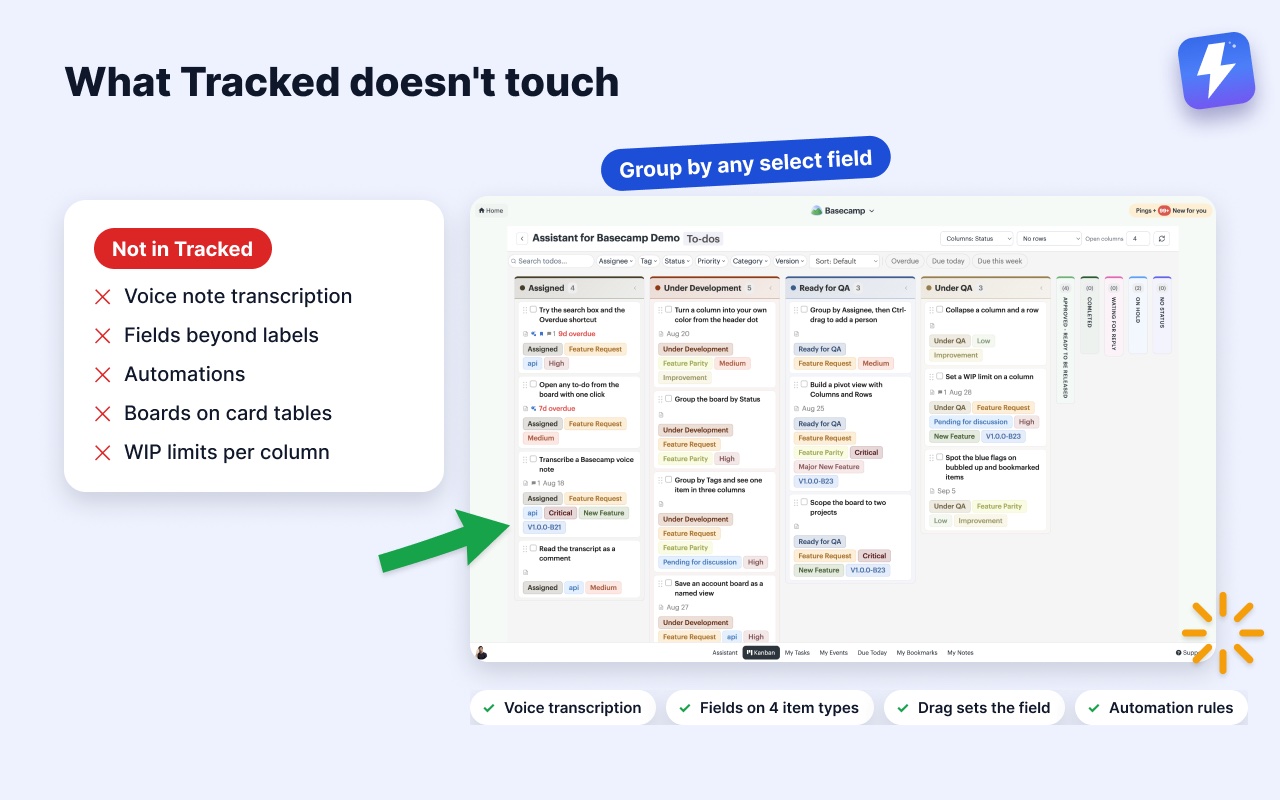
Inside that, the depth reverses. Assistant turns any to-do list or card table into a board (your lists become the columns, so there’s nothing to set up), lets you group it by any select-type field so a Status board and a Priority board are two clicks apart, filters by assignee, tag, status, field values, or due dates, and treats a drag as data: drop a card in “Under QA” and the status field changes, with a comment on the item recording who moved it. On Tracked, boards visualize; changing anything else stays manual. The kanban help doc covers setup.
Three things go further than a board that only sorts cards:
- Pivot view. Pick one field for the columns and another for the rows, say Status across and to-do lists down. Rows collapse when you want the detail out of the way, and the column headers and row labels stay put while you scroll.
- Grouping by tags and multi-selects. An item carrying three tags shows up in all three columns rather than being forced into one. Group by assignee and a to-do appears in each assignee’s column; drag one of those copies and you move that single assignment, or hold Ctrl to add a person instead of replacing them. That drag is for to-dos only. Cards have no assign route yet, so it’s switched off there.
- WIP limits the whole team can see. Set a limit on a column and everyone sees it, not just you. Limits are stored per board, so “Review” can allow 10 in one project and 3 in another. The count turns red when open work passes the limit, and completed items never count toward it.
Labels vs fields
This is the structural difference. Tracked’s labels are one flat list doing every job: priority, type, client, and stage all become labels, and filtering “high-priority bugs for Acme” means your team invented and remembered three label conventions.
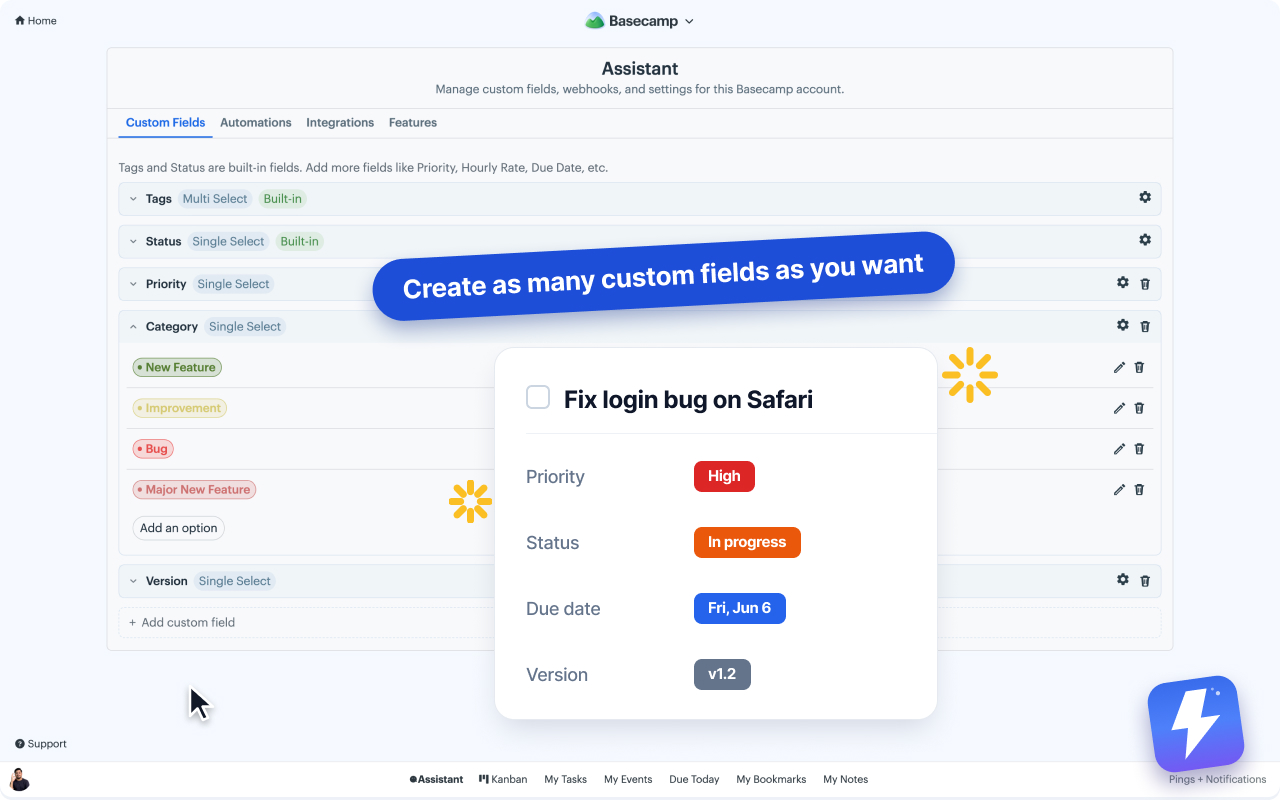
Assistant models those as separate fields: a Priority single-select, a Category select, a Client field, a Version field, each with its own colors and options, each filterable and groupable on the board, each visible on the item’s page. Fields apply to to-dos, card-table cards, messages, and documents, so a message thread can carry “Status: Approved” and a document can carry “Version: Final”. Admins decide who can add new options, and each project can switch individual fields off entirely. Here’s how custom fields work, with details in the custom fields doc.
If your complexity genuinely fits one label list, Tracked’s simplicity is a feature, not a gap.
Automations
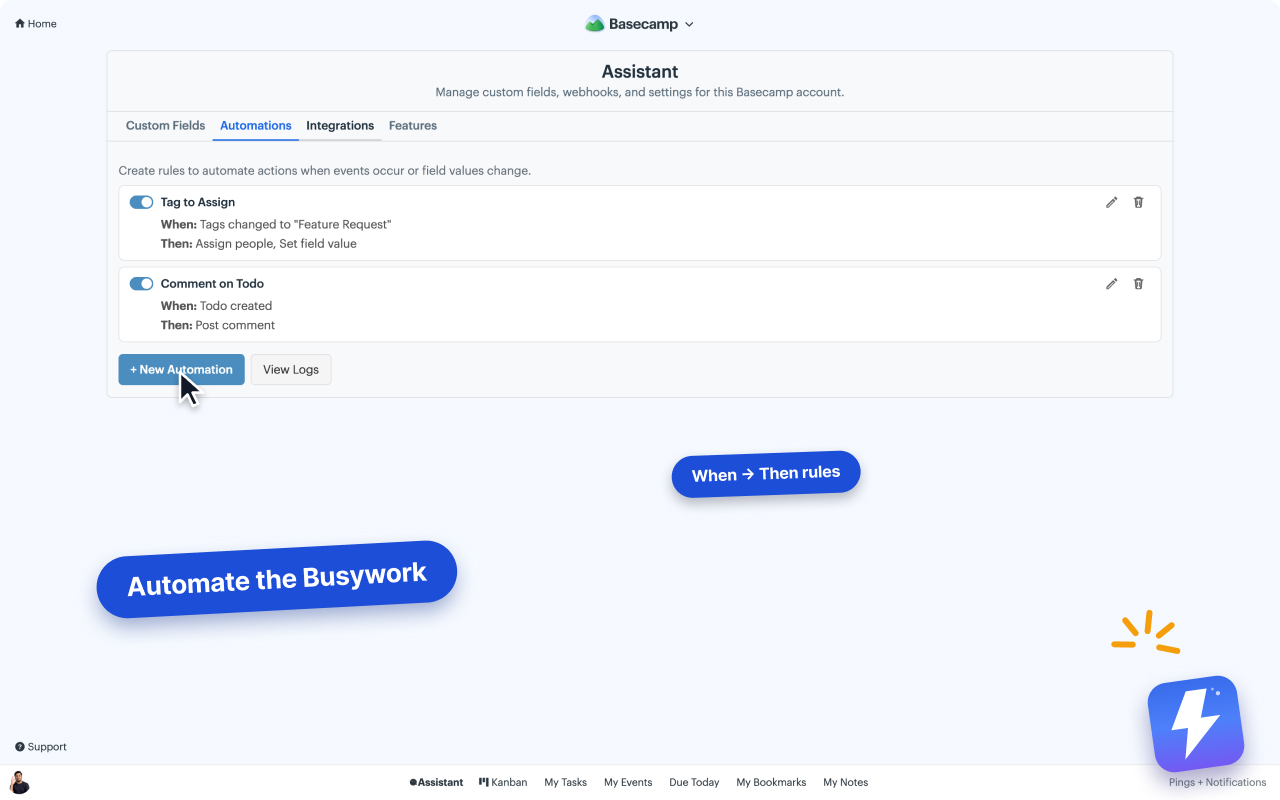
Assistant has them; Tracked doesn’t. Rules combine a trigger (a Basecamp event like to-do completed or comment posted, or one of your fields changing) with actions: set a field, assign people, complete a to-do, post a comment. “When Status changes to Ready for QA, assign the QA lead and comment the checklist” runs itself at 2am. This is the category difference between a board that shows state and a system that enforces process.
One honest caveat: these react to what happens inside Basecamp, not to inbound webhooks from outside tools, so they don’t replace Zapier for cross-app work. See how to automate Basecamp without Zapier and the automations doc.
Pricing math
| Team size | Tracked | Assistant | Cheaper |
|---|---|---|---|
| 3 users | $9/mo | $29/mo | Tracked |
| 5 users | $15/mo | $29/mo | Tracked |
| 10 users | $30/mo | $29/mo | Break-even |
| 15 users | $45/mo | $29/mo | Assistant |
| 20+ users | $60/mo (unlimited tier) | $29/mo | Assistant, at half |
Tracked’s pricing was verified against trackedhq.com on 2026-08-15; ours is on the pricing page. Either can change independently, and the break-even point moves with them.
Annual on Assistant ($290/yr) works out to $24.17/mo. Tracked’s billing scales with headcount; Assistant’s doesn’t move when you add contractors, clients, or new hires. One admin pays, and everyone on the Basecamp account is covered. Full breakdown on the pricing page and the billing doc.
Where Tracked is simply better
Being direct about it: a web dashboard you can open in any browser and on a touch screen without Basecamp being on the page at all. Assistant only runs inside Basecamp, which is a design choice, not a backlog item. Add a 30-day trial against our 7, and lower cost below 10 users. If two or more of those describe your team, buy Tracked.
Where Assistant is simply better
The same directness the other way. Tracked has no answer to any of these:
- Voice note transcription. Basecamp 5 records voice notes and neither Basecamp nor Tracked turns them into text. Assistant transcribes any note in one click, posts the transcript as a comment the whole thread can read and search, and pulls out a summary and action items on longer ones. 6,000 minutes a month are included.
- Fields beyond labels. Status, priority, version, category, plus text, number, and date fields, on to-dos, cards, messages, and documents. Tracked has labels and estimates, on to-dos only.
- A board that writes back. Group by any select field and drag a card between columns to set that field, with an audit comment on the item. Change a column’s color from the board and the new color is saved to Basecamp, so everyone sees it, not just the people running the extension. Tracked’s board moves cards; it doesn’t update data.
- Pivot view, saved views, and shared WIP limits. One field across and another down, arrangements you save by name and reopen on any computer, and per-column limits the whole team can see.
- Automations. Rules that fire on Basecamp events and field changes, so triage and handoffs run without anyone remembering to do them.
- Boards on card tables, not just to-do lists.
- Card-table and column copying. Copy a whole table, or copy or move a single column into another table, in the same project or a different one, carrying every card with its comments and attachments. It runs as a resumable background job you can pause and come back to.
- Flags on bubbled-up and bookmarked items, shown on native Basecamp lists, on the item’s own page, and on board cards, so the things you set aside stay visible where you already work.
- Docs & Files grid, unread highlighting, and Campfire notifications, none of which have a Tracked equivalent.
Pick Assistant if two or more of those matter to you. They’re the reason the flat price holds at any headcount: you’re buying a wider tool, not a cheaper seat.
Switching from Tracked
There’s no automated migration today. The manual path most teams take: recreate labels as tags or a status field (the field manager adds options with colors in minutes), add a number field for estimates, then open the Kanban on your busiest project and set values as you triage; the board makes untagged items obvious. Both trials can run simultaneously on the same Basecamp account, so you can compare with your real data before either bill starts.
FAQ
Do they work at the same time? Yes. Both are overlays and don’t conflict. Running both during a trial is the fastest way to decide.
Does either change my Basecamp data? Labels, fields, and board configurations live in each tool’s own database, keyed to your Basecamp items. Your to-dos and projects stay untouched either way. Assistant writes to Basecamp only when you act: completing a to-do from the board, posting an audit comment.
Which works with the current Basecamp? Assistant is built for the current Basecamp, at app.basecamp.com and 3.basecamp.com. Tracked’s own site states it does not support Basecamp 2 or Classic; check there for current-version details.
Is there a per-seat plan on Assistant? No. $29/mo flat, or $290/yr, unlimited users, 7-day trial with no card.
See the wider field of options in Tracked Alternatives for Basecamp, start with the getting started guide, or install it for Chrome or Firefoxinstall it for Chrome or Firefox and run the 7-day trial against a real project before you decide.
Useful? Tell Google you want more of this.