Basecamp Updates: What's New in Basecamp (September 2026)
37signals ships quietly. There is no public roadmap, their product-updates site went dormant in early 2025, and most release news now arrives as in-app announcements, where nobody outside a Basecamp account can read them. The rest is scattered across DHH’s blog, the REWORK podcast, App Store version history, and GitHub.
This page pulls all of it into one dated record, including those in-app announcements. We refresh it monthly, and when a month is quiet we say so instead of padding it. We build Assistant for Basecamp, so we watch this closely for a living.
The current state, in one paragraph
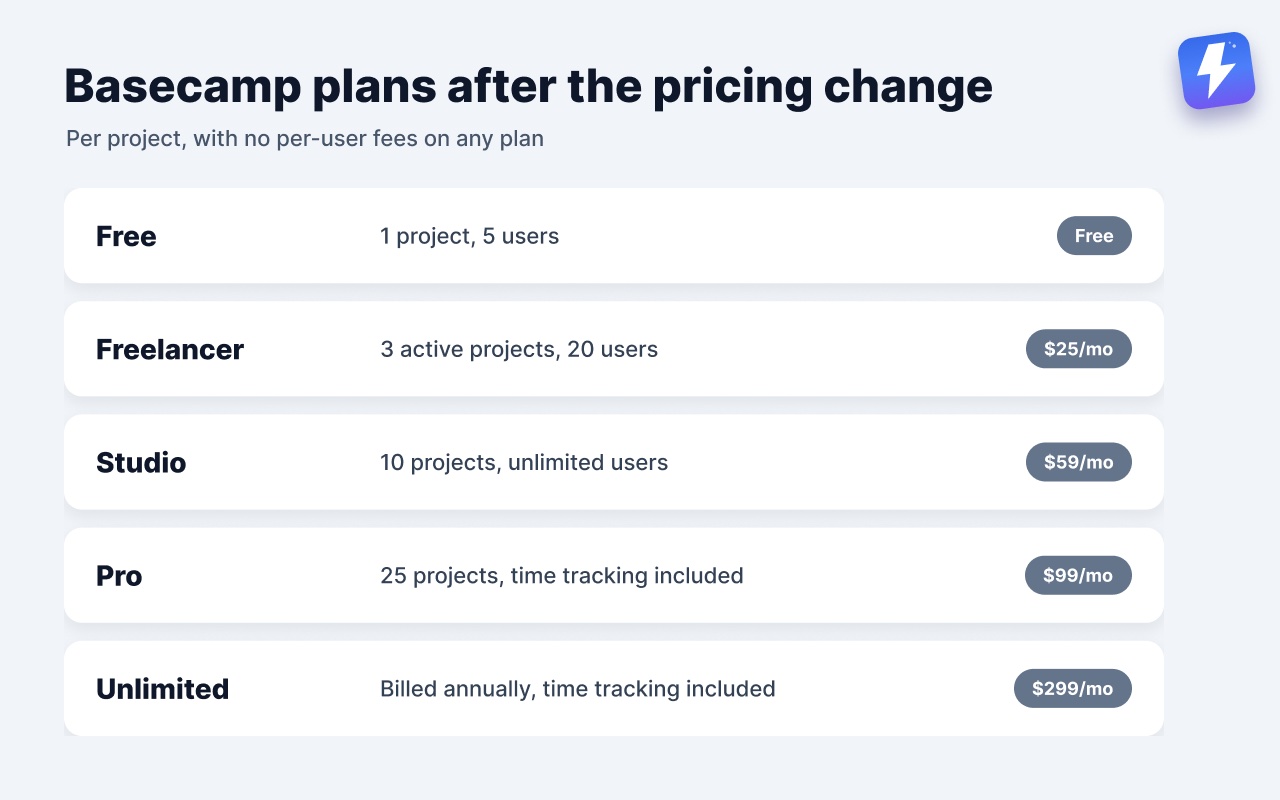
Basecamp 5 is the current version, rolled out the evening of May 25, 2026 (US Pacific) to every account automatically, serving around a million people a day per DHH’s launch post. The help hub now lists only Basecamp 5, Basecamp 2, and Basecamp Classic, and the old 3.basecamp.com address answers with Basecamp 5. Pricing moved from per user to per project in mid-August, with no per-user fees on any plan: Free (1 project, 5 users), Freelancer at $25 per month (3 active projects, 20 users), Studio at $59 per month (10 projects), Pro at $99 per month (25 projects), and Unlimited at $299 per month billed annually. Studio and up include unlimited users. The $50-per-month Timesheet add-on is gone from the pricing page; time tracking now comes with Pro and Unlimited.
September 2026
Project wallpapers (announced in-app September 30). Any project can now carry its own background image, such as a client’s logo, a photo, or a pattern. Click the project name, upload an image, and choose Fill Screen to stretch it or Tile to repeat it. Everyone on the project sees the same wallpaper. Web and desktop apps only.
Replies that quote a comment (same announcement). Hover over a comment and click Reply to quote it in your response, or highlight part of it first to quote only that part. It works anywhere you can comment. In Pings and Chats, highlight the text, then choose Reply from the ••• menu. Web and desktop apps only.
Drop files onto Docs & Files from the project page (same announcement). Drag one or more files from your computer onto the Docs & Files tool without opening it first. They land in the main Docs & Files area, nobody on the project gets notified, and you can sort them into folders afterwards.
Accessibility fixes (same announcement). More reliable keyboard navigation, clearer screen reader announcements, easier jumps between parts of the page, and better keyboard and screen reader support when writing and editing text, attachments, and galleries. 37signals says more of this work is underway.
Spotlights on the project page (announced in-app September 2). Any item in a project, whether a message, card, to-do list, file, or event, can now be pinned to the top of the project home page from its ••• menu. Add as many as you need and drag them into order. A spotlighted event shows a live countdown in the 15 minutes before it starts, plus its join link if it has one.
Project activity moves onto the project page (same announcement). The project page used to show the three most recent updates at the top, with the full timeline on a separate page. Now the whole feed sits below the project tools, and a View activity link near the top jumps down to it. The toggle to show or hide activity is gone.
Print views cleaned up (same announcement). 37signals printed and saved PDFs from 100 screens, from to-do lists and docs to reports and timesheets, and polished the print view on each one.
The iOS app shipped 5.0.16 on September 3, labeled “Bug fixes and improvements.”
August 2026
My Bar opens full screen (announced in-app August 18). Tasks, events, bookmarks, and notes in the My Bar tray at the bottom of the screen now open full screen over the page you’re on, instead of in small popups. You no longer need a “See all” step to reach the full list. Each view has a filter field at the top. A new My Activity view lists what you’ve recently posted or taken part in, so you can get back to a doc or discussion quickly.
Pricing moves from per user to per project (between August 12 and 19, not announced in-app). Archived copies of basecamp.com/pricing show the old plans on August 12, $15 per user or $299 per month for Pro Unlimited, and five flat-priced tiers by August 19. The current plans are in the summary at the top of this page.
A rearranged sidebar (announced in-app August 5, live the next day). The “New for you” button moved from the bottom-right corner to the top-right, and unread Pings folded into the New for you panel, so opening, reading, and closing your notifications happens in one corner of the screen instead of a bottom-to-top round trip.
Also this month: two more live walkthrough webinars with Jason Fried (August 13 and 25), and a Breakfast with Basecamp event in Chicago on August 27. The iOS app shipped one release, 5.0.15 on August 22, labeled “Bug fixes and improvements.”
July 2026
All Tasks lands on the Everything page (announced in-app July 30). The Everything page (SHIFT+4) already aggregated messages, comments, and files account-wide; now an All Tasks view shows every to-do and card across the account, grouped by project, with filters for project, type, assignee, overdue, due date or none, and a subtasks toggle.
Wormholes (same announcement). Cards can now travel from one card table to another, so support can send a card to on-call or marketing can hand work to design without rebuilding it.
Calendar Agenda view (announced in-app July 7). A toggle switches the calendar from the month grid to a chronological list of upcoming events and due dates, grouped by day, with the same filters as the grid.
Per-person notification defaults (same announcement). Account owners, admins, and project creators can now set, per person, whether someone gets notified about everything in a project or only @mentions and their own discussions.
The iOS app shipped weekly point releases (5.0.6 through 5.0.14) from June 1 to July 30, all labeled “Bug fixes and improvements.”
June 2026
Home Screen Zoom (announced in-app June 5). A zoom toggle switches the home screen between two and four project columns, answering the most common post-launch complaint about the cramped grid.
Activity gets two views (same announcement). The Latest Activity screen split into a toggle: Timeline (fully time-stamped, reverse-chronological, scroll back through everything) and Wrap-up (updates grouped by project per day).
Bubble Up refined (announced in-app June 10). Only the two most recent Bubbled Up items now sit at the top of the sidebar, with a View more for the rest, so snoozed items stop crowding out new activity. Web and desktop first, mobile to follow.
On the podcast, Fried and Hansson spent the June 24 REWORK episode on how the launch went. Some coverage mis-dates the launch to June because of that episode. The launch was May.
May 2026: Basecamp 5 launches
Rolled out the evening of May 25 (US Pacific), announced publicly May 26. Every Basecamp 4 account upgraded automatically; old links redirect. The three flagship changes, in DHH’s own ordering:
- The Lexxy editor. Tables (including pastes from Excel and Sheets that keep their formatting), Markdown support, live syntax highlighting for code, and voice notes. Built on Lexical and open-sourced by 37signals the year before.
- Keyboard shortcuts everywhere. Hold SHIFT and the interface reveals them.
- A permanent sidebar. Replaces the old Hey! menu as the way you move around.
Beyond the headline three: an action-oriented home screen, a “For You” sidebar section, live-filtering search, global and per-project calendars with recurring events (a top customer request, per the in-app preview), subtasks and loose to-dos, account-wide Everything pages, a universal menu on SHIFT+J, Bubble Up, My Bar, an overhauled activity view, and a new logo. 37signals’ own count: “over 100 improvements.” Their stated AI posture: “AI accessible, but not agent hysteric.”
The first 48 hours brought over a hundred fixes, plus one restored favorite announced in-app on May 28: an Upcoming assignments report showing every card and to-do with a due date across all projects, filling the gap left by the old Upcoming Dates report.
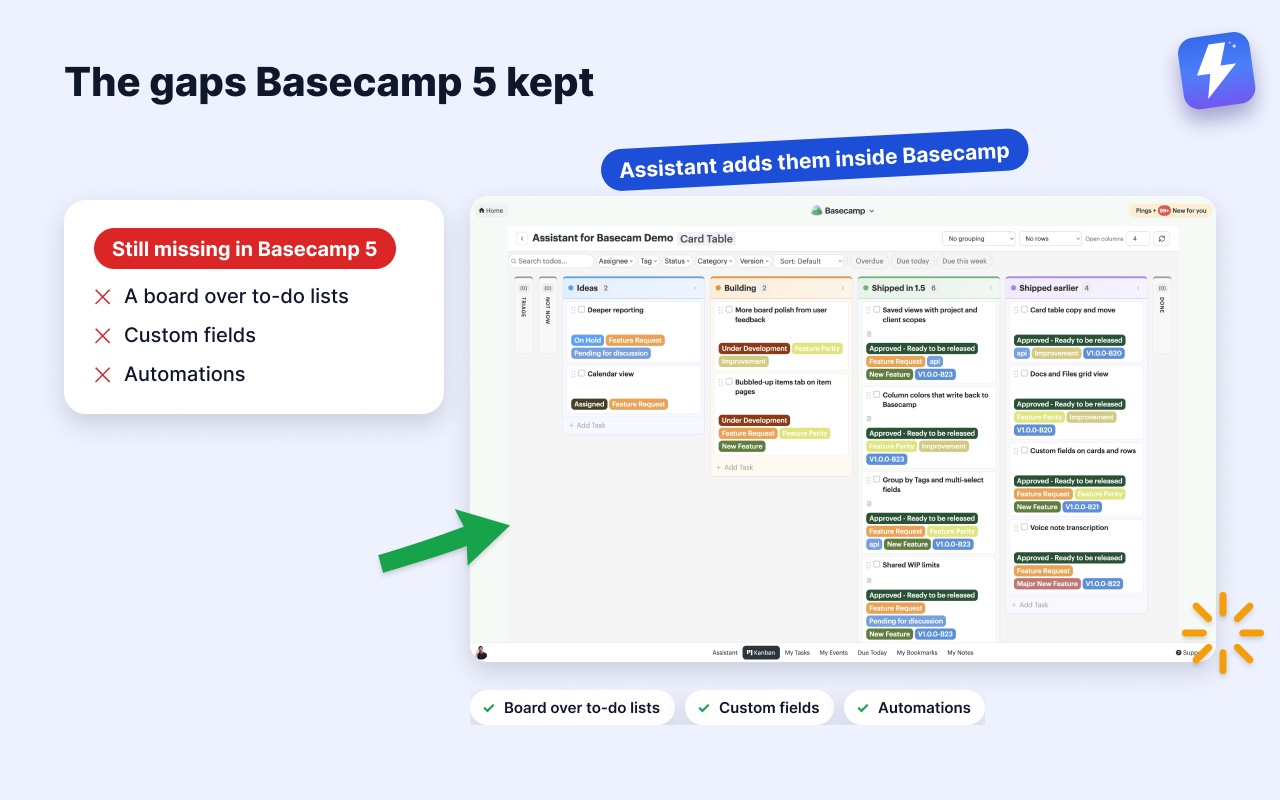
We wrote a full walkthrough of what changed and what still has gaps in what’s new in Basecamp 5.
March 2026: Basecamp opens to AI agents
Announced March 25 and confirmed the next day in-app: a much-expanded API, an official basecamp command-line tool, and a Skill that teaches AI agents to drive it. An agent can do what a person can: write documents, add and complete to-dos, post messages, upload files, answer check-ins. Officially supported with Claude, Codex, OpenCode, and Cursor, with SDKs for Go, Ruby, TypeScript, Swift, and Kotlin. Fried’s in-app framing: “initially tailored to the highly technical segment,” with a more mainstream version promised “down the road.”
The quiet part: the CLI’s v0.1.0 had been sitting on GitHub since February 25, a month before the announcement. Watching their repos catches releases before the posts do.
January 2026: Basecamp 5 announced
Jason Fried’s January 20 in-app announcement was the first public word of Basecamp 5: a full calendar (per-project and global), tables in messages and docs, Markdown support, and faster access to assignments and events, with a first-half-of-2026 target. It shipped four months later.
2025
- October: Groups arrived: admins create named groups in Adminland, and one @mention notifies everyone in the group.
- July: a live class program launched (Basecamp 101, Card Table deep dives, client workflows), which grew into the walkthrough webinars that now accompany every big release.
- February: the last two features 37signals ever posted to its public updates feed: Hilltop View (every Hill Chart across the account in one report) and client-access settings on project templates. Both were re-announced in-app in March.
- September (2025): Lexxy released as open source for Rails, a preview of Basecamp 5’s editor.
2024
- October: Public Links got a polish pass and an option to include comments on publicly shared items; earlier in the year, public links came to Card Tables.
- August: Pings gained names and images, so group DMs stopped being an anonymous pile of avatars.
- June: the Timesheet add-on launched: a timer on to-dos, cards, and docs rolling into per-project timesheets hidden from clients. A Basecamp Classic favorite reborn as a $50/month add-on. (Our time-tracking guide covers where it fits next to Harvest and Everhour.)
- April: References began auto-linking related items whenever you link to a message, to-do, card, or doc, plus public Card Tables.
- February: projects and Stacks got colors and logos on the home screen, and existing projects became convertible into templates.
2023
The in-app announcements started in February 2023 (“we’re debuting a new way to share news with you, right in the Hey! menu”). What shipped that year, in order: scheduled messages and docs plus a list view for Docs & Files (February), Steps inside card-table cards with per-step assignees (February), Up Next prioritization in My Assignments and bulk due-date changes (March), link previews in Campfire and Pings plus a new date picker (May), Lineup time travel and Markers (June), one-page project creation (July), public folders and custom Door images (August), Stacks for grouping projects (October), and Move the Needle project health indicators with Mission Control (December).
How this page stays current
Once a month we re-check the primary sources: Basecamp’s own in-app announcements (the main channel, invisible outside an account, which is why we mirror the substance here), DHH’s blog at world.hey.com, the REWORK podcast index, App Store version history (the only reliably dated proof of shipping cadence), and 37signals’ GitHub tags for the CLI and agent skills. The dormant public updates feed gets a courtesy poll in case it revives. Dates come from opened primary pages, not search snippets, because snippets got both of this year’s landmark dates wrong.
Last verified: September 11, 2026. If something shipped that we missed, tell us and we’ll add it with a source.
Useful? Tell Google you want more of this.