Basecamp vs Notion: Is Switching Worth the Rebuild?
Basecamp hands you a structure. Notion hands you the pieces to build one. That is the whole choice, and it decides how much of your week goes into the tool instead of into the work.
A disclosure before any of it. We build Assistant for Basecamp, a browser extension that adds the structured fields and boards people usually go to Notion for, so we have a stake in your answer. Notion is genuinely better at several things and this guide says which. If adding the structure without the rebuild is the better move, it is further down, and the cost of a full migration is its own piece: the real cost of leaving Basecamp.
Basecamp vs Notion: what are you actually choosing between?
The Basecamp vs Notion question trips people up because the two tools aren’t really the same kind of product. Basecamp is an opinionated project management tool. You sign up, create a project, and you already have message boards, to-do lists, a schedule, a chat room, and a docs area. The structure is decided for you.
Notion is a blank workspace. You get pages, databases, and a set of building blocks, and you assemble whatever you want out of them: a wiki, a task tracker, a CRM, a content calendar. Nothing is decided for you.
So “basecamp or notion” isn’t a feature checklist fight. It’s a question about how much structure you want handed to you versus how much you want to build yourself. The rest of this post walks through where each one genuinely wins.
What Basecamp does well
Basecamp’s strength is that it removes decisions. A new team member opens a project and understands it in a few minutes, because every project looks the same: messages here, to-dos there, files in one place, chat in another.
Where it stands out:
- Communication and work live together. Message boards for announcements, Campfire chat for quick back-and-forth, and automatic check-in questions (“What did you work on today?”) are built in. You don’t bolt on a separate chat tool.
- It’s calm by design. Basecamp deliberately limits notifications and avoids the firehose feeling. There’s no activity stream screaming at you all day.
- Hill Charts. A genuinely original way to show whether work is “still figuring it out” (uphill) or “just execution now” (downhill). Notion has no real equivalent.
- Onboarding is fast. Because the structure is fixed, there’s almost nothing to set up. You invite people and start working.
Basecamp also has a few tools people forget it ships: Card Tables (a kanban-style board with columns, separate from to-do lists) and Project Templates so you can clone a project’s setup for the next client or sprint.
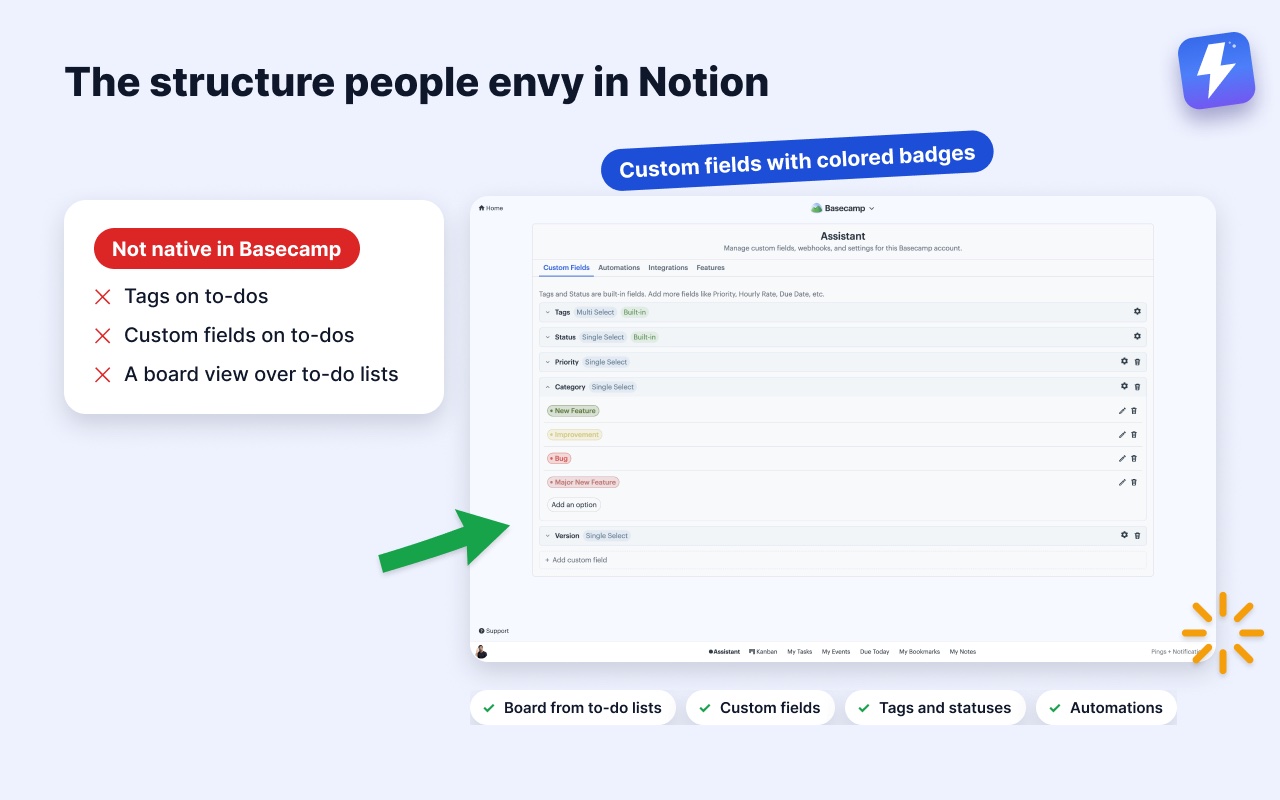
What Basecamp keeps to its higher plans or leaves out matters too. Time tracking is built in as Timesheet (a green timer, logged hours, and a report you can filter and export), but only on the Pro and Unlimited plans. Harvest and Everhour still earn their keep if you need invoicing, budgets, or rate cards on top of the hours. There’s no Gantt chart (Hill Charts are the philosophical replacement), and no tags or custom fields on to-dos. That last gap is the one most growing teams run into, and it’s where an add-on helps. More on that below.
What Notion does well
Notion’s strength is the opposite of Basecamp’s: nothing is fixed, so you can model your work exactly how your brain works.
Where it wins:
- Databases are the real superpower. A Notion database is a table you can view as a board, a calendar, a timeline, a gallery, or a list, all from the same data. Custom properties (text, number, select, multi-select, date, relation, formula) let you track anything. Basecamp has no native equivalent.
- Docs and knowledge bases. Notion pages nest infinitely and link to each other. For a company wiki, an SOP library, or product documentation, it’s far richer than Basecamp’s Docs.
- Relations and rollups. You can link a “Tasks” database to a “Projects” database to a “Clients” database and have them talk to each other. This is closer to a lightweight no-code app than a project tool.
- Templates and a huge community. There’s a pre-built Notion template for almost any workflow you can imagine.
If your team lives in documentation, or you want one workspace that bends to fit a process you’re still inventing, Notion is hard to beat.
Where Notion is the better choice
To be fair about it, here’s where Notion clearly wins and Basecamp can’t follow:
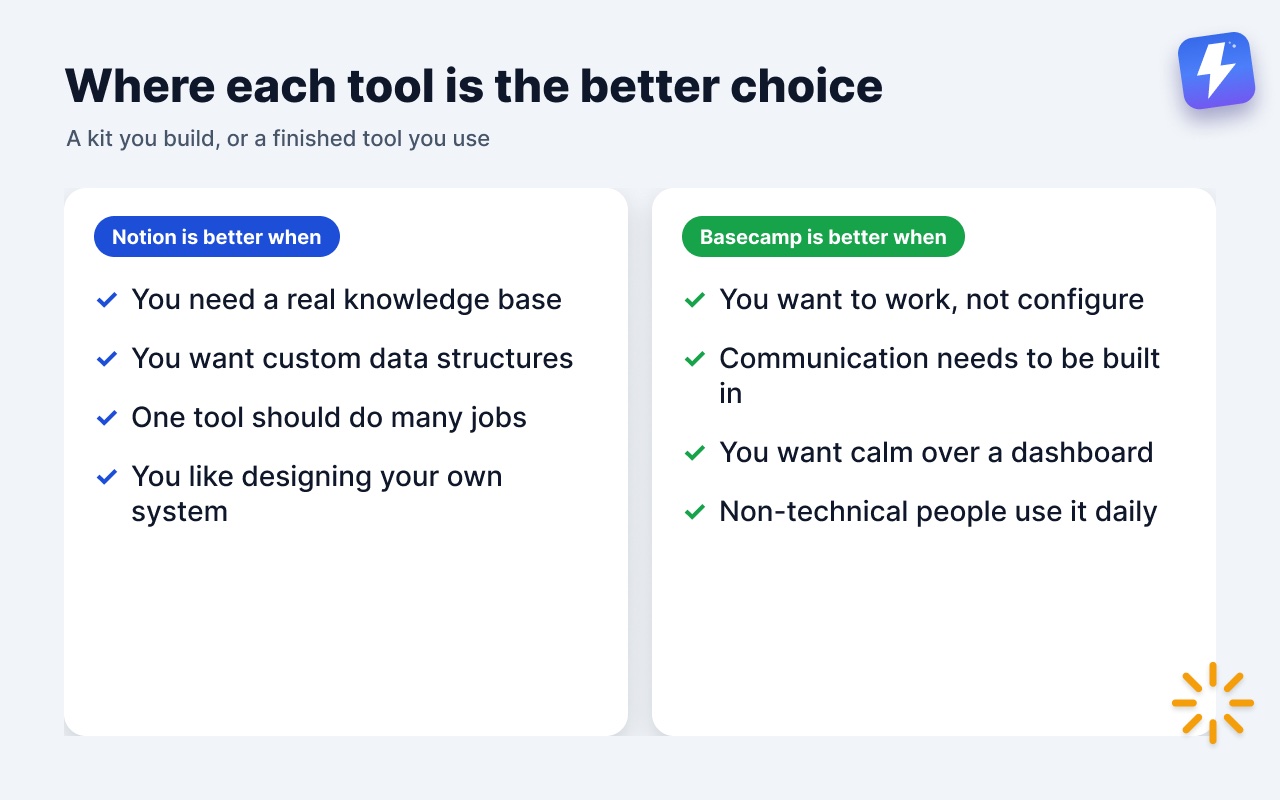
- You need a real knowledge base or wiki. Nested, interlinked, richly formatted docs are Notion’s home turf.
- You want custom data structures. Tracking deals, content pieces, inventory, or anything with custom fields and relationships? Notion does this natively; Basecamp does not.
- You want one tool to do many jobs. Notes, tasks, docs, and a light database in a single workspace is exactly what Notion is built for.
- You like designing your own system. If shaping the tool is part of the fun, Notion rewards that.
Where Basecamp is the better choice
And here’s the honest other side. Basecamp wins when:
- You want to work, not configure. Notion’s flexibility is a cost. Someone has to design the system, maintain it, and teach it to every new hire. Many teams spend more time tweaking their Notion setup than doing the work it tracks. Basecamp has none of that overhead.
- Communication needs to be built in. Notion’s commenting is fine, but it isn’t a place for team discussion or chat. Basecamp’s message boards and Campfire are first-class.
- You want calm over a dashboard. Notion can become an anxiety machine of dozens of databases and views. Basecamp’s fixed, quiet structure keeps a team focused.
- Non-technical people need to use it daily. A fixed layout that never changes is easier for a mixed team than a workspace where the rules differ from page to page.
The pattern: Notion gives you a powerful kit and asks you to build the tool. Basecamp hands you the finished tool and asks you to use it.
What about price?
Notion has a free tier for individuals and small groups, then charges per user (Plus is in the $10–$12 per user per month range, with Business and Enterprise tiers above that). Costs scale with headcount.
Basecamp prices differently. It charges by how many projects are active at once, not by people, and no plan has per-user fees. Free covers 1 project for up to 5 users, and Freelancer is $25/mo for 3 projects and 20 users. Studio ($59/mo, 10 projects), Pro ($99/mo, 25) and Unlimited ($299/mo, billed annually) all include unlimited users. So the question flips: Notion gets more expensive as you add people, and Basecamp gets more expensive as you run more projects at once. A large team on a handful of projects pays far less on Basecamp; a two-person team juggling many projects may pay less on Notion. Run your own headcount and project count through both before deciding.
The honest middle ground: keep Basecamp, add the structure you miss
A lot of teams land here: they love Basecamp’s calm and built-in communication, but they envy Notion’s custom fields and board views. They don’t want to migrate everything into a workspace they’ll have to maintain forever.
That’s the exact gap we built Assistant for Basecamp to close. It’s a browser extension that adds the structure Basecamp lacks, without moving your projects anywhere. Your team keeps working in Basecamp.
What it adds:
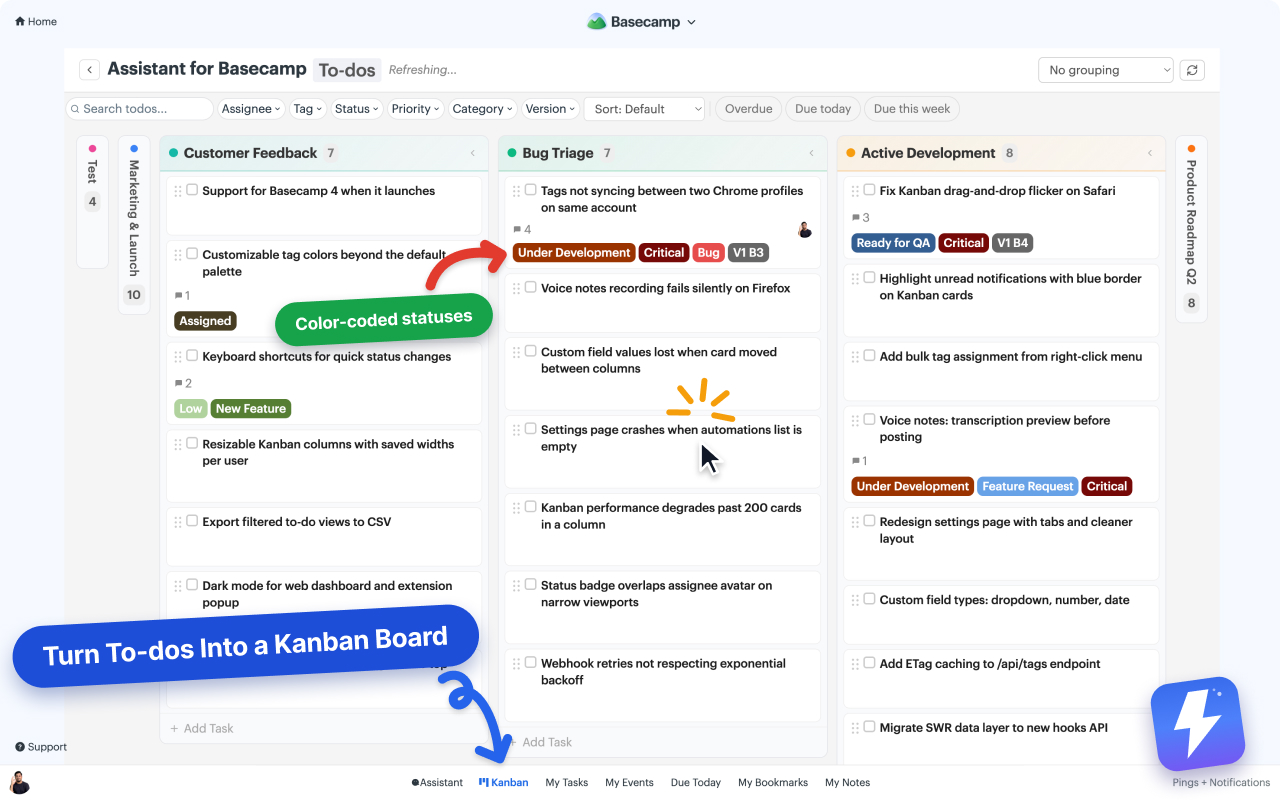
- A kanban board per project, where each of your to-do lists becomes a column. Your project’s structure becomes the board, instead of you rebuilding it from scratch the way you would in a fresh Notion database.
- Custom fields on cards and to-dos (single-select, multi-select, text, number, date) with colored badges, the Notion-style data tracking people miss most.
- Tags and statuses on cards, to-dos, and messages.
- An unread highlight and automations that react to Basecamp events and field changes.
- Voice note transcription: any Basecamp voice note becomes text in one click, posted as a comment the whole thread can read.
To be clear about the limits: this is not a replacement for Notion’s database engine or its wiki. You can’t build relational tables, rollups, or a nested knowledge base inside Basecamp with it. If those are core to how you work, Notion is still the right home. The extension is for teams who want Basecamp’s workflow with a layer of Notion-like structure on top, not for teams who want to recreate Notion.
It’s $29/month or $290/year for the whole workspace, unlimited seats, one admin pays, with a 7-day free trial and no card needed.
So, Basecamp or Notion?
Choose Notion if your work centers on documents and custom data, you want one flexible workspace, and you’re willing to design and maintain the system yourself.
Choose Basecamp if you want a finished tool that a mixed team can use on day one, with communication built in and almost nothing to configure.
And if you want Basecamp’s simplicity but keep wishing it had Notion’s custom fields and board view, you don’t have to switch. You can add that layer on top and keep your projects exactly where they are.
If you’re weighing other tools too, the Basecamp vs Trello and Basecamp vs ClickUp comparisons cover the same trade-offs against board-first and all-in-one tools.
Useful? Tell Google you want more of this.