Basecamp vs Trello: Do You Need Trello, or Just a Board?
Most “Basecamp vs Trello” comparisons read like one tool is obviously better. They’re not actually competing for the same job. Trello is a board. You drag cards through columns and watch work move. Basecamp is a place where a whole project lives, with messages, files, to-dos, schedules, and chat all in one spot. Picking between them isn’t about which is “better software.” It’s about which shape your work has, and which problems you want one tool to solve.
This is the honest version. We build a browser extension that adds features inside Basecamp, so we use Basecamp every day and we’ll tell you plainly where Trello does the job better. By the end you’ll know which one fits, and what to do if you like Basecamp but miss having a board.
If the board is the only thing pulling you toward Trello, start here. And if you are weighing a full move, we costed one in the real cost of leaving Basecamp.
What’s the core difference between Basecamp and Trello?
Trello is a kanban tool. The whole product is the board: lists across the top (think To Do, Doing, Done, or any stages you invent), cards inside them, and you drag cards left to right as work progresses. It’s visual, it’s fast to set up, and a five-year-old could understand it in thirty seconds. That simplicity is the entire point.
Basecamp is a project hub. A single project holds separate tools: a message board for announcements and discussions, to-do lists for tasks, a Docs & Files section, a group chat called Campfire, a schedule, and automatic check-in questions. Each tool does one thing well, and the project ties them together so nothing lives in someone’s inbox or a separate app.
So the short version of the trello vs basecamp question: Trello shows you where work is in a process. Basecamp gives a team one place to run the whole project, board not included by default.
That last part matters, so let’s be clear about it up front. Basecamp does have a kanban-style tool called Card Tables, which we’ll cover below. But Basecamp’s main task tool is the to-do list, which is a checklist, not a board. If a moving board is the thing you care about most, that’s a real difference, and we’ll come back to it.
When is Trello the better choice?
Trello wins when the board is the work, and you don’t need much else around it.
You want a board and almost nothing else. If your job is “see every item, see what stage it’s in, drag it forward,” Trello does that with zero overhead. No message board to ignore, no schedule to set up. Open the app, look at the board, done.
You’re a solo user or a tiny team. Trello’s free plan covers unlimited cards and up to 10 boards per workspace. For one person tracking a personal project, a freelancer managing a handful of clients, or two people sharing a simple pipeline, you may never need to pay anything.
You think in stages, not lists. Sales pipelines, content calendars, hiring funnels, support queues. Anything where an item visibly moves from one state to the next fits a board naturally. Trello was built for exactly this.
You want power-ups and integrations à la carte. Trello has a large library of Power-Ups (calendar views, automation via Butler, integrations with Slack, Google Drive, and so on). You bolt on only what you need. Basecamp deliberately resists this; it ships a fixed set of tools and doesn’t want a plugin marketplace.
You want it learnable in one minute. This is underrated. If you’re handing a board to a client, a contractor, or a volunteer who will never read a manual, Trello’s learning curve is close to zero. Drag a card. That’s the whole tutorial.
If those points describe your situation, stop here. Trello is the right answer and you don’t need to overthink it.
When is Basecamp the better choice?
Basecamp wins when a project is bigger than a board, and the real problem is scattered communication, not task tracking.
Your work spills across email, chat, and files. This is the pain Basecamp was built for. Instead of a project living half in Slack, half in Google Drive, half in email threads, everything sits in one project: discussions on the message board, files in Docs & Files, quick talk in Campfire, tasks in to-do lists. New team members read the project and they’re caught up. No archaeology through six tools.
You manage clients or stakeholders, not just tasks. Basecamp gives you per-project access so a client sees only their project, plus a clean message board for the kind of decisions and updates that get lost on a card. A board alone rarely covers “here’s the proposal, here’s the discussion, here’s the file, here’s the timeline.”
You want predictable, flat pricing. Basecamp charges by how many projects are active at once, not per seat, and Studio ($59/mo, 10 projects) and up include unlimited users. For a growing team, “everyone’s included” pricing can be far cheaper than paying per head, especially once you add clients and contractors as guests.
You want fewer notifications, not more. Basecamp’s whole philosophy is calm: automatic check-ins replace status meetings, New for you collects what’s actually directed at you, and there’s no firehose. If your team is drowning in pings, this design choice alone can be the reason to switch.
You need writing, not just cards. A lot of real project work is a paragraph, not a card title: a decision, a brief, a piece of feedback. Basecamp’s message board and Docs are built for that. A Trello card description can hold text, but the board isn’t where teams go to read and discuss.
How do they compare on pricing?
This is where the two genuinely diverge, and the right pick depends on team size.
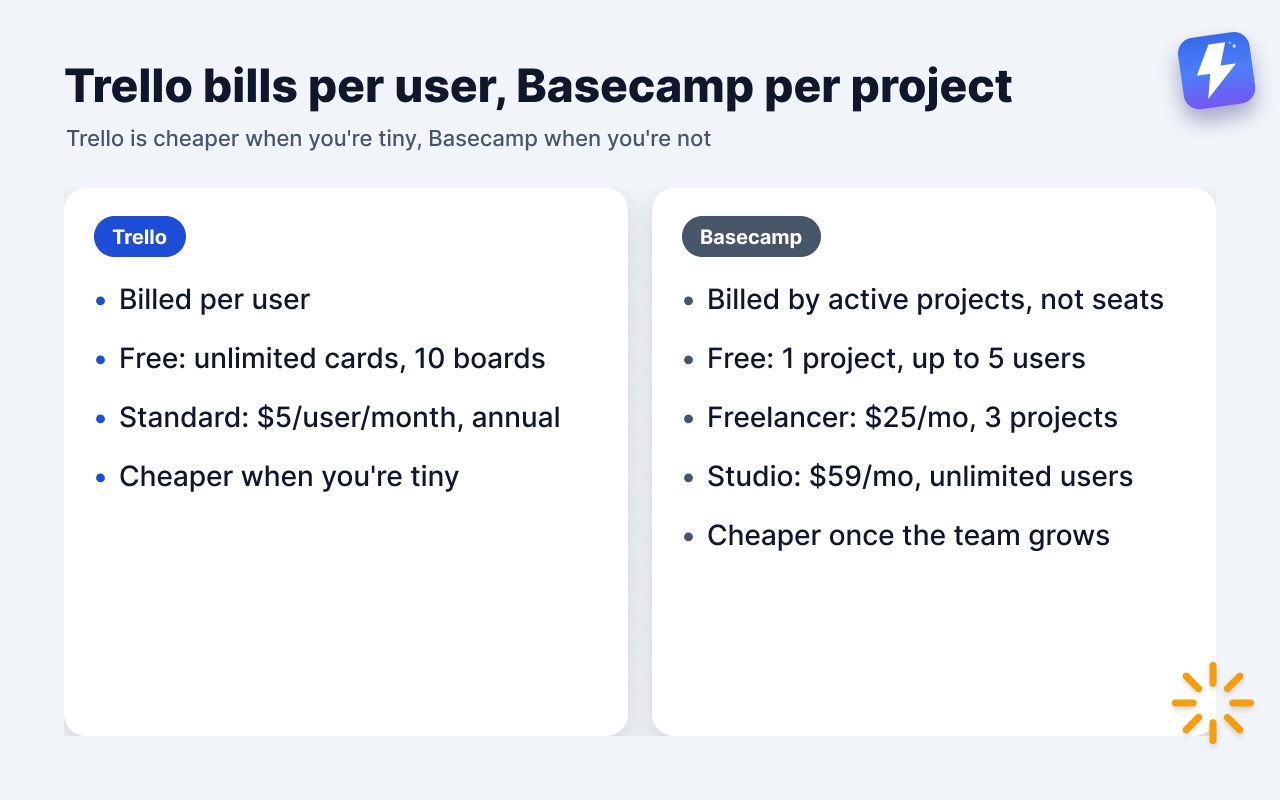
Trello bills per user. There’s a free tier (unlimited cards, up to 10 boards and 10 collaborators per workspace), then Standard and Premium tiers priced per user per month. For one person or a couple of people, free or cheap. For a team of 20, you’re multiplying that monthly price by 20.
Basecamp bills by project, not by person. Free covers 1 project for up to 5 users; Freelancer is $25/mo for 3 active projects and 20 users; Studio ($59/mo, 10 projects), Pro ($99/mo, 25) and Unlimited ($299/mo, billed annually) include unlimited users. A team of 3 and a team of 30 pay the same on Studio; what moves the bill is how many projects run at once.
The honest read: Trello is cheaper when you’re tiny, Basecamp is cheaper when you’re not. Trello Standard is $5 per user per month billed annually, so it undercuts Basecamp’s $25 Freelancer plan below five people and its $59 Studio plan below twelve. A solo freelancer tracking one personal board can stay free on either. A 15-person agency paying per seat everywhere will likely save money consolidating into Basecamp. Check both pricing pages against your real headcount and project count before deciding, since both companies adjust prices over time.
Does Basecamp have a kanban board like Trello?
Sort of, and this is the most common point of confusion, so here’s the accurate answer.
Basecamp has a tool called Card Tables. It’s a kanban-style board with columns, and you drag cards across them, much like Trello. You can add it to a project from the project’s tools. If a board is what you want, Basecamp can give you one.
But two things are worth knowing. First, the Card Table is a separate tool inside a project, sitting alongside your to-do lists, not a view of them. Your to-do lists stay as checklists; the Card Table is its own board with its own cards. Second, Basecamp’s day-to-day task tool is still the to-do list, and most teams run their tasks there. So if you adopt Basecamp expecting “my to-do lists, but as a Trello board,” that’s not how it works out of the box.
If you want the full picture, we wrote a dedicated guide to Basecamp Card Tables, and a piece on when to use a Card Table vs a to-do list that covers the trade-off in plain terms.
Where does Trello clearly beat Basecamp?
Being honest about gaps is the only way this comparison is useful, so here’s where Trello simply does it better.
- Pure board speed. If your single need is a fast, draggable board, Trello is more direct. Basecamp asks you to add a Card Table and live inside a larger project structure you may not want.
- A free tier. Basecamp’s Free plan is one project for up to five people, with 1 GB of storage and a single tool in that project. Trello’s free tier gives up to 10 collaborators 10 boards, and many small teams never outgrow it.
- Cost for tiny teams. Below five people, Trello’s $5-per-user Standard plan costs less than Basecamp’s cheapest paid plan, and it’s often nothing at all on its free tier.
- The integration marketplace. Trello’s Power-Ups library is large and lets you assemble exactly the toolkit you want. Basecamp intentionally ships a fixed feature set and resists add-ons.
- Cross-project board views. Trello’s paid tiers offer ways to see cards across multiple boards at once. Basecamp’s Card Tables are per-project.
If any of these is your make-or-break feature, Trello is the right call, and no amount of “all-in-one” wins it back.
Where does Basecamp clearly beat Trello?
And the other direction, just as honestly.
- Everything in one place. Messages, files, chat, schedule, to-dos, check-ins, per project. Trello is a board; it was never trying to be your team’s home base.
- Flat pricing at scale. From Studio up, unlimited users for one price beats Trello’s per-seat billing once a team passes about a dozen people.
- Client and stakeholder work. Per-project access, a real message board, and Docs make Basecamp far better for running work with clients, not just tracking tasks.
- Calm by design. Automatic check-ins, a single New for you feed, and no notification firehose. If reducing noise is the goal, Basecamp is built around it.
- Discussion and documentation. Real writing lives better on a message board and in Docs than in card descriptions.
Basecamp or Trello: which should you pick?
A quick decision guide, since “it depends” is true but useless on its own.
Pick Trello if: you’re a solo user or small team, a board is 90% of what you need, you want a free or cheap option, and learnability matters more than depth.
Pick Basecamp if: you’re running real projects with a team or clients, your communication is scattered across too many apps, you want flat pricing as you grow, and you’d trade some board flexibility for one calm place where everything lives.
Pick Basecamp, then add a board if: you love Basecamp’s all-in-one design but the lack of a Trello-style view over your to-do lists is the one thing holding you back.
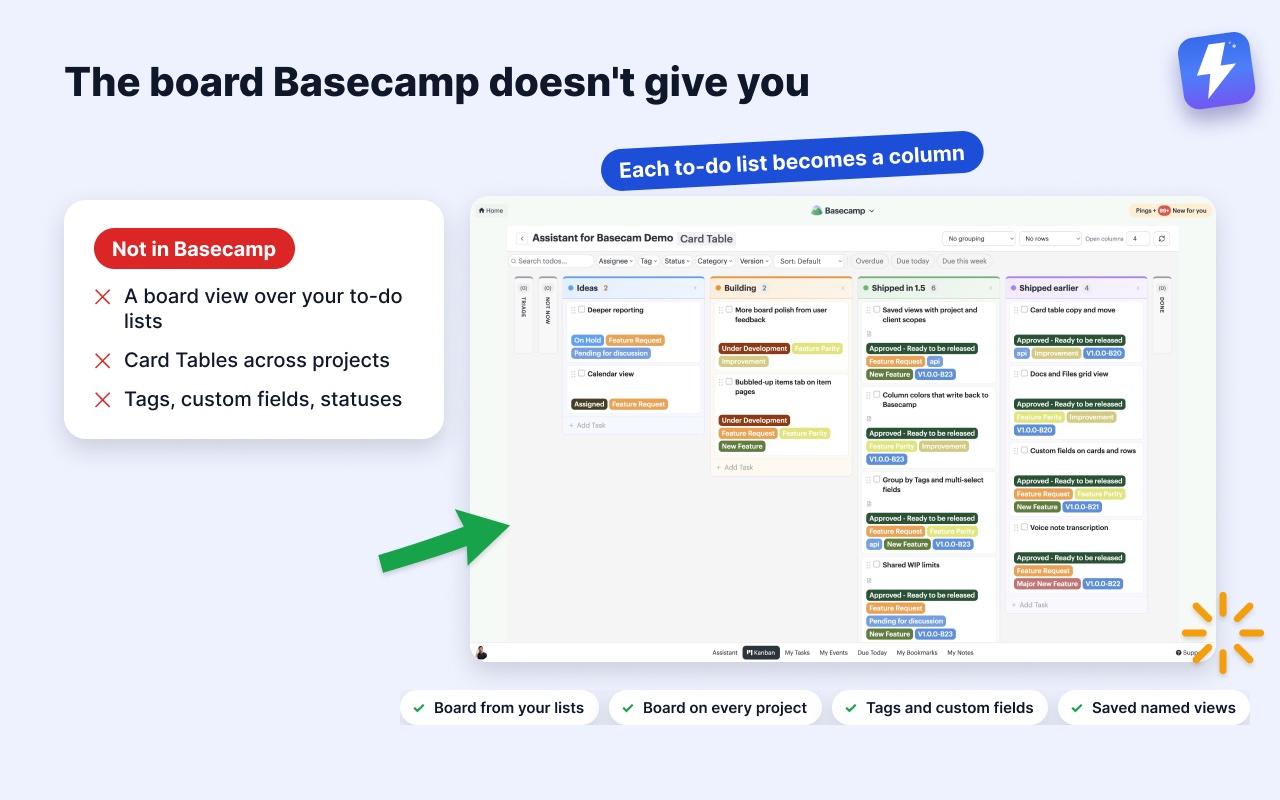
That last case is worth a word, because it’s common and Basecamp doesn’t solve it natively. Card Tables give you a board, but a separate one, not a view of the to-do lists your team already uses. We build Assistant for Basecamp, a browser extension that adds a Kanban board where each of your existing to-do lists becomes a column, so your project’s actual structure is the board. No new card table to maintain in parallel, and no preset To Do/Doing/Done to bend your work into. You can run that board on one list, on a whole project, or across every project at once, and save a chosen set of projects or clients as a named view. It also adds tags, custom fields, and statuses on top of Basecamp, the kinds of things Trello users tend to miss when they move over.
It also transcribes Basecamp’s voice notes in one click, posting the transcript as a comment the whole thread can read.
To be clear about what it isn’t: it’s a browser extension that runs inside Basecamp in desktop Chrome or Firefox, so there’s nothing to open on a phone or tablet. If you need a board away from Basecamp, a competitor called Tracked has a standalone web dashboard, and we cover that difference honestly. Assistant for Basecamp is $29/month or $290/year for unlimited seats, one admin pays, with a 7-day free trial and no card needed to start. You can read how the board works before you try it.
Either way, the real question isn’t “Basecamp vs Trello, which is better.” It’s whether you need a board or a home base. Answer that, and the tool picks itself.
Useful? Tell Google you want more of this.