How to Run a Remote Team in Basecamp
The hardest part of running a distributed team isn’t picking the right tool. It’s getting work to move forward when half the team is asleep. Basecamp for remote teams works well precisely because it was built by a remote company that defaults to writing things down instead of pulling everyone into a call. This guide covers how to set up an async-first workflow in Basecamp, where its native tools fit, and where a browser extension helps your team catch up on what changed without scheduling a meeting to find out.
Why Basecamp suits remote work in the first place
Most project tools assume everyone is online at the same time. Basecamp assumes the opposite. Its core pieces, the message board, automatic check-ins, and to-do lists, are all built to be read and answered on your own schedule. That’s the whole game for a distributed team. If a decision lives in a message board post, a teammate in another timezone reads it when they wake up and replies in context. If it lives in a meeting nobody recorded, it’s gone.
So basecamp remote work isn’t about cramming a co-located workflow into a new app. It’s about leaning into the parts Basecamp already does well: writing instead of meeting, clear ownership instead of constant status-chasing, and a record that doesn’t depend on who was online when.
How do you set up async check-ins in Basecamp?
Basecamp’s automatic check-ins are the single most useful native feature for a remote team, and most teams underuse them. A check-in is a recurring question Basecamp posts to the whole team on a schedule you pick, and everyone answers in their own time.
The classic one is “What did you work on today?” posted every afternoon. But the question is the lever, so make it earn its place:
- “What are you working on this week?” every Monday gives the team a written plan without a planning call.
- “Anything blocking you?” every day surfaces problems before they sit for three days.
- “What shipped this week?” every Friday creates a running record of progress people can scroll back through.
Answers stack in one thread, so you read the whole team’s day in a single scroll instead of chasing six people. Nobody has to be online at the same moment. To set one up, open the Automatic Check-ins tool in any project, write the question, pick who answers, and set the cadence. That’s the async backbone. Everything else hangs off it.
Put decisions on the message board, not in chat
Campfire (Basecamp’s group chat) is fine for quick back-and-forth. But chat is a bad place for anything you’ll need again, because it scrolls away and nobody re-reads it. For a distributed team, the rule that saves the most pain is simple: decisions and announcements go on the message board; chatter stays in Campfire.
A message board post has a title, a body, and its own comment thread. That makes it findable later and easy to reply to in context. When a teammate three timezones away opens the project, they see the decision, the reasoning, and the discussion in one place, instead of reconstructing it from forty chat lines. Write the post as if the person reading it wasn’t in any prior conversation, because on a remote team, they usually weren’t.
Make ownership unambiguous
Async only works if it’s obvious who owns what. The moment two people each assume the other has it, the task sits until someone gets pinged about it, which defeats the point of working asynchronously.
In Basecamp, every to-do can be assigned to a person and given a due date, and assignments show up in that person’s New for you panel and their My Stuff view. The discipline is to use both, every time:
- One assignee per to-do. “The team will handle it” means nobody will.
- A real due date, so the work has a deadline instead of drifting.
- A clear title that states the outcome, not the activity.
Basecamp does the routing for you once ownership is set. The assignee gets notified, the item lands in their personal list, and you stop being the human dispatcher who keeps asking “did anyone pick this up?”
Where Basecamp’s native tools run thin for remote teams
Here’s the honest gap, and it’s worth naming because it’s where remote teams lose the most time.
Basecamp’s notifications are great at telling you what was aimed at you: an @mention, an assignment, a reply in a thread you’re in. They’re silent on everything else. A teammate finishing three to-dos overnight won’t notify you. A status moving from blocked to in-progress won’t ping anyone. A comment on a thread you’re not subscribed to never reaches your Hey! menu.
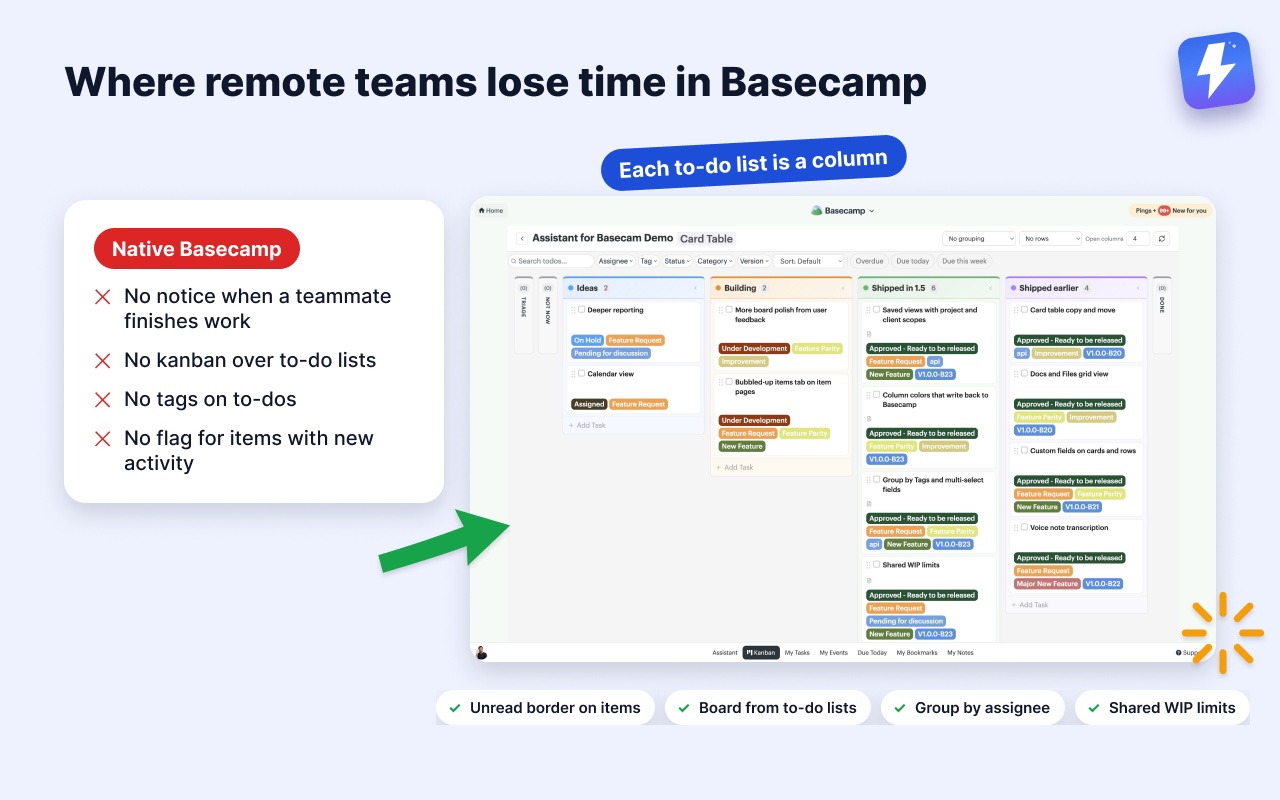
For a co-located team that gap barely matters, because you overhear the rest. For a distributed team it’s the whole problem. You wake up to a project that moved for eight hours while you slept, and the only way to see what changed is to open each project and click through it by hand. Basecamp also has no native kanban view over your to-do lists, no tags on to-dos, and no way to flag which items have new activity, so “catching up” stays a manual hunt.
How to catch up fast on what changed overnight
Assistant for Basecamp is a browser extension that runs inside Basecamp and closes that gap. It doesn’t replace your check-ins, message boards, or notifications, and nobody moves to a second tool. It adds ways to see project movement that native Basecamp never reports, which is exactly what a distributed team needs first thing in the morning.
Unread highlight flags what’s new without a single click
When a to-do, card, or message has activity you haven’t seen, Assistant draws a border around it right in the list. You don’t open each item to check whether something changed. You glance, and your eye stops on the highlighted ones.
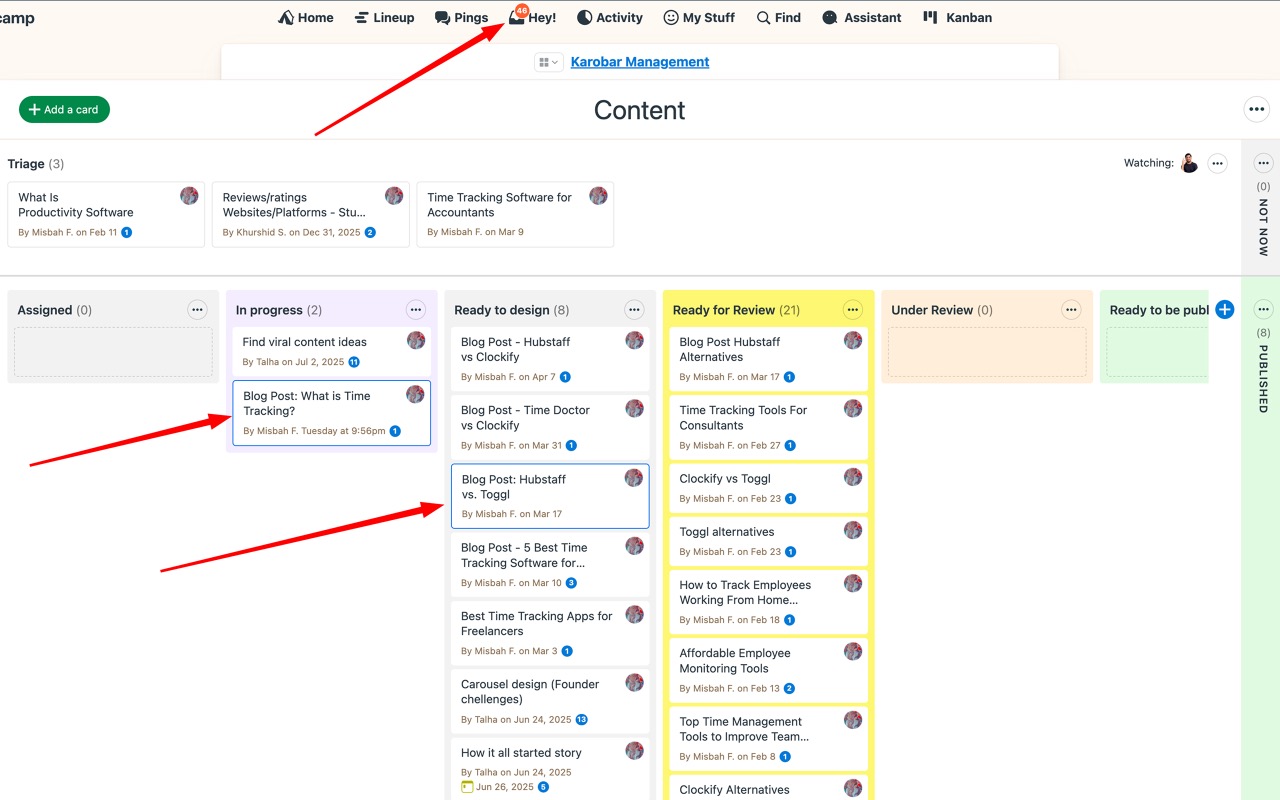
This matters most across timezones. The highlight tracks per person, so your unread is yours, not a shared “someone saw this” state. You open Basecamp after eight hours offline and the work that moved is already flagged, instead of you reconstructing the night from notifications that already scrolled away. The unread highlight help doc covers the behaviour, and we wrote a fuller guide on spotting unread updates in Basecamp.
A Kanban board for shared visibility
For a distributed team, a board answers the question everyone keeps asking in chat: what’s actually in progress right now? Assistant turns a project’s to-do lists into a Kanban board where each to-do list becomes a column, so your project’s existing structure is the board. There’s no separate setup, and no preset Backlog and Done columns to wrangle.
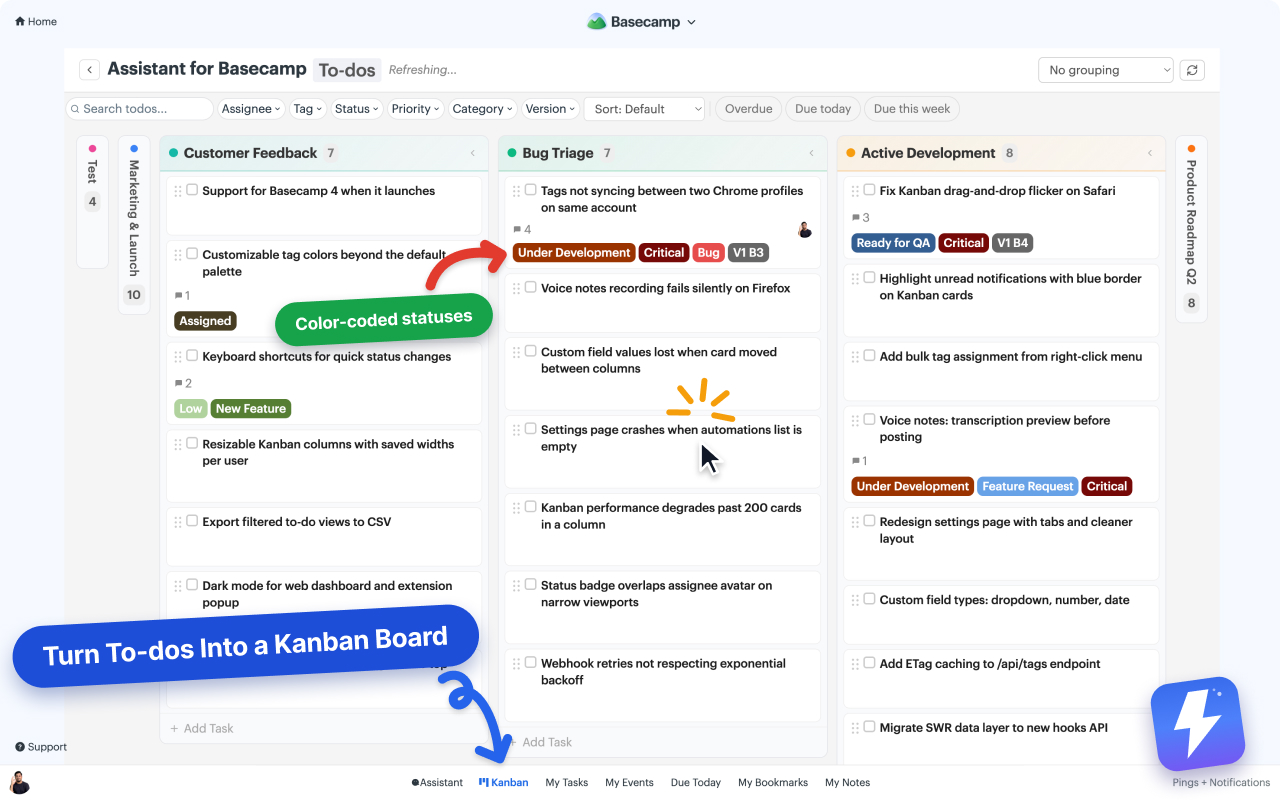
You can group the board by assignee to see each person’s load at a glance, and you can open it over one to-do list, one project, or every project in the account. That widest setting is the one distributed teams want. Group an account-wide board by assignee and each column holds everything that person owns, not just their share of whichever project you happened to open. Narrow it first if you need to: the picker searches your projects and clients, you select several projects or several clients rather than a mix, and you save the result as a named view that follows you to any computer you sign in from.
Agree on a WIP limit too, so no one quietly takes on twelve things at once. Limits are set per column and shared, so the whole team sees the same number and the count turns red when open work passes it. Finished work never counts against it.
One caveat worth stating plainly: Assistant draws only inside Basecamp’s own pages in a desktop browser, so a teammate working from a phone gets none of this. Tracked has a separate dashboard you can open on a tablet without Basecamp on the page. Setup is in the Kanban help doc.
Native Basecamp versus the extension: who wins where
This isn’t a clean sweep, so here are the honest trade-offs for a remote team.
Basecamp wins on reach. Check-ins, message boards, and notifications follow your team everywhere, including the mobile app and any browser. Assistant is a browser extension, so the highlight and board appear when someone is working in Basecamp in desktop Chrome, Firefox or another Chromium browser. If a teammate runs their day on a phone, native Basecamp carries more of the load for them.
Basecamp wins on the async foundation. Check-ins, ownership, and the written record are the actual workflow. Assistant doesn’t replace any of it, it sits on top. Get the foundation right first; the extension makes a good system faster, not a broken one functional.
The extension wins on catching up. Everything that moved while you were offline, the layer notifications structurally ignore, is what the unread highlight and board surface. For a distributed team, that’s the daily pain, and it’s the part that turns “open and click through everything” into “scan and stop.”
A workable remote setup, start to finish
Putting it together for a distributed team:
- Set up a daily blocker check-in and a weekly plan check-in so status flows in writing, not meetings.
- Push decisions and announcements to the message board; keep Campfire for quick chatter only.
- Assign every to-do to one person with a real due date, so ownership is never ambiguous.
- Install Assistant for BasecampInstall Assistant for Basecamp so the team can flag unread activity and see work on a board.
Assistant is one flat price for the whole team: $29/month or $290/year, unlimited seats, 7-day free trial, no card needed. One admin subscribes and everyone on that Basecamp account gets the highlight and the board. Pricing is on the pricing page.
The teams that run well across timezones aren’t the ones with the most tools. They’re the ones who wrote down what mattered, made ownership obvious, and gave everyone a fast way to see what changed while they were asleep.
Useful? Tell Google you want more of this.