Basecamp vs Asana: What You Gain and What You Leave Behind
Most basecamp vs asana arguments are really an argument about temperament. One tool wants your project to feel quiet and easy to read. The other wants you to model the work in detail and let the software do more of the thinking. Neither is wrong. They just suit different teams, and picking the one that fights how your team actually works is how you end up paying for software nobody opens.
This is an honest comparison. We make a browser extension for Basecamp, so we have a side, and we’ll tell you exactly where Asana beats Basecamp rather than pretend it doesn’t. The goal here is to help you pick correctly the first time.
If it turns out you want Asana’s fields and board without the migration, that option is further down. We costed the migration itself in the real cost of leaving Basecamp.
What’s the core difference between Basecamp and Asana?
Basecamp is built around calm. A project is a small set of tools: message board, to-do lists, docs and files, a group chat called Campfire, schedule, and automatic check-ins. There’s one obvious way to do most things, the interface is uncluttered, and the whole product is designed so a non-technical team can use it without training. The trade-off is that Basecamp deliberately leaves features out. It would rather you have fewer knobs than a powerful tool you have to learn.
Asana is built around modeling work. A task can carry custom fields, dependencies, subtasks, and a due window, and you can view the same set of tasks as a list, a board, a calendar, or a timeline. There are rules that fire when something changes, multiple project templates, and reporting dashboards. The trade-off is the opposite of Basecamp’s: more power, more to set up, more places for two people to do the same thing two different ways.
So the short version of the asana vs basecamp question: Basecamp optimizes for “everyone can read this and nothing is on fire.” Asana optimizes for “we can describe the work precisely and automate the busywork.”
Where Asana wins
Let’s start here, because if you’re deciding basecamp or asana and you genuinely need these things, the rest of the comparison doesn’t matter.
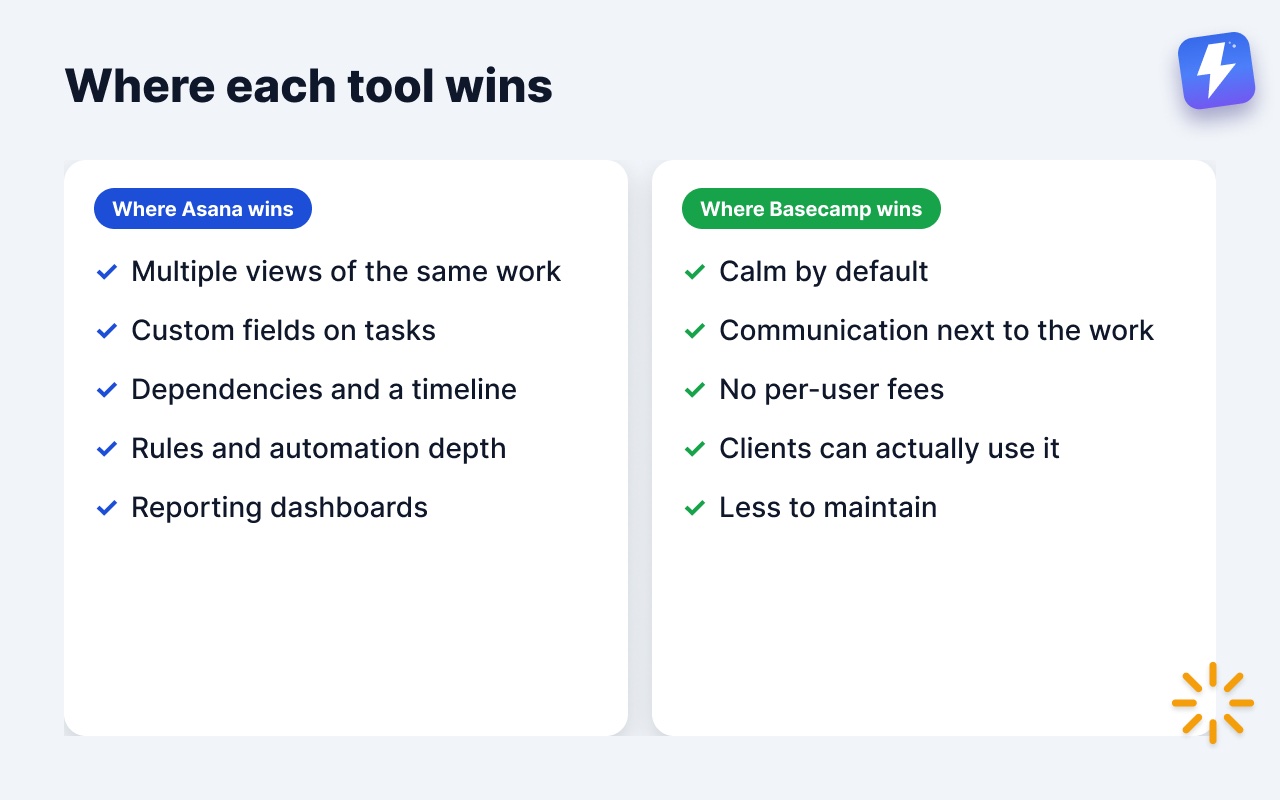
- Multiple views of the same work. Asana lets you flip one project between a list, a kanban board, a calendar, and a timeline without re-entering anything. Basecamp has to-do lists and a separate Card Table tool, and they don’t share data. If your team thinks in boards one day and timelines the next, Asana does that out of the box.
- Custom fields on tasks. Priority, estimate, client, stage, cost center, whatever you track, Asana lets you add it as a structured field and filter or group by it. Basecamp has no native custom fields on to-dos. This is a real gap, and we’ll come back to it.
- Task dependencies and a timeline. Asana can mark task B as blocked until task A finishes, then show the chain on a timeline. Basecamp has Hill Charts for a sense of progress, but no dependency links and no Gantt-style timeline. If you run projects where order matters and slippage cascades, that matters.
- Rules and automation depth. Asana’s rules can react to field changes, move tasks between sections, assign people, and set due dates, with a deep library of triggers and actions. Basecamp has no native task automation at all.
- Reporting dashboards. Asana can chart tasks completed, work by assignee, overdue counts, and more, inside the tool. Basecamp’s reporting is light by comparison.
If three or more of those are non-negotiable for how you run projects, pick Asana. Don’t let anyone talk you out of a tool that fits the shape of your work.
Where Basecamp wins
Now the other side, just as honestly.
- It’s calm by default. Basecamp’s biggest feature is what it leaves out. There’s no endless field configuration, no six views to keep in sync, no decision about which of four ways to log a task. New people get productive in a day. For teams that drowned in a heavier tool, this is the whole point.
- Communication and work live together. The message board, Campfire chat, and automatic check-in questions (“What did you work on today?”) are built into every project. In Asana, conversation tends to scatter into task comments or a separate chat tool. Basecamp keeps the discussion next to the work.
- No per-user fees. Basecamp charges by how many projects are active, from Free (1 project) to Unlimited ($299/mo, billed annually), and every plan from Studio up includes unlimited users. For a growing team, adding people doesn’t change the bill.
- Clients can actually use it. Basecamp’s clientside feature lets you loop a client into a project and control exactly what they see, without teaching them a complex tool. Handing a client an Asana board with custom fields and dependencies is a harder sell.
- Less to maintain. Powerful tools rot when nobody owns the configuration. Basecamp has almost nothing to maintain, so it doesn’t drift into a half-set-up mess six months in.
If your team’s real problem is noise, overhead, and tools nobody opens, Basecamp wins, and adding Asana would make things worse, not better.
A side-by-side on the features people actually ask about
To be accurate about both tools, here’s where each stands natively.
| Capability | Basecamp | Asana |
|---|---|---|
| Kanban board | Yes, via the separate Card Table tool | Yes, board view of any project |
| Kanban over your to-do lists | ❌ | N/A (no to-do-list concept) |
| Custom fields on tasks | ❌ | ✅ |
| Task dependencies | ❌ | ✅ |
| Timeline / Gantt | ❌ (has Hill Charts) | ✅ (Timeline) |
| Native automation rules | ❌ | ✅ |
| Project templates | ✅ | ✅ |
| Built-in team chat | ✅ (Campfire) | No native chat |
| Client access controls | ✅ | Limited |
| Time tracking | ✅ Timesheet, on Pro and Unlimited plans only | No native (integrations) |
| Reporting dashboards | Light | ✅ |
A couple of clarifications, because both tools get misreported. Basecamp does have a kanban-style tool (Card Tables) and does have project templates, so it isn’t fair to say it has neither. What it lacks is tags on to-dos, custom fields, a timeline, and a kanban view that sits on top of your existing to-do lists. Basecamp does track time natively: Timesheet landed in June 2024, with a timer on to-dos, cards and docs, hours entered as 2:30 or 2.5, and a report you can filter by project, person or date range and export to CSV. What’s fair to say is that it only comes with the Pro ($99/month) and Unlimited plans. Harvest and Everhour are still worth pairing with either tool if you need invoicing, budgets or rate cards. We cover the Basecamp side in does Basecamp have time tracking?.
Who should pick Basecamp
Choose Basecamp if:
- Your team is small to mid-size and values clarity over configurability.
- You work with clients and want a clean, controlled view to share with them.
- Communication keeps scattering across tools and you want it back in one place.
- A previous tool collapsed under its own complexity and nobody wants a repeat.
- Most of your work is “a pile of things that need to get done,” not a dependency-laden plan.
Who should pick Asana
Choose Asana if:
- You need to view the same work as a list, board, calendar, and timeline.
- You track structured attributes on tasks and filter or group by them.
- Your projects have real dependencies where one slip moves everything.
- You want automation rules doing the repetitive moves for you.
- You need in-tool reporting dashboards for stakeholders.
The honest read: if you find yourself listing five things Asana does that you can’t live without, that’s your answer. If your list is “fields and a board view, but the rest of Asana is more than we need,” keep reading.
What if you love Basecamp but miss Asana’s fields and board?
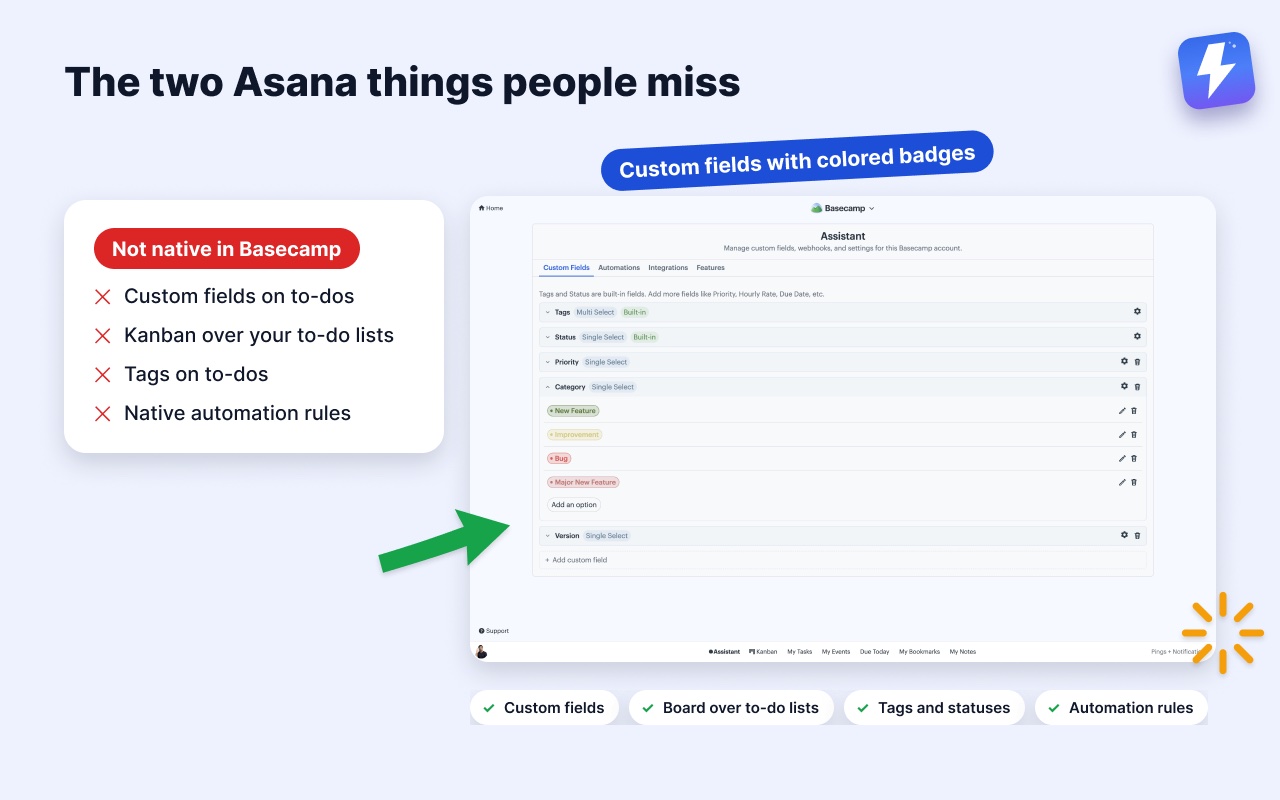
This is the most common spot teams land in. Basecamp’s calm is exactly what they wanted, but they miss two specific Asana things: structured fields on tasks, and a kanban board they can actually run the work on. They don’t want all of Asana to get those two things back.
That’s the gap we built Assistant for Basecamp to fill. It’s a browser extension that adds features inside Basecamp itself, so nothing migrates and your team keeps the tool they already know.
Here’s what it adds on the Asana-shaped wishlist:
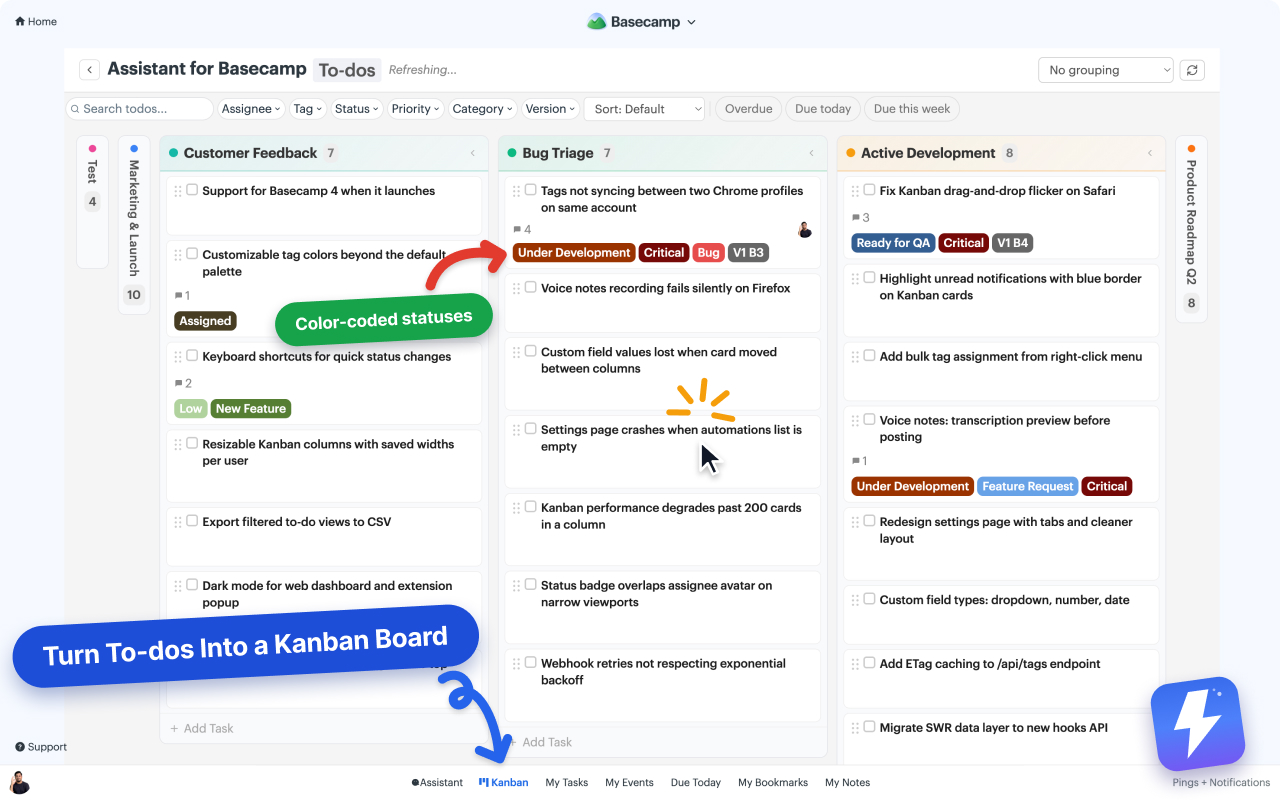
- A kanban board over your existing to-do lists. Each to-do list becomes a column, so your project’s real structure is the board, with no preset Backlog/Done columns to fight. Drag a card to another column and the to-do moves to that list, syncing back to Basecamp for everyone, including teammates who never open the board. Run it on a single list, a whole project, or every project on the account, and save a chosen set of projects or clients as a named view that follows you to any computer. Here’s how to add a kanban board to Basecamp.
- Custom fields on to-dos and cards. Single-select, multi-select, text, number, and date fields with colored badges, the structured-attribute thing Asana is good at. See how to add custom fields to Basecamp.
- Tags and reusable statuses on cards, to-dos, and messages, plus grouping that rebuilds the board by assignee, tag, status, or any multi-select field. An item carrying three tags shows in all three columns. There’s also a pivot view that puts one field across the columns and another down the rows, and per-column WIP limits the whole team shares.
- Voice note transcription. Basecamp 5 records voice notes but never turns them into text. One click posts the transcript as a comment the whole thread can read and search, with a summary and action items on longer notes.
- Automation rules triggered by Basecamp’s own events and by custom-field changes, with actions like setting a field, completing a to-do, assigning people, or posting a comment. One honest limit: these don’t accept inbound Zapier or Make webhooks. The triggers are Basecamp events and field changes, not external calls. See how to automate Basecamp without Zapier.
It’s $29/month or $290/year for the whole workspace, unlimited seats, one admin pays, with a 7-day free trial and no card needed to start.
And the honest caveats: there are no dependencies, no timeline, and no reporting dashboards, so the three Asana features built on sequencing and roll-up stay missing. It also runs only inside Basecamp, in desktop Chrome or Firefox, so there’s nothing to open on a phone or a tablet. If you need a board away from Basecamp, Tracked has a standalone dashboard. For fields and a board layered onto the calm of Basecamp, Assistant is the fit.
The short version
Pick Asana if you need multiple views, dependencies, custom fields, automation, and dashboards, and you’re willing to set it up and maintain it. Pick Basecamp if you want communication and work in one calm place that a whole team, clients included, can use without training. And if you want Basecamp’s calm plus the two Asana features people miss most, fields and a real kanban board, add Assistant for Basecamp and keep everything inside Basecamp where it already lives.
Useful? Tell Google you want more of this.